The church social media checklist: 71 minutes a week and four checks before you post
The weekly, monthly, and quarterly lists with a minute budget on every item, plus the four checks that catch a minor's face, a wrong service time, an unattributed image, and a dead link.

Most advice written about church social media hands you a strategy. You probably have one. What you do not have is a list short enough to run at twenty to nine on a Thursday morning with a cold cup of coffee, and a rule for the moment you are looking at a photograph of the children’s class and cannot remember whether the family in the second row ever said yes.
So this page is the list. Weekly, monthly, quarterly, and one ninety-second check that runs before every single post. Every item carries a minute budget, a named owner, and the reason it earned a slot. Four items exist because of mistakes churches make often enough to be predictable: a minor’s face without consent, a wrong service time, a picture somebody else took, and a link that stopped working eight months ago.
The whole thing prints on two sides of paper, and there is a calendar file at the bottom that puts the blocks in your own week. If you want the argument for why the account exists at all, that is a different question and it belongs in a church social media strategy that survives the volunteer. This page assumes you already decided to do the work and want to know exactly what the work is.
Four names, once, so nobody asks again
Every item below is assigned. A checklist with no owner column is a list of things somebody else will do.
Whoever has the phone. One person carries a phone during the service and takes the shots. Not everybody. One person, named on Sunday morning, so nobody is deciding what to photograph while the offering is being taken.
The writer. Drafts the week’s posts in one sitting. This is a writing job, not an app job, and it happens in a document.
The approver. An elder or a staff member who reads the drafts before they go out. Their five minutes happen before the post, not after the apology. Anything touching doctrine, money, a pastoral crisis, or a family in trouble waits for them.
The scheduler. Runs the four checks, puts the posts in the queue, and answers messages on Friday. This is the person who needs the password, and by the end of this page there should be two of them.
In most churches this is one or two people wearing four hats, which is fine. The point of naming the hats is that when a photograph of a child goes out without permission, the question “who was supposed to check” has an answer. If the person wearing them has never run an account before, hand them the four-week version in training a church social media volunteer and start them on the Sunday item only.
The week, by lane
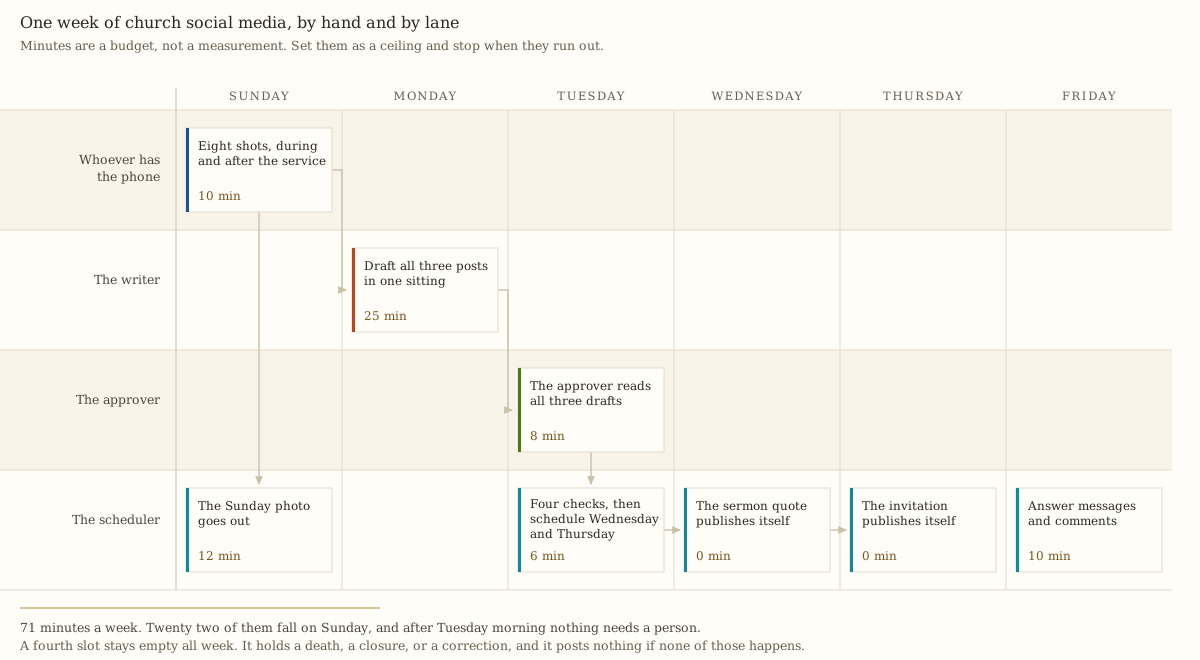
The shape matters more than the total. Twenty two of the seventy one minutes fall on Sunday, when the building is already full of people and the photographs are free. Twenty five fall on Monday, in one sitting, because writing three posts at once costs less than writing one post three times. After Tuesday at nine fifteen, the rest of the week publishes itself.
That last part is what keeps a volunteer from quitting in February. A church that has to decide something on Wednesday will not post on Wednesday.
The weekly checklist
| Day | What happens | Who | Minutes |
|---|---|---|---|
| Sunday | Eight shots, during and after the service | Whoever has the phone | 10 |
| Sunday | The Sunday photograph goes out, with the passage cited | The scheduler | 12 |
| Monday | Draft all three of the week’s posts in one sitting | The writer | 25 |
| Tuesday | The approver reads all three drafts | The approver | 8 |
| Tuesday | Four checks on each draft, then schedule Wednesday and Thursday | The scheduler | 6 |
| Friday | Answer the messages and the comments | The scheduler | 10 |
| All week | The fourth slot stays empty | Everyone | 0 |
The eight shots. Naming them in advance is the whole trick, because a volunteer who has to invent a shot list during a service comes home with eight photographs of the back of somebody’s head. Take these: the room filling up, the open Bible on the lectern, hands in a hymnal, the coffee table, a child’s drawing, two people talking in the aisle, the building from the sidewalk, and the door somebody actually walks in through. Faces turned away or in profile unless you have cleared them. The same eight-shot card, with the phone settings, sits inside social media without a media team.
The Sunday photograph. Out the same afternoon, with the passage cited by chapter and verse rather than the preacher’s best sentence. A verse travels further than a slogan, and it is the thing you want repeated. Templates for the wording of all three weekly posts are already written out in church social media posts that work on Facebook.
The empty fourth slot. This is the item churches leave off and then regret. One slot a week stays unfilled, all year, and it holds a death, a weather closure, a correction, or genuine news. If none of those happens, nothing posts, and an empty slot is not a missed post. A church that fills every slot in advance has no room left on the day the news is real.
Why seventy one minutes and not twenty
Add the whole system up. Seventy one minutes a week is 3,692 minutes a year. Forty minutes a month is 480. A hundred and ten minutes a quarter is 440. That is 4,612 minutes, or about seventy seven hours a year, which averages out to an hour and a half a week.
Nobody publishes that number, and it decides more than the choice of app does. Seventy seven hours is two working weeks. If your church does not have two working weeks of volunteer attention to spend, cut the plan until it fits rather than writing a bigger one and abandoning it in six weeks. One account posted three times a week for two years beats three accounts posted daily for six weeks and then silent until Christmas, because the silence is what a stranger reads as closed.
The three cuts that lose the least: drop the Friday inbox block to five minutes and answer only messages, not comments. Drop the eight shots to four. Do not drop the approver, and do not drop the four checks.
The four checks, before anything goes out
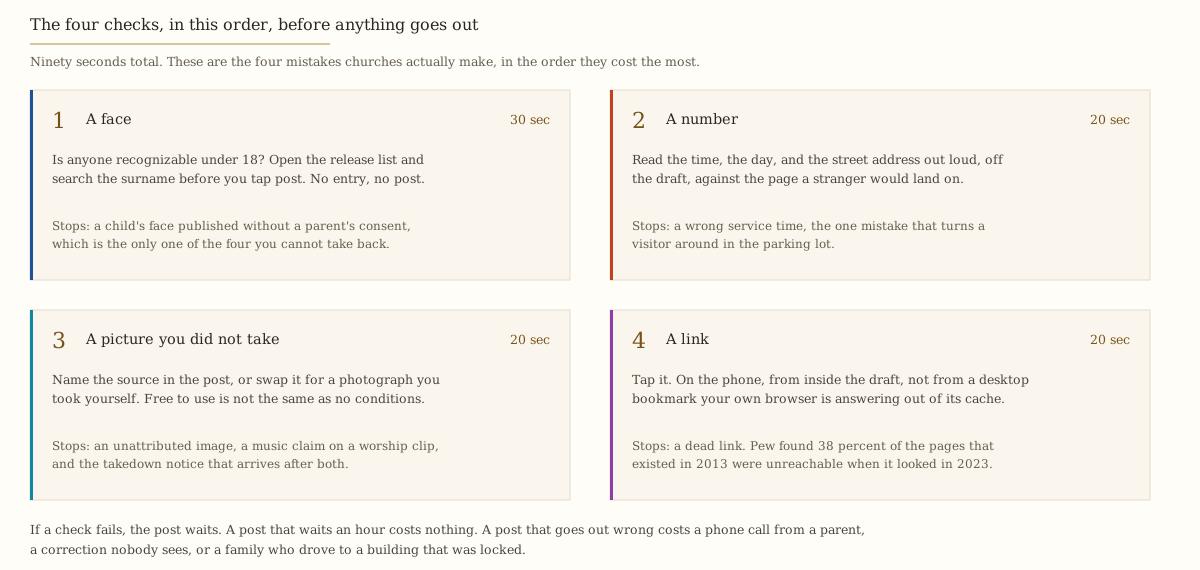
These run on every post, including the ones the approver already read, because the approver reads for judgment and this reads for facts. Ninety seconds. If a check fails, the post waits, and a post that waits an hour costs nothing.
A face: is anyone recognizable under 18, and do you hold the release?
Thirty seconds. Open the release list, search the surname, and if there is no entry there is no post.
The federal rule people reach for here is the Children’s Online Privacy Protection Act, and it is worth knowing exactly what it does and does not do. Its definition of personal information, at 16 CFR 312.2, covers “A photograph, video, or audio file where such file contains a child’s image or voice,” and it defines a child as anyone under 13. That definition is real and it is federal. What it binds is an operator of a commercial website or online service directed to children, which your Facebook page is not.
So no federal rule tells your church what to do with a photograph of a nine-year-old. The standard for your page is the one you write down, and if nobody writes one, there is none.
State law reaches further than most churches expect in one specific case. New York Civil Rights Law section 50 makes it a misdemeanor to use “the name, portrait, picture, likeness, or voice of any living person” for “advertising purposes, or for the purposes of trade” without written consent, “or if a minor of such minor’s parent or guardian.” Every state handles likeness rights differently, and the statute is New York’s, so check your own. But notice which posts sit near that line. A Sunday photograph of the congregation is almost certainly not a trade use. A capital campaign appeal with a child’s face on it, or an advertisement for a paid summer camp, is a great deal closer than anyone in the room realizes.
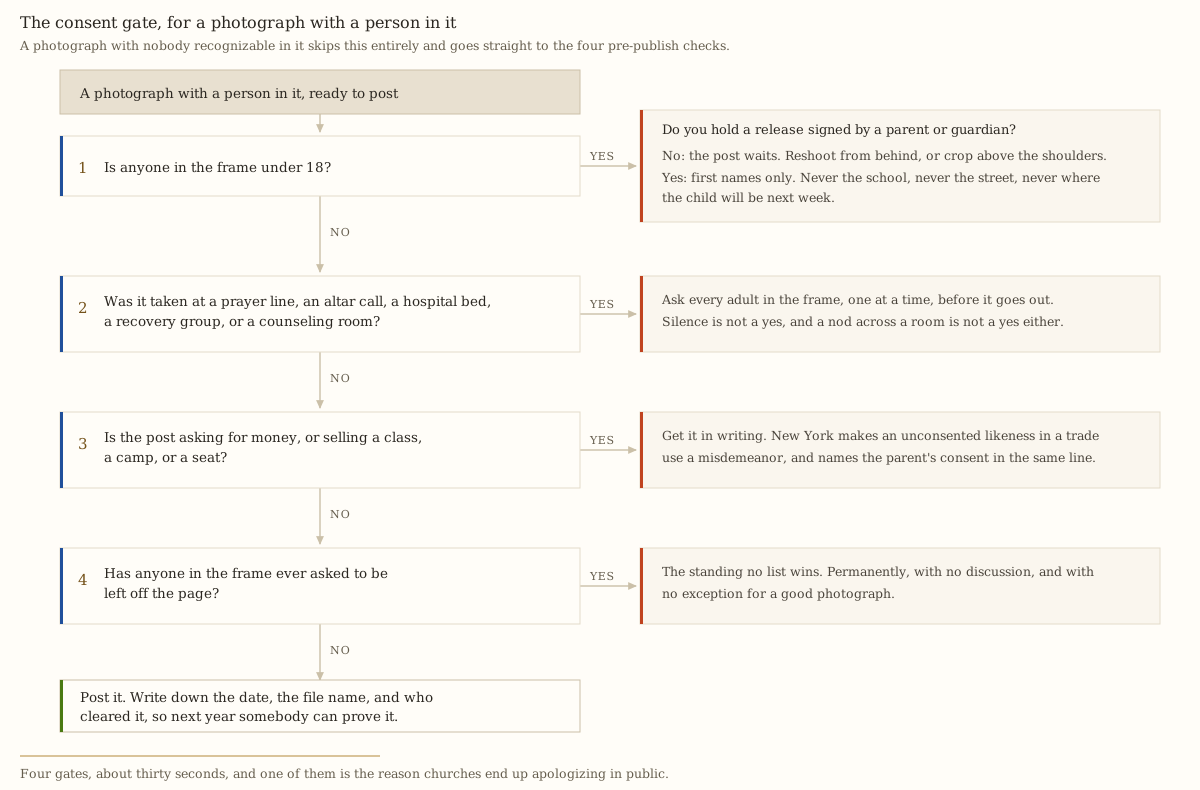
Three rules that make the gate workable rather than theoretical.
A release is signed by a parent or guardian, dated, and renewed at the start of each school year. Not a line on a registration form from 2019 that nobody can find. One page, one signature, one date, filed where the scheduler can search it in twenty seconds. There is a release log printed on the back of the download at the bottom of this page.
Captions never carry a child’s full name, the school, the street, or where the child will be next week. First name at most. The photograph is the least identifying part of that sentence; the schedule is the part that matters.
The standing no list is permanent. Anyone who asks to be left off the page goes on it, with no discussion, no reason required, and no exception for a good photograph. This includes adults. A congregation that has watched one person’s request get overruled will never trust the camera again.
The same instinct applies to the pictures you never post at all. A prayer line, an altar call, a hospital bed, a recovery group, a counseling room. Ask every adult in the frame, one at a time, before it goes out. Silence is not a yes and a nod across a room is not a yes. If your church keeps member records in a system, the neighboring question of who can see what is handled in protecting member data.
A checklist item is not a policy. The gate above is what the person posting runs in the moment; the document a board adopts, with the release wording and the statutes quoted in full, is a church social media policy. Adopt that once, then run this.
A number: read the time, the day, and the address out loud
Twenty seconds. Off the draft, out loud, against the page a stranger would actually land on.
Churches publish their service time in at least three places: the social profile, their own website, and a Google Business Profile. Any two of those can drift apart without anybody noticing, because the person who changed one does not own the others. Google’s own guidance tells a business to provide its regular customer-facing hours and to set special hours for particular days “like holidays or special events,” which is exactly the case a church gets wrong: Christmas Eve, Good Friday, the fifth Sunday with one combined service, the week the sanctuary floor is being replaced.
Make the three agree on the first Monday of every month, and put special hours in before the holiday rather than after it. A wrong service time is the only mistake on this list that ends with a family sitting in a parking lot outside a locked building, and they do not call to tell you.
A picture you did not take: name the source, or swap it
Twenty seconds. Either the post names where the image came from, or you replace it with a photograph you took yourself.
The free stock libraries do not require attribution, and that is the trap. The Unsplash License states “No permission needed (though attribution is appreciated!)” while still prohibiting selling images without significant modification and compiling them “to replicate a similar or competing service.” The Pexels License says “Attribution is not required” and then attaches conditions that matter far more to a church than credit does: “Identifiable people may not appear in a bad light or in a way that is offensive,” and do not “imply endorsement” by the people in the imagery.
That endorsement clause rules out the most common church use of stock photography. A smiling family you downloaded, posted above the words “our church family,” implies that those people attend your church. They do not, they never agreed to, and Pexels writes the prohibition into the license you are relying on.
Music is the version of this problem that gets churches actioned rather than embarrassed. Meta’s music guidelines state that “Use of music for commercial or non-personal purposes in particular is prohibited unless you have obtained appropriate licenses,” that “There should always be a visual component to your content; recorded audio should not be the primary purpose,” and that “The greater the density of music in content, the more likely it may be limited.” A church page is not personal use.
For the songs your own musicians play, the license that covers uploading them exists and it is cheap. The CCLI Streaming License covers churches to “Live-stream or upload your worship to your church website, your social media pages, or other streaming platforms,” across roughly 450,000 songs and hymns “performed live,” and CCLI’s page states that pricing “start[s] from just $84 per year for churches already licensed with CCLI, or $108 for an average church (100 - 199 people),” checked 29 July 2026. What that license does not cover is a master recording. Posting a clip with the original artist’s track underneath it is a separate product, which CCLI sells as Streaming Plus for “artist tracks, backing tracks, and multitracks.”
So the practical rule for a worship clip: your congregation singing, forty seconds, with the license you already hold, and nothing playing underneath it that came off a record.
A link: tap it, on the phone, from inside the draft
Twenty seconds. Not from your desktop bookmark, which your own browser may be answering out of its cache.
Link rot is not a small effect. Pew Research Center’s May 2024 study When Online Content Disappears found that “38% of webpages that existed in 2013 are not available today,” that 23 percent of the news pages it sampled contained at least one broken link, and that 54 percent of Wikipedia pages carry at least one reference pointing at a page that no longer exists. Pew also tracked social posts directly: 18 percent of the tweets in its collection window were no longer publicly visible, with 15 percent gone inside a month.
On a church page that means the link aggregator somebody set up in 2022 for a subscription nobody is paying, the event page for a conference that happened, and the sermon that moved when the website was rebuilt. Your pinned post is the highest-value link on the account and nothing tells you when it breaks, which is why tapping every link is a monthly item rather than an annual one.
If your links keep breaking because the destination keeps moving, the underlying problem is where the service times live, and the cheap ways to own that page are compared in small church website options.
The monthly checklist
First Monday of the month, forty minutes, immediately after the Monday drafting block so it happens while somebody is already sitting down.
| What happens | Who | Minutes |
|---|---|---|
| Read the clicks from the profile to the service times page and write the number in the same place | The scheduler | 5 |
| Reread the pinned post as a stranger | The writer | 8 |
| Tap every link in the bio and the pinned post | The scheduler | 4 |
| Make the service times agree on the profile, the website, and the Google Business Profile | The scheduler | 8 |
| Fill next month’s known dates into the empty slots | The writer | 10 |
| Delete one dead thing | The scheduler | 5 |
One number, and only one. Clicks from the profile to the page carrying your service times. Follower count answers nothing an elder can act on, and the reasons a raw number misleads a church are the same ones laid out in measuring church attendance honestly. Write it in the same place every month so twelve of them make a line.
The pinned post is the audit. Read it as somebody who has never been in the building. It has to answer four things: what time, what street address, what happens with the children, and how long the service runs. Most church profiles have no pinned post at all, which means the most valuable post on the account is the one nobody wrote.
Delete one dead thing. An event page for an event that already happened. A pinned post from last Easter. A link to a page that no longer exists. One a month, chosen quickly, no committee.
Next month’s known dates are mostly already known. Advent, Holy Week, the members’ meeting, the baptism service, the closure for the holiday. Working out those dates every year by hand is wasted effort when the whole grid is computed in a twelve-month church social media calendar. Copy the next four weeks of it into the empty slots and stop there.
Which account to keep, if you can only keep one. Pew’s social media fact sheet, from a survey of 5,022 US adults fielded 5 February to 18 June 2025, puts YouTube at 84 percent of US adults, Facebook at 71, Instagram at 50, TikTok at 32, and X at 8. The age split decides it: among adults 65 and over, Pew records Facebook at 57 percent and Instagram at 19, while among adults 18 to 29 it flips to Instagram 80 and Facebook 68. If your congregation skews over fifty and you can keep exactly one page alive, keep Facebook and stop apologizing for it.
The quarterly checklist
First Monday of January, April, July, and October. A hundred and ten minutes, and it needs the approver in the room rather than the scheduler alone, because half of it is about access.
| What happens | Who | Minutes |
|---|---|---|
| List everyone who can get into every account, and remove anyone who has left | The approver | 20 |
| Confirm two current people can get in, and watch the second one log in | The approver | 10 |
| Refresh the release list and the standing no list | The approver | 25 |
| Read the last ninety days of posts and count how many carried a time and an address | The writer | 20 |
| Check the license on anything with music in it | The approver | 10 |
| Rewrite the pinned post | The writer | 15 |
| Test the whole thing on a phone that has never seen your page | The scheduler | 10 |
Access is the item that matters most and gets skipped every time. The password on a church page usually belongs to somebody who no longer attends, or to a volunteer’s daughter in another state who set it up as a favor in 2019. Write down every person who can get in. Remove anyone who has left the church, left the role, or cannot be reached this week. Then confirm two current people can actually log in, by watching the second one do it, because an account only one person can open is one illness away from a silent page.
Read ninety days of your own posts in one sitting. Count how many gave a stranger a time and an address. If it is under a third, the feed is a hallway sign published to the internet, and the fix is the Thursday invitation rather than more content. What to do with the people who do walk in belongs to a guest follow-up system, and the year-shaped version of this planning sits in the church content calendar.
Test it cold. Borrow a phone that has never seen your page. Search the church name. Land on the profile. Try to find Sunday’s start time in fifteen seconds. If you cannot, a visitor cannot.
Should a church pay for a scheduler?
The checklist runs on nothing. Every platform lets you schedule a post from its own app, and a church posting three times a week can hold this whole system with a printed sheet and a calendar reminder. The reason to pay is narrower than the vendors suggest, and there are exactly two: more than one account to keep in step, and an approver who should be signing off inside the tool rather than in a text message.
- Buffer Essentials $5 per channel a month, one user
- Buffer Team adds approval workflows
- Metricool Starter $25 a month, up to 5 brands
- Later Starter one social set, one user
Prices read off each vendor's own pricing page on 29 July 2026, at the annual rate where one is published. Two of the four charge per channel, so the curve depends on how many accounts a church of that size actually runs: this assumes one at 120 people, two at 300, three at 900, and five at 3,000. Doing the same work by hand in the native apps costs nothing and about 77 hours a year.
See the numbers
| Vendor | 120 people | 300 people | 900 people | 3,000 people |
|---|---|---|---|---|
| Buffer Essentials | $60 | $120 | $180 | $300 |
| Buffer Team | $120 | $240 | $360 | $600 |
| Metricool Starter | $300 | $300 | $300 | $300 |
| Later Starter | $225 | $225 | $225 | $225 |
The shape is the finding: two of these four bills grow with your account list and two do not, and they cross in the middle of the range where most churches sit.
Per-channel pricing wins small and loses fast. Buffer’s pricing page lists Essentials at $5 a month per channel, or $60 a year, and Team at $10 a month per channel, or $120 a year. One Facebook page on Essentials is $60, which is nothing. Five accounts on Team is $600, which is a line item an elder will ask about. Buffer’s free plan carries three channels and ten scheduled posts per channel, refillable, which is a real option for a church posting three times a week.
The flat plans cross over at three accounts. Metricool prices by brand rather than by channel: its Starter plan runs $25 a month in US dollars for up to five brands, so the bill does not move as you add networks. Buffer Team is cheaper at one or two accounts and more expensive at three, which is the crossover the chart draws. Metricool’s free plan is the interesting one for a small church: one brand, every network except LinkedIn and X, and up to twenty posts a month. The three-post week is about thirteen.
Putting the approver inside the tool is what actually costs money, and nobody prices it out. Buffer Team is the cheapest plan in this set that ships approval workflows, at $120 a year for one channel and unlimited team members. Metricool puts post approval and team management on its Advanced plan, at $67 a month for fifteen brands, which is $804 a year. Later’s Starter plan carries one user at $18.75 a month billed yearly, so a second person means the Growth plan at $37.50 a month, $450 a year, for two. Later ships no permanently free tier, only a fourteen-day trial.
So the second seat is the expensive seat everywhere except Buffer, where extra people are free and extra accounts are not. That is the one pricing fact in this category worth remembering, because a church adds people faster than it adds accounts.
Hootsuite’s plan cards rendered no price at all to an automated fetch on 29 July 2026. The FAQ text on that same page states that paid plans “start at $99 for a Standard plan, $199 for a Professional plan, and range up to $399 for an Advanced plan,” per month per user. At $1,188 a year for the entry tier, it is priced for a marketing department, and no church running this checklist needs it.
The decision, stated plainly. One account and one person: pay nothing, and use the platform’s own scheduler or Metricool’s free brand. An approver who should be signing off in writing inside the tool: Buffer Team, $120 a year for one account, $240 for two, and no charge for the people. Three or more accounts where approval happens by text message instead: Metricool Starter at $300 a year flat, which passes Buffer Team at the third account.
How often should a church post on social media?
Three times a week, on the same three days, with a fourth slot held empty. Three is the ceiling one volunteer with a job can hold in February as well as September, and consistency over two years beats volume over six weeks. Daily posting is how a church page goes silent.
Do you need a parent’s permission to post a photo of a child at church?
No federal law requires it for a church page, and that is the reason to require it yourself. Get a release signed by a parent or guardian, dated, renewed each school year, filed where the person posting can search it in seconds. Caption with a first name at most, never the school and never next week’s location.
Who should approve church social media posts?
One elder or staff member, reading all of the week’s drafts in a single eight-minute block before anything is scheduled. Approval after publication is an apology. Anything touching doctrine, money, a pastoral crisis, or a family in trouble does not go out without them, and the approver is a person, not a committee.
Take the checklist with you
Three files. Nothing to sign up for.
The printable checklist is the whole thing on two sides of paper: the four checks, the weekly, monthly, and quarterly lists with every minute budget, a line for each of the four names, a standing no list, and a release log with columns for the family, the children covered, who signed, and when it expires. Tape it inside a cupboard door.
The task list as a CSV carries twenty four rows with cadence, day, item, minutes, owner, and a column stating why each one is on the list. It opens in a spreadsheet and imports into most task managers, so the checklist can live where the rest of the office’s work already lives.
The calendar file puts the blocks in your own week: Sunday capture and Sunday post, the Monday drafting session, the Tuesday approval and scheduling pair with a ten-minute alarm, the Friday inbox, the monthly review on the first Monday, and the quarterly audit on the first Monday of January, April, July, and October. Times are floating rather than fixed to a timezone, so they land at the same local hour wherever you import them. Import it once, then drag the blocks to hours that suit your building.
What to do on Thursday
Pick the one that describes your church and do only that this week.
If nobody currently posts and nobody has the password. Start with the quarterly access item, not the weekly list. Find out who can get in, get two current people in, and post nothing until that is true. A page you cannot open is worse than a page that is quiet, because you cannot correct it either.
If you post, but sporadically, and there is no approver. Print the checklist, write the four names on it, and run only the Sunday photograph and the Thursday invitation for four weeks. Two posts a week, held, with the four checks on both. Add Monday’s drafting block in week five.
If the rhythm is already there and you want it to stop being fragile. Run the four checks on the next ten posts and keep score of which one fails. It will be the same one every time. Fix that, then import the calendar file so the blocks stop depending on somebody remembering, and set the quarterly audit before you close the laptop.
Whichever one you are, the first move is the same: name the four people, and hand one of them the printed sheet. Announcement wording for the week you start is already drafted in church announcement examples, and everything else on this shelf is filed under church communication.
Sources
Every figure and price above was read from these pages on the date given.
- When Online Content Disappears, Pew Research Center, published 17 May 2024. Read 29 July 2026.
- Social Media Fact Sheet, Pew Research Center, survey of 5,022 US adults fielded 5 February to 18 June 2025. Read 29 July 2026.
- 16 CFR 312.2, Definitions, Children’s Online Privacy Protection Rule, via Cornell Law School’s Legal Information Institute. Read 29 July 2026.
- New York Civil Rights Law section 50, New York State Senate. Read 29 July 2026.
- Unsplash License, Unsplash. Read 29 July 2026.
- Pexels License, Pexels. Read 29 July 2026.
- Music Guidelines, Meta. Read 29 July 2026.
- Streaming License, CCLI. Read 29 July 2026.
- Set your hours, Google Business Profile Help. Read 29 July 2026.
- Pricing, Buffer. Read 29 July 2026.
- Pricing, Metricool. Read 29 July 2026.
- Pricing, Later. Read 29 July 2026.
- Plans, Hootsuite. Plan cards rendered no price to an automated fetch; the figures quoted come from the FAQ text on the same page. Read 29 July 2026.