Training a church social media volunteer: the first four weeks
A four week onboarding for someone who has never run an account: what they learn each week, the access they get and when, the eight shot capture card, the approval rule, and the handover document.

The handover usually takes ninety seconds. It happens in a hallway after a service, somebody says the password out loud, the new volunteer types it into their notes app, and everyone walks away relieved. Six weeks later the account has three posts on it, two of them a photograph of a flyer, and the person who took it on feels like they have failed at something nobody ever explained.
Training is not the missing ingredient in that story. A plan is. Specifically, a plan that grants access in the same order it teaches the job, so the volunteer never holds a permission they have not yet been taught to use, and the church never has to take one back.
What follows is four weeks, eleven sessions, roughly five hours of somebody’s time in total. It ends with a volunteer who can run the account alone, a written record of who can get into what, and a handover document that already exists on the day they eventually stop.
How do you train a church social media volunteer?
Teach in the order you grant access. Week one they watch and shoot three photographs with no login at all. Week two an elder reads them the approval rule and they get task access to the Page. Week three they post unwatched. Week four they run the whole week alone and write the handover document.
That is the shape. The rest of this page is what happens inside each week, what the volunteer hands back at the end of each session, and the four decisions a church has to make before week one starts.
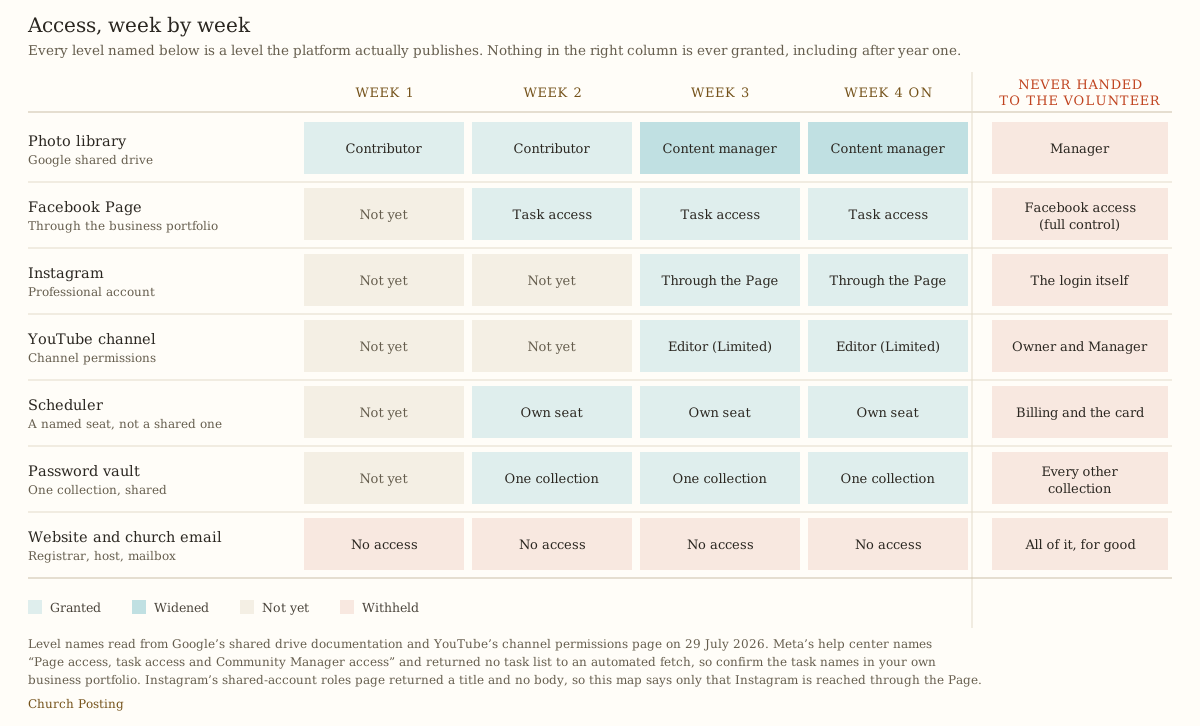
The four failures this replaces
Before the plan, the failure modes. Each of these is a church that did train the volunteer, just not in an order that held.
The account is inside somebody’s personal profile. Meta’s own help center describes three separate things: “Page access, task access and Community Manager access” (Give, edit or remove Facebook Page access, read 29 July 2026). A church that hands over the login instead of granting access has skipped the distinction, and the day that volunteer leaves the church, the Page leaves with them. Recovering a Page from a former member who no longer answers messages is not a support ticket. It is a negotiation.
The volunteer has more access than the pastor. This happens within a month in almost every church that starts by making the volunteer an administrator so they can “just get in and do it”. Nobody has ever regretted starting a volunteer at a lower level. Plenty of churches have spent a year trying to work out who holds the top level of an account nobody remembers creating.
Nobody said what needs approval, so everything feels like it does. A volunteer with no written rule asks permission for a photograph of the coffee table, gets no answer for four days, and stops asking, which means the next thing they publish is the thing that actually needed a second reader. The approval rule exists to make most posts require nothing.
The training was one long conversation. Five hours in one Saturday morning produces a volunteer who remembers the first forty minutes. Four weeks of short sessions with something to hand back at the end of each one produces a volunteer who has already done the job three times before they are trusted with it.
Who should get the account, and who should not
Three people get offered this job in most churches, and two of them are the wrong choice for reasons that have nothing to do with ability.
The teenager who is best at Instagram is the wrong choice because the job is mostly showing up on a Tuesday for two years, and because the approval rule requires them to tell an adult no. Give them the camera. Do not give them the account.
The member who runs a marketing business is the wrong choice more often than churches expect. They will build something good and then bill their real clients first, and the church’s account inherits whatever is left over that month. If they want to serve, ask them for four hours once to set up the templates and the naming pattern, then hand the weekly job to someone else.
The pastor’s spouse is the wrong choice because every criticism of the account becomes a conversation inside a marriage. There are churches where this works. There are more where it quietly ended the account.
The person who actually holds this well is ordinary: they are already at the building most weeks, they answer a text inside a day, and they can be told no without it becoming a wound. Ability with a phone is the fourth requirement, not the first.
Week one: watch, then shoot three frames
Two sessions, sixty-five minutes, and no login.
Session one, forty-five minutes at a desk with whoever runs the account now. Not a training session. They watch you post. You narrate what you are deciding while you decide it: why this photo and not that one, why the address goes in every caption, why you are not answering the comment at the top.
What they learn: who the account is talking to. This is the whole first week, and it is worth stating out loud in one sentence, because a volunteer who thinks the audience is the congregation will produce posts a stranger cannot parse. What the account is for and the three questions a stranger asks in fifteen seconds is the argument to walk them through, and it takes about ten minutes.
What they get: Contributor on the photo library, and nothing else. Google’s shared drive documentation names five levels: Manager, Content manager, Contributor, Commenter and Viewer. Contributor “can create and add files, can create folders” and can restore files from the trash (Create a shared drive, read 29 July 2026). That is exactly the level somebody needs to drop photographs into a folder and no more.
Use a shared drive rather than a folder inside somebody’s personal account, and the reason is the handover: files in a shared drive belong to the drive, so when a volunteer’s membership is removed, three years of photography stays where it is. A folder shared out of a personal Google account leaves with the account.
Session two, twenty minutes on Sunday, alone. They take three photographs. Not a portfolio, three frames.
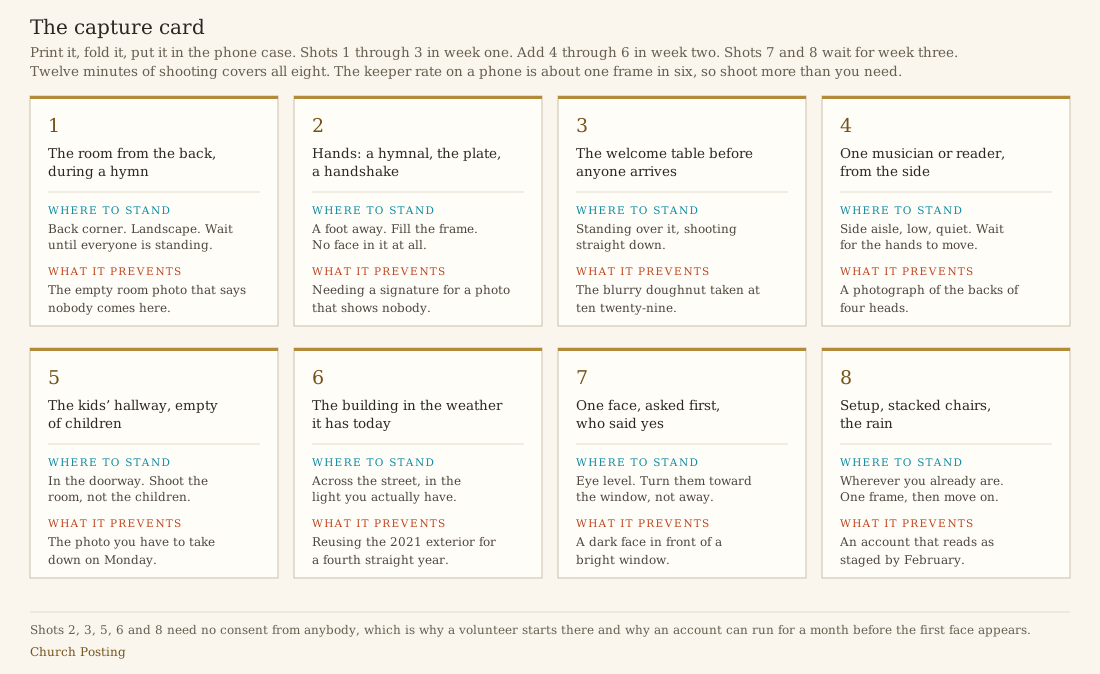
The card is the reason this works without a photography lesson. It removes the hardest part of the job, which is deciding what to point a phone at while a service is happening. Three settings improve a phone photograph more than any editing app: wipe the lens before the first frame, tap the screen on the face or the page you want exposed correctly, and stand so the light comes from behind you rather than behind your subject.
Twelve minutes covers all eight shots once they get there. The keeper rate on phone photography is roughly one frame in six, so tell them to shoot far more than they need and delete on the drive rather than in the moment.
Week two: the rules arrive before the reach does
Three sessions, ninety-five minutes, and the first real access.
An elder runs the rules session, not the outgoing volunteer. This is the one instruction in this plan that churches skip and then regret. When the person who explains the approval rule is the same person handing off a chore, the rule reads as one volunteer’s preference. When an elder says it, it is the church’s rule, and the volunteer can invoke it later against a member who wants their photograph taken down or their event promoted.
Forty-five minutes covers the approval rule, the consent list, and the two situations that damage churches fastest: a death in the congregation, and a member’s trouble becoming content. Write the policy down before this session rather than during it.
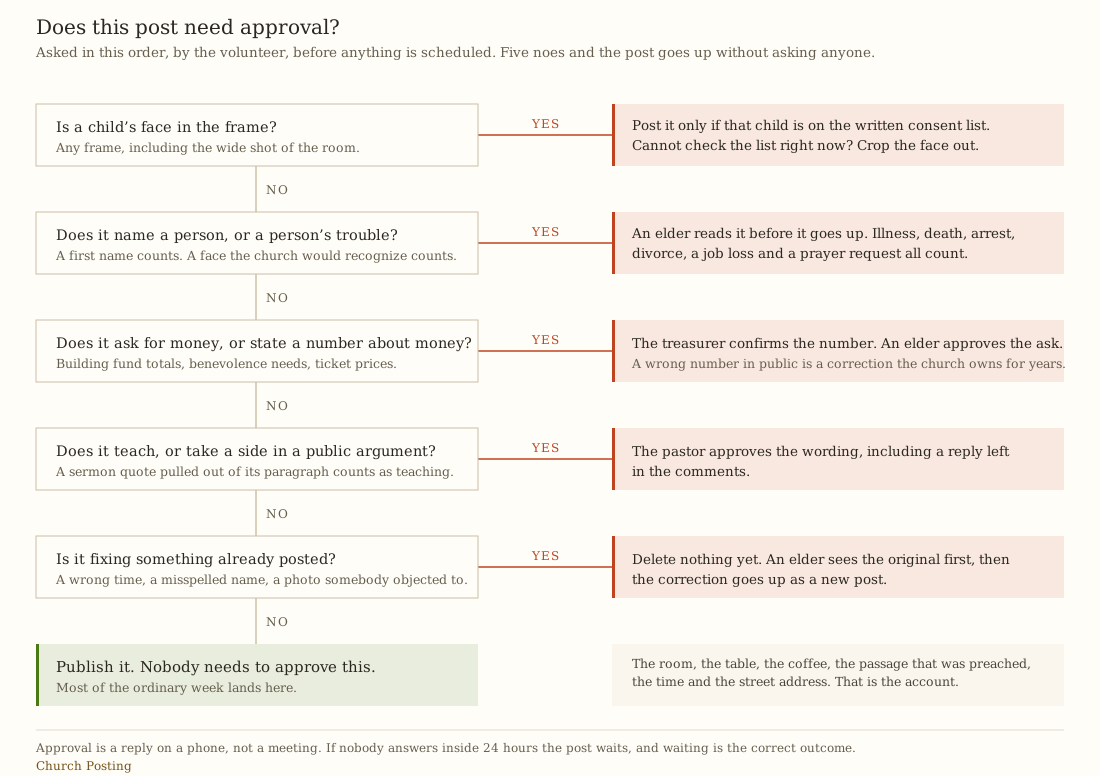
Three things about that tree that matter more than its content.
It is answered by the volunteer, not by a reviewer. The volunteer runs the five questions and only escalates on a yes. A rule that routes everything through an approver dies in three weeks because the approver goes on vacation.
Approval is a reply on a phone, not a meeting. Give it a stated window. If nobody answers within twenty-four hours, the post waits, and waiting is the correct outcome rather than a failure.
Deletion is the one action that always needs a second person. A volunteer who deletes a post because somebody complained has destroyed the evidence of what was actually published, which is the thing an elder needs to see when the complaint escalates. Correct in a new post.
Access granted at the end of that session: task access on the Facebook Page, a named seat on whatever scheduler the church uses, and one shared collection in the password vault. Nothing else. Instagram, the video channel and the wider drive permission all wait for week three.
Meta’s help center did not return its task list to an automated fetch on 29 July 2026, so read the exact task names in your own business portfolio rather than trusting anyone’s summary of them, including this one. The principle survives whatever Meta calls them this quarter: grant the ability to publish and reply, withhold full control of the Page.
Session two, thirty minutes, one caption written in the room. They write it, you watch. Every caption needs the time, the street address, and one sentence a stranger can understand without church vocabulary. The four patterns worth rotating are in church social media posts, and using a pattern rather than inventing a voice is what makes week five survivable.
Cite the passage by book, chapter and verse. Never paraphrase Scripture to fit a caption’s tone.
Session three, twenty minutes on Sunday, alone. Six shots this time. They also report which shot they could not get and why, because that sentence is worth more than the photographs. “I could not get the room during the hymn because I was holding a baby” is the beginning of a real workflow.
Week three: they post and you read it afterward
Three posts, scheduled in one sitting, unwatched. The outgoing volunteer reads them after they publish, not before. This is uncomfortable and it is the point. A volunteer who has never published without a review will not publish without a review when you are away, which means the account stops the first week you travel.
Batching matters more than it sounds. Writing one caption a day costs more total time than writing three at once, because the expensive part is switching into the writing frame of mind rather than the writing itself. The forty-five minute weekly workflow is the shape this settles into permanently: one capture session and one desk session, and nothing that does not fit in those two blocks happens at all.
Access granted this week: Instagram through the Page, Content manager on the photo library, and Editor with limited access on the video channel if the church has one.
That last level is worth naming precisely, because it is the only permission in this plan that a platform designed exactly for this situation. YouTube publishes seven channel permission levels: Owner, Manager, Editor, Editor (Limited), Subtitle Editor, Viewer and Viewer (Limited). An Editor can upload, publish, manage live streams and moderate chat, and cannot “delete channel or published content, manage permissions, enter contracts, delete streams, delete/reset stream keys”. Editor (Limited) is the same thing without access to revenue data (Add or remove access to your YouTube channel with channel permissions, read 29 July 2026). A volunteer who can upload and cannot delete published content or hand out permissions is precisely the volunteer a church wants.
Session two, thirty minutes with an elder: comments and messages. What gets answered, what gets escalated inside an hour, what gets hidden. They leave with a written list of the four kinds of message they will forward instead of answering, and asking for money is always on that list.
Session three, twenty minutes on Sunday. All eight shots, which means asking one person for permission out loud for the first time and adding a name to the consent list in person. That conversation is a skill and it takes one Sunday to learn.
Week four: alone, and the handover gets written on day one
Run the whole week with nobody watching. Capture, pick five assets, write three captions, schedule, close the laptop. Nothing new is granted in week four. The absence of a reward at the end is deliberate: the job is the job, and the last thing a volunteer needs at the moment they finally have it is another permission to learn.
Fifteen minutes on the one number. Profile clicks to the page that lists service times, read once a month, written down with last month’s figure beside it. Follower count answers nothing about whether a stranger walked in. If the elders want that number set beside real attendance, measuring church attendance honestly explains why a click and a body in a chair are not the same unit, and the guest follow-up system is where the account’s job ends and the church’s begins.
Thirty minutes writing the handover document. In week four. Not in the last week of serving.
This is the single highest-value half hour in the plan and it is the one every church skips. The handover document written by somebody who is leaving next Sunday is always thin, because the things worth recording are the things that felt obvious at the time. The version written in week four, while everything is still strange, catches what the fourth-month version cannot: that the two-factor code goes to a phone number nobody at the church controls, that the photo folder from 2023 has a naming pattern nobody uses anymore, that one family withdrew consent in March and the reason was never written down.
Then it gets updated at every quarterly access review, which takes ten minutes because it already exists.
Take the plan and the template
Three files. The plan is the schedule, the calendar is the same schedule as appointments, and the handover template is the document that exists from week four onward.
- The four week onboarding plan, as a CSV. Fourteen rows: every session, the day, the minutes, who runs it, what the volunteer learns, the exact access granted at the end of that session, what they hand back, and a done column. Opens in any spreadsheet. The last three rows are the standing commitments: the monthly number, the month four check on whether the approval rule is really being used, and the quarterly access review.
- The same sessions as a calendar file. Fourteen entries dated onto August 2026 with the monthly and quarterly reviews set to repeat. Import it and drag the block onto your own weeks. The times are floating, so a 7pm session stays at 7pm wherever the church is.
- The handover document template. Ten sections: what the volunteer could get into and at what level, what they never had, where the pictures are, the state of the consent list, what is scheduled and not yet published, the three things that will break first, standing commitments, people outside the church who were ever sent a login, what they would change, and a removal checklist signed by staff rather than by the departing volunteer.
Plain text on purpose. A template that only opens in one company’s software is a template that stops working the year the church stops paying for that software.
What a second pair of hands actually costs
Most churches running one volunteer and one staff member do not need to buy anything. Meta describes Business Suite as the place to “manage all your business activity on Facebook, Messenger and Instagram from one place” (Meta Business Suite, read 29 July 2026), and that page prints no price. If Facebook and Instagram are the whole stack, the tooling budget for this plan is zero.
The cost appears the moment two people need to touch the same queue. Every price below was read off the vendor’s own pricing page on 29 July 2026.
- Buffer Essentials 1 user
- Buffer Team unlimited team members
- Later Starter 1 user, 8 profiles
- Later Growth 2 users, 16 profiles
Read from buffer.com/pricing and later.com/pricing on 29 July 2026, at the annual billing rate each page shows. Buffer prices per channel: $60 a year on Essentials, $120 a year on Team. Later prices per plan: $18.75 a month on Starter and $37.50 a month on Growth, both billed annually, which is the $225 and $450 plotted here. Later also advertises three extra months on annual billing, which would lower the effective first-year total.
See the numbers
| Vendor | 1 people | 2 people | 3 people | 5 people | 8 people |
|---|---|---|---|---|---|
| Buffer Essentials | $60 | $120 | $180 | $300 | $480 |
| Buffer Team | $120 | $240 | $360 | $600 | $960 |
| Later Starter | $225 | $225 | $225 | $225 | $225 |
| Later Growth | $450 | $450 | $450 | $450 | $450 |
Two things in that chart decide the purchase.
The flat lines cross the rising ones between three and five accounts. Buffer charges per channel, so it is the cheapest option for a church running a Page and an Instagram account and gets more expensive with every account added. Later charges per plan, so a church running six accounts pays the same as a church running one. The crossover sits at four channels, which is where most churches actually are once somebody connects the youth account.
The gap between the two Buffer lines is the price of the second person. Buffer’s free plan covers three channels with “10 scheduled posts per channel”, Essentials is $5 a month per channel with one user account, and Team is $10 a month per channel with “Unlimited team members” (Buffer pricing, read 29 July 2026). At three channels that is $360 a year against $180, so letting a staff member and a volunteer both work the queue costs $180 a year. On Later the equivalent step is Starter to Growth, $225 to $450, so the second seat is $225 (Later pricing, read 29 July 2026).
A hundred and eighty dollars a year to stop two people sharing one login is the best money in this whole plan, and it is the line item that gets cut first in every church budget meeting.
Two more numbers, for completeness rather than for the chart. Metricool publishes a free tier covering one brand, twenty scheduled posts a month and every network except LinkedIn and Twitter as its page still words it, with Starter shown as a range rather than a single figure, “From €16–€29 / $20–$36” a month (Metricool pricing, read 29 July 2026). Hootsuite’s plans page showed no dollar figure inside its plan cards to an automated fetch, and its own questions section states that paid plans “start at $99 for a Standard plan, $199 for a Professional plan, and range up to $399 for an Advanced plan”, with Standard covering ten social accounts (Hootsuite plans, read 29 July 2026). The text returned did not state whether those figures are monthly or annual, so this page does not plot them and does not guess. At the cheapest possible reading Hootsuite still costs several times the Buffer line, and a church with one volunteer has no use for what the difference buys.
For the member-facing side of the stack rather than the posting side, Planning Center lists People as a “Free unlimited database and reporting included” and the Church Center member app free at its essential level (Planning Center pricing, read 29 July 2026). Canva’s pricing page returned HTTP 403 to every request made while writing this, so nothing here states what Canva’s plans or its nonprofit program cost or include. Read those terms yourself, on the day, before you budget. The wider comparison of what churches pay to talk to their own members sits in the communication tools directory.
The credentials problem, and the one rule everybody gets backwards
Some logins cannot be permission controlled. A shared Instagram password, a graphics account somebody set up in 2022, the login for whatever prints the bulletin. Those go in one shared vault collection, and the collection is the unit that gets revoked.
Bitwarden’s free tier includes “Free sharing with another user”, its Families plan is $3.99 a month billed annually for up to six accounts with unlimited sharing and collections, and its Teams plan is $4 a month per user billed annually with centralized ownership and event logs (Bitwarden pricing, read 29 July 2026). For a church with one volunteer, the free tier or the Families plan is genuinely enough, and the event log on Teams is worth the money only when three or more people are in the vault.
Now the rule that gets backwards in almost every church that thinks about this at all. Rotating shared passwords every quarter is not a security practice, it is a calendar habit that produces weaker passwords written on more sticky notes. NIST’s Digital Identity Guidelines are explicit: “Verifiers SHOULD NOT require memorized secrets to be changed arbitrarily (e.g., periodically),” and “However, verifiers SHALL force a change if there is evidence of compromise of the authenticator” (NIST Special Publication 800-63B, read 29 July 2026). A church does not need quarterly rotation. A church needs rotation on one specific event, which is a person leaving, and that event belongs on the removal checklist rather than on a schedule.
Two-factor recovery is the part that bites eighteen months later. Google’s guidance is to “print or download a set of 8-digit backup codes to keep in a safe place” and warns against checking the remember-this-device box on any shared machine (Turn on 2-Step Verification, read 29 July 2026). Print the backup codes, put them where the church keeps its other paper, and make sure every recovery phone number on every church account belongs to the church rather than to whoever set the account up. This is the field on the handover template that most often comes back filled in with a name nobody recognizes. The same instinct governs everything else the church holds about its members, which is the subject of protecting member data.
Teach the copyright rule in sixty seconds
One thing a volunteer will do in their first month, every time, is put a song under a clip of the service. Teach the consequence rather than the doctrine.
On a video channel, a Content ID claim is not a copyright strike, and the two are worth separating out loud. A claim lets the rights holder “Block a video from being viewed”, “Monetize the video by running ads on it”, or “Track the video’s viewership statistics”, and when the claim is on the audio the uploader may be able to “mute the claimed audio” (Learn about Content ID claims, read 29 July 2026). A strike is a different animal: “We remove the content from YouTube” (Understand copyright strikes, read 29 July 2026).
So the sixty-second version for a volunteer: a popular song under a service clip is most likely to get the audio silenced or an advertisement run against the church’s own footage, and at worst gets the whole thing taken down. Use the room’s own sound, or use nothing. A silent clip of the room filling up works. A muted clip of the choir does not.
What happens when they quit in week two
They will, sometimes. Treat it as information rather than failure.
If they quit after the rules session, the rules were not the problem. What usually happened is that the job was described as creative and turned out to be administrative, and forty-five minutes with an elder made that plain. That is a good outcome reached early and it cost the church about two hours.
Run the removal checklist the same week anyway, all of it, even though they held access for eleven days. The habit is the point. A church that removes access reliably when somebody serves for eleven days is a church that removes it reliably when somebody serves for four years and leaves badly.
Then ask the next person for four weeks rather than for the account. Nobody wants to inherit a church’s social media forever. Plenty of people will do a defined four-week trial that ends in a decision.
Decide this week
Three situations, three answers.
One volunteer, no communications staff, under about 150 people. Run the free stack. Meta Business Suite for the Page and Instagram, a shared drive for the photographs, a free password vault collection, and no scheduler purchase at all. Print the capture card, book the week-one session for a Tuesday, and grant Contributor on the drive and nothing else until an elder has read the approval rule out loud. The whole plan costs five hours and no money.
A staff member and a volunteer both touching the queue. Buy the second seat. At three connected accounts that is $180 a year on Buffer Team over Essentials, or $225 a year moving from Later Starter to Growth. Shared logins between a staff member and a volunteer are how a church ends up unable to say who published something, and there is no free way out of that other than one of the two people not doing the job.
A volunteer already holds the login and has already left. Do these in order, this week. Work out who holds the top level on every account and write it down. Grant the church itself an access level equal to or above the departed volunteer’s, before you remove anything. Rotate every credential that was shared rather than permission controlled. Replace every recovery phone number and every set of backup codes with the church’s own. Only then remove the person. Then fill in the handover template retroactively, from what you found, because what you just spent a week discovering is exactly what that document exists to hold.
Whichever situation fits, the first appointment is the one to make now. Put the week-one session in the calendar before you recruit anybody, because a plan with a date on it is a job somebody can say yes to, and “would you look after our Facebook page” is not.
The weekly rhythm this settles into is one capture session and one desk session, and what gets planned into those two blocks over a year belongs in the content calendar.
Sources
Every price, permission level and quotation above was read from these pages on the date given. Nothing here is quoted from memory or from a summary.
- Give, edit or remove Facebook Page access, Meta, read 29 July 2026. Names “Page access, task access and Community Manager access”. The task list itself did not render to an automated fetch, which is why this page tells you to read it in your own business portfolio.
- Manage Roles on a Shared Instagram Business Account, Meta, attempted 29 July 2026. Returned a page title and no body content, so no Instagram role name is claimed anywhere above.
- Meta Business Suite, Meta, read 29 July 2026. Prints no price.
- Add or remove access to your YouTube channel with channel permissions, YouTube Help, read 29 July 2026. The seven permission levels and what Editor cannot do.
- Learn about Content ID claims, YouTube Help, read 29 July 2026.
- Understand copyright strikes, YouTube Help, read 29 July 2026.
- Create a shared drive, Google Workspace Learning Center, read 29 July 2026. The five shared drive access levels.
- Turn on 2-Step Verification, Google Account Help, read 29 July 2026. Backup codes and the shared-device warning.
- NIST Special Publication 800-63B, Digital Identity Guidelines: Authentication and Lifecycle Management, National Institute of Standards and Technology, read 29 July 2026. Section 5.1.1.2 on arbitrary password change.
- Buffer pricing, Buffer, read 29 July 2026. Free at 3 channels with 10 scheduled posts per channel, Essentials $5 a month per channel with 1 user, Team $10 a month per channel with unlimited team members, $60 and $120 a year per channel on annual billing.
- Later pricing, Later, read 29 July 2026. Starter $18.75 a month annual, 1 social set of 8 profiles, 1 user. Growth $37.50 a month annual, 2 social sets, 2 users. No free plan.
- Metricool pricing, Metricool, read 29 July 2026. Free tier at 1 brand and 20 scheduled posts a month, excluding LinkedIn and Twitter. Starter shown as a range rather than one figure.
- Hootsuite plans, Hootsuite, read 29 July 2026. No figure inside the plan cards to an automated fetch. The questions section states plans start at $99 for Standard, $199 for Professional, up to $399 for Advanced, without stating the period in the text returned.
- Bitwarden pricing, Bitwarden, read 29 July 2026. Free sharing with one other user, Families $3.99 a month annual for up to 6 accounts, Teams $4 a month per user annual.
- Planning Center pricing, Planning Center, read 29 July 2026. People free with unlimited database and reporting, Church Center free at its essential level.
- Canva pricing, Canva, attempted 29 July 2026. Returned HTTP 403 to every request, so no Canva price or nonprofit term is stated above.