Church event planning software that stops the double-booked fellowship hall
Room booking, volunteer rotas, public calendar embedding, and approvals, with prices read off vendor pages on 29 July 2026 for Planning Center, Breeze, ChurchTrac, Elvanto, Skedda, and more.
Updated Jul 29, 2026
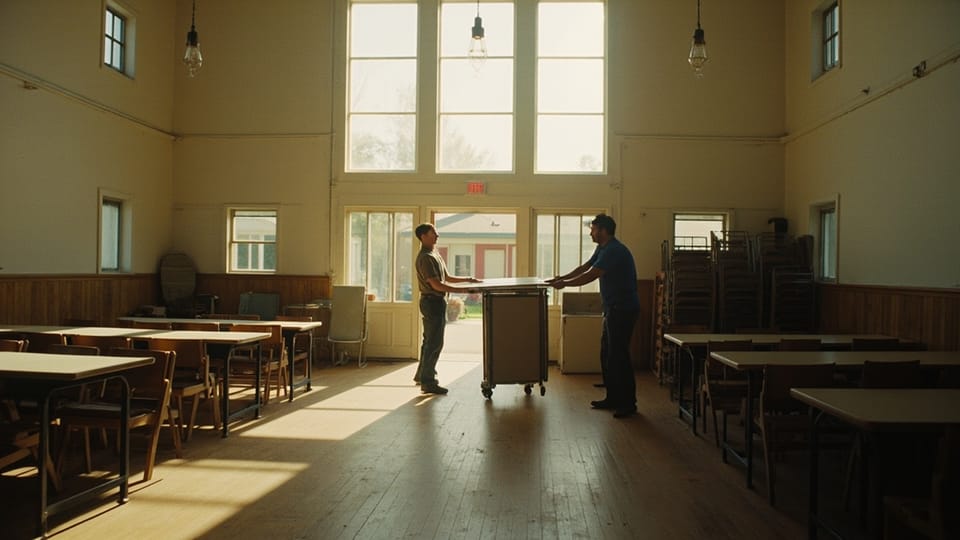
The funeral was Thursday at two. At noon the youth pastor and six students carried folding tables into the fellowship hall, because the lock-in was Friday and setup always happened the day before. Nobody had told him about the funeral. The family walked in on a room half converted into a gym.
Church event software exists for that moment. The month grid is the part vendors screenshot. The part that decides whether you keep the software is what happens when two ministries want the same room and neither of them knows it.
The two jobs a general calendar does badly
Google Calendar, Outlook, and every project tool with a calendar view will hold your events and show them in a grid. Two things they handle badly, and both are why churches go shopping.
Rooms and equipment have to be able to say no. A church building is a small conference center operated by volunteers. The fellowship hall, the sanctuary, the nursery, the gym, room 12, the coffee urns, the portable sound system, the van. Two ministries can request any of them for the same Saturday, and the calendar has to refuse the second request out loud rather than stack two entries on the same square.
The volunteer rota has to be readable by the volunteer. What a volunteer needs is a text message on Thursday saying she is on nursery this Sunday, and a button that finds a substitute when her mother goes into the hospital. Software that produces a beautiful printed rota and no reminders has solved the wrong half of the problem.
Before you look at a product, rank these six by how much pain each is causing now: refusing a double booking, reserving equipment and childcare and custodial time, publishing events to your website without retyping them, scheduling volunteers and reminding them, routing a request to somebody who can approve it, and repeating an event correctly. Most churches under 400 need the first, the third, and the fourth.
A room and a resource are different, and the difference costs you Sundays
Planning Center’s Calendar page describes what you are building as a catalog of “all the spaces and resources available for your events, from the gym and sanctuary, to tables and sound equipment.” That distinction is the whole design.
A room is a physical space that one event occupies. Two events cannot share it, so conflict detection on rooms is a hard no.
A resource is a thing or a service attached to an event. Six round tables, a projector, the coffee urn, two hours of custodial time. Resources have quantities. Three events can each request four of your ten round tables and none of them conflict. The fourth event asking for four is the one that breaks.
Three failures, in every church that sets this up carelessly:
Nested rooms. The fellowship hall splits into A and B with a divider. Enter three rooms with no relationship between them and the software will book the whole hall for a wedding reception and side B for a Sunday school class at the same hour. Enter the parent and the children and tell the system that booking the parent blocks both. If your tool cannot express that, put the divider in the room name and train people to read it.
No setup and teardown time. The event is 6pm to 8pm. The room is unusable from 4:30pm and stays occupied until 9pm. A calendar that books the event window instead of the real window creates a conflict no software will catch, because on paper there is no overlap. Book the real window and put the public time in the title.
Nobody owns the room list. Somebody adds “Fellowship Hall” while “Fellowship hall” already exists, and now the conflict check compares two different rooms. One person owns the room catalog and everyone else requests against it.
What these tools cost, checked 29 July 2026
Every figure below was read off the vendor’s own pricing page on that date, and every page is linked at the claim and again in Sources. Prices move, so confirm before you sign. How we verify one is on how we review.
| Tool | Priced by | Published price |
|---|---|---|
| Planning Center Calendar | rooms you manage | 1 room free; 5 rooms $15/mo; 15 rooms $32; 30 rooms $69; 50 rooms $115; 75 rooms $179; top tier $239 |
| Planning Center Services | people who can log in | 5 free; 20 for $15/mo; 50 for $32; 150 for $69; 400 for $115; 1,000 for $179; unlimited $239 |
| Breeze | flat rate, no tiers | $72/mo, plus $29/mo for Worship Tools |
| ChurchTrac | names in the database | 75 for $9/mo; 125 for $18; 250 for $36; 500 for $54; 1,000 for $72; unlimited $90 |
| Elvanto | active adults | 50 for $19/mo; 100 for $39; 200 for $78; plus a $149 setup cost |
| Ministry Scheduler Pro | volunteer count | No figure printed. The page reads “Up to $ / month” with no number in it |
| Rock RMS | honor-system donation | $4.45 per average weekend attendee per year, plus hosting from $405/mo |
| Skedda | bookable spaces | Starter from $99/mo for 15 spaces, Plus $149 for 20, Premier $199 for 25, billed annually |
| Google Workspace for Nonprofits | users | $0 per user per month for eligible organizations |
Planning Center Calendar is the only church product here where room management is the thing you pay for and everything else is free. The page states it plainly: Calendar “is completely free to create unlimited events, manage resources, and add admins,” and “pricing is based on the number of rooms you need to manage.” A church with a sanctuary, a fellowship hall, a nursery, and two classrooms pays $15 a month. The same page names approving facilities requests, event request forms, iCal import from Google or Outlook, an iCal feed out, and embedding events on your website. For most churches this is the strongest answer in the category, because the price is aimed at the exact thing churches need.
The cost is that Calendar is one product in a family and the family is priced separately. Volunteer scheduling lives in Planning Center Services, priced by “the total number of people who access the system in any way.” Five is free and 20 is $15 a month, which sounds generous until you count a worship team, two nursery rotations, ushers, a sound rota, and the greeters. That is 50 people at a 200-member church, so $32. Calendar plus Services at that size is $47 a month before People, Check-Ins, or Giving. Budget the suite, not the module. The free ceilings on every product in that family, and the exact point each one ends, are in free church management software.
Breeze is $72 a month flat with no tier by contact count, and its pricing page lists “Volunteer Tracking & Scheduling” and “Church Calendar & Events” as included rather than as add-ons. The homepage names room handling directly: “Assign rooms & resources, avoid double bookings by scheduling facilities, sound equipment, or childcare needs.” Text messaging includes 250 messages a month, then $10 per 500. Worship Tools costs $29 more, and a bundle with apps and a website runs $119.
Two things before you price Breeze against the others. Its pricing page carries the line “Breeze has been rebranded as Tithely Church Management,” and Tithe.ly sells the same $72 figure under its own name, so ask on the sales call which roadmap you are buying. And at $864 a year, Breeze costs more than Planning Center Calendar and Services combined at the sizes most churches buy. The difference buys one system and one login for the whole office instead of a suite you assemble.
ChurchTrac is the cheapest credible option here: $9 a month for 75 names, $18 for 125, $36 for 250, $54 for 500, $72 for 1,000, and $90 for unlimited. Accounting adds $15 a month, messaging adds $7, and paying annually charges 10.8 months for 12. Archived names do not count against your limit. Its worship page says volunteers “can block out dates and add notes for days that they are unable to serve” and names automatic reminders, which is real. Its events page names a central church calendar, registrations, and attendance, and says nothing about rooms, resources, or conflicts.
So if room booking is your problem, ChurchTrac is not the answer. A 250-name church can run ChurchTrac at $36 and add Planning Center Calendar at $15 and still spend less than one Breeze subscription.
Elvanto charges by active adults: $19 a month for 50, $39 for 100, and $78 for 200, with a $149 setup cost on every tier. Paying a year up front drops those to $15.20, $31.20, and $62.40 a month. It is a Tithe.ly company, and its price page defines an active adult as “someone who attends your services, volunteers or gives financially,” with no charge for children or outreach contacts, which is the fairest definition of a billable person in this comparison.
The setup fee buys something. Elvanto says data migration assistance is part of it. Weigh that against Planning Center, Breeze, and ChurchTrac all charging nothing to start and importing your data free. And nothing on the pages we could read names room booking or conflict detection: the pricing page claims “you get all the features” with “no add-on modules,” and the features page describes services, child check-in, volunteer rostering, run sheets, and a song database. Ask about rooms directly rather than assuming an all-in-one includes them.
Ministry Scheduler Pro does not print a price. The page shows an Online edition and a Plus edition, both reading “Up to $ / month” with no dollar figure anywhere in the page, so this guide prints none. What the page does state: the subscription runs six months and then renews annually, an unconditional money-back guarantee is available inside those six months, and optional SMS is billed at $0.02 per message sent or received. The named features are the ones a rota needs: sub requests, automatic reminders, online access for volunteers, mobile and web scheduling, service notes and resources. Plus adds a sign-in kiosk, custom fields, ministry folders, group scheduling, and disaster recovery. Ask for the annual total at your volunteer count in writing before you book a call.
It does one job. It is not a church management system, it does not book rooms, and it will not hold your membership roll. Buy it when the rota is the pain and the rest of the office already works, which describes a lot of parishes with large usher, lector, and Eucharistic minister rotations.
Rock RMS is free, funded by an honor-system donation the site sets at $4.45 per average weekend attendee per year, so a church of 300 pledges $1,335. Its license is narrower than the word open source implies: the Rock Community License Agreement grants use, modification, and distribution “SOLELY FOR INTERNAL USE BY FAITH BASED ORGANIZATIONS,” and defines that as a 501(c)(3).
Hosting is the real number and Rock hands it to two partners, saying “while cloud hosting prices may differ from partner to partner, the Spark donation stays the same across the board.” Those two partners do print prices, and the gap between them is worth reading: Rock Cloud charges $419 a month up to 1,000 attendees, $1,119 up to 2,500, $2,319 up to 5,000, and $4,419 up to 10,000. Cloud 9 charges $405, $1,025, $2,050, and $3,945 for the same four tiers. Both add a $249 setup fee. A church of 800 is looking at roughly $5,000 a year in hosting plus a $3,560 donation before anybody books a room.
Rock is a real option for a church with a working software developer among its members who has agreed in writing to a term of service. It is not an option because somebody’s nephew is good with computers.
Skedda is a workplace booking product, and it is here for churches who go looking outside the church-software world for room booking. Starter starts at $99 a month for 15 spaces, billed annually, Plus at $149 for 20 spaces, and Premier at $199 for 25, with higher rungs at $249 for 35 spaces and $349 for 45. Every price on the page reads “Starting at” and every button says “Talk to Sales,” so treat those as floors. The trial is 30 days of the Premium tier with no payment method required. No nonprofit rate is named on the pricing page.
Run the arithmetic before the demo. Skedda Starter is $1,188 a year for 15 spaces. Planning Center Calendar is $384 a year for 15 rooms and it knows what a Sunday service is. Skedda’s advantage is interactive floor plans and a rules engine, and Skedda sells a separate product called AllBooked for “sports, studios, coworking, and community booking” with embedded pricing and payments. That is the one to ask about if you rent the gym to a basketball league. For internal ministry scheduling, plain Skedda is priced for an office tower.
Google Workspace for Nonprofits is $0 per user per month for eligible organizations and Calendar is in every plan. Google now prints its discounted per-seat figures too: Business Standard at $3.50 per user per month on a one-year commitment, Business Plus at $6.16, and Enterprise at a stated 70 percent or more off list, with the free and discounted editions capped at 2,000 users. Check eligibility first. Google’s eligibility page requires a nonprofit charitable organization in good standing and names three categories it will not verify: governmental entities, hospitals and health care organizations, and schools and universities. Religious organizations are not named in either direction, so confirm with the program.
Google Calendar is what most churches are already using, so it gets its own section below.
Covenant OS is our own church management system. It is in development and there is nothing to buy, so it belongs in this list as disclosure and nowhere near the top of it. Choose from the options above, this month. Nothing here should make you wait on us.
Can you run this on Google Calendar?
More often than most church-software pages will tell you, and the answer turns on whether you have a Google Workspace administrator.
Google Calendar has real room booking. It calls a room a calendar resource, and Google’s admin documentation describes resources as “anything people can reserve: conference rooms, company cars, mother’s rooms, or whatever your company provides for workers.” That covers a church building well. Resources hang off buildings, and you can create up to 10,000 buildings.
The first catch is who can create one. The same page says creating buildings and resources requires the “Buildings and resources” administrator privilege, and resources are added in the Admin console one at a time or by CSV upload. So a church running on personal Gmail accounts has no room booking at all. A church on Workspace for Nonprofits has it, at no cost, as soon as someone with admin access builds the room list. The CSV path is the one to use: export the empty resource list, fill in your rooms in a spreadsheet, upload it back, and you have the whole building entered in an afternoon instead of clicking through 30 forms.
There is an approval path, and almost nobody writing about church calendars knows it exists. Google documents a resource manager who can accept or decline when a resource is scheduled. A super admin shares the resource with that person at “Make changes AND manage sharing,” sets the resource to add all invitations to its calendar automatically, and turns on notifications. From then on the resource manager answers Yes, Maybe, or No to each booking, and that person does not have to be an administrator. So the office administrator can own the fellowship hall without owning the Admin console.
What it still does not give you is the request form and the audit trail. Planning Center Calendar hands a ministry leader a form, drops it in a queue, and keeps the record of who asked for what and when. Google gives you an invitation and a yes-or-no, which is a lighter version of the same idea and enough for a church with one contested room and one administrator. Public embedding is free and works well, and the reminders are fine.
If you are already on Workspace for Nonprofits, have an admin, run fewer than about eight rooms, and have no volunteer rota worth the name, build the resources and stop shopping. The moment a volunteer needs a text on Thursday, or somebody asks who booked the gym in March and why, you have outgrown it.
Volunteer scheduling, and who names what
The rota is where church software either earns its money or becomes a printed page nobody reads. Below is what each vendor’s own page names, quoted rather than summarized, because feature lists in this category are unusually vague.
| Tool | What its own page names |
|---|---|
| Planning Center Services | Blockout dates, “fill in needed volunteer positions automatically based on when someone was scheduled last, preferences, and blockout dates”, signup sheets |
| Ministry Scheduler Pro | Sub requests, automatic reminders, online access for volunteers, mobile and web scheduling, service notes and resources, optional SMS billed at $0.02 per message |
| ChurchTrac | ”Volunteers can manage their availability and block out dates”, automatic reminders |
| Breeze | ”Volunteer Tracking & Scheduling”, listed as an included feature with no further detail on the pricing page |
| Elvanto | ”Create run sheets, schedule your volunteers, access your song database, lyrics and chords” |
Four things separate a rota that works from one that does not. Test all four in a trial rather than reading them off a page.
Volunteers enter their own unavailable dates. If the coordinator is the only person who can record that the Millers are in Colorado the second week of June, the coordinator becomes a database and quits within a year.
Reminders go out by text, not only by email. Volunteers under 40 do not read church email. This is the highest-return feature in the category and the one most often buried behind a messaging add-on, so price the messaging.
A volunteer can request a substitute without calling the coordinator. Ministry Scheduler Pro’s page calls this sub requests. Planning Center Services uses signup sheets plus a direct line to the team leader. Whatever it is called, have a volunteer decline a Thursday assignment during your trial and watch what the software does.
The schedule reaches people who never log in. Some of your ushers will never install the app. Ask what a scheduled person sees if they never accept the invitation. If the answer is nothing, you have a paper process forever.
Recurring events and the fifth Sunday
Every rota built on “first and third Sunday” has a defect in it, and the defect fires several times a year.
Four months in 2026 have five Sundays: March, May, August, and November. In 2027 it is January, May, August, and October. In 2028 it is five months: January, April, July, October, and December.
On a fifth Sunday, the first-and-third team served two weeks ago, the second-and-fourth team served last week, and next Sunday the first-and-third team is up again. One team serves twice in three weeks and the other waits five. The software reports no error because it was told to do exactly this. The nursery coordinator finds out in March, when the same two mothers have covered nine of the last twelve Sundays.
Two fixes, the first better.
Rotate by position in a list, not by ordinal date. Team A, Team B, Team C, repeating, ignoring which numbered Sunday of the month it happens to be. Planning Center Services automates this, filling needed volunteer positions “automatically based on when someone was scheduled last, preferences, and blockout dates.” If your tool cannot do it, keep the rota in a numbered list and assign from the list.
Or name the fifth Sunday as its own event. Many churches already do this by tradition: a combined service, a fellowship meal, a hymn sing. Naming it removes the ambiguity and hands you four or five Sundays a year that nobody schedules in the usual pattern.
One more recurrence test worth ten minutes in a trial. Open the repeat editor and try to express your real standing meetings: a women’s Bible study on the last Tuesday, elders on the first Monday unless it is a holiday, a work day that skips December. Change one occurrence and see whether the change sticks to that date or propagates to the series. Delete one and see whether it returns next year. Product pages say nothing about this and calendar tools differ most here.
Approvals, or who actually owns the room
Software does not fix a double booking. A rule does, and the software enforces the rule.
Write four sentences and put them in the staff handbook:
- The calendar is the only calendar. If it is not on the church calendar it does not exist, including counseling appointments held in a room other people use.
- One person approves room requests. In most churches the office administrator. Not the pastor, who approves everything, and not a committee, which approves nothing before Thursday.
- Requests need lead time. Two weeks for a normal event, with the exceptions named in writing: funerals, hospital emergencies, and an elders meeting called at short notice.
- Standing events are reviewed once a year, in one sitting. Every church accumulates a Tuesday 7pm block for a group that stopped meeting in 2022, and it holds a room every week until somebody looks.
Planning Center Calendar names both halves of this: approving facilities requests, and sharing event request forms “with your staff to book their events (like team lunches or planning meetings) and with your congregation for events like memorial services or weddings.” That second half is worth noticing. A public request form is how a family asks for the building for a funeral without phoning three people, and almost no church publishes one.
That is the shape to look for. A request form the ministry leader fills out, a queue the administrator works through, and an approval that turns a request into a booking. If your product has no approval step the rule still works, because the queue can be an email address and the administrator enters approved events herself.
Eight staff members with edit access and no approver is the whiteboard problem with better graphics.
The public calendar on your website
Two audiences, one calendar, and this is where most church websites go wrong.
Your staff calendar holds the real room windows, setup blocks, custodial time, pastoral appointments, and the deacons meeting nobody outside the diaconate needs to see. Your public calendar holds events a member or a visitor can attend, with the public start time, the address, and what to do with children. Never publish the raw staff calendar. A visitor reading “Fellowship Hall HOLD 4:30pm setup” learns that your church confuses its filing system with communication.
Three ways to get events onto a website, in descending order of durability:
An iCal feed. Planning Center Calendar offers one and states the constraint honestly: “All edits have to be made from Planning Center Calendar first, then changes will reflect in the other programs.” A feed keeps one source of truth and lets your website, a member’s phone, and a staff member’s Outlook all read the same thing. The same page offers iCal file import in the other direction, so moving off Google or Outlook does not mean retyping a year of events.
An embed. Planning Center Calendar and Google Calendar both do this and it takes a volunteer ten minutes. The tradeoff is an iframe your site cannot style, which usually reads poorly on a phone and gives search engines nothing.
Retyping events by hand. This is what most churches do, and it is why the website shows a Vacation Bible School that ended in July until somebody notices in October. If retyping is the process, it needs a named owner and a weekly slot.
Planning Center’s Calendar page names all three routes together, plus posting to the Church Center app. Whatever your tool, an event listing needs the time, the address, whether childcare is provided, and a name to contact. A title and a date is a rumor.
How and when events get announced on social and in the newsletter is a separate rhythm, worked out in the church content calendar. Event software fills the grid. That post decides who hears about it and when. If the harder question is which events belong on the grid in the first place, what fills a church calendar is the one to read before you buy anything, because a facilities tool makes an overloaded calendar run on time rather than making it smaller.
What to buy
Under 100 people, one room. Google Workspace for Nonprofits at $0 a seat and a volunteer who spends an afternoon building the resources by CSV. You do not have a room conflict problem. You have a communication problem, and free tools solve it.
100 to 400 with a real building. Planning Center Calendar for rooms and Planning Center Services for the rota, $47 a month at 15 rooms and 50 volunteers. If the office already runs Breeze and it works, do not tear it out. Breeze names room and resource assignment and includes volunteer scheduling at $72 flat, so test it against your real room list before you switch anything.
400 and up, or a church with a school. Planning Center Calendar at $69 or $115 for 30 or 50 rooms is still the strongest price here for facilities work, and by that size you need the suite anyway. Compare against Rock only if you have a developer in writing, and price both hosting partners rather than the first one Rock links to.
The rota is the whole problem and the office is fine. Ministry Scheduler Pro, with the six-month money-back guarantee as the real trial. Get the price in writing first.
You rent space to outside groups for money. The one case where Skedda earns its price, because a rules engine and paid public booking are things church software does not do. Ask about AllBooked rather than the workplace product, and price it against what the gym actually brings in.
What to skip
Skip a facilities module before your room list is clean. Six months of “Fellowship Hall” and “fellowship hall” and “FH” in three systems will defeat any conflict detection ever written. Clean the list first, on paper.
Skip paying for room management you are not using. Planning Center Calendar’s free tier is one room and unlimited events. A church with a shared calendar and one contested space should pay nothing here.
Skip a setup fee when a comparable product charges none. Elvanto’s $149 is money spent before you know whether the software fits.
Skip any product where you could not get a straight price. A vendor who will not name a number until a call is telling you how the relationship will go.
Do this in the next two weeks
Walk the building with a clipboard and write down every space two ministries could want at the same time, including the kitchen, the parking lot, and the room with the copier. Note which ones nest inside others.
Then pull the last three months of calendar entries and count the conflicts that actually happened, plus the near misses somebody caught by accident. Zero means you need a shared calendar and not a facilities system, so stop reading vendor pages today. More than three means you have a $15-a-month problem you have been solving with phone calls.
Then run one trial, not four. Load your real room list, enter next month’s events with real setup and teardown windows, and have a volunteer decline an assignment. A tool that survives that is the tool.
Compare the wider office systems in the church management directory, and if you are also choosing the system that holds your membership roll, start with choosing church management software and the free ceilings in free church management software. If the room booking decision is going to be bundled with a ledger purchase, price the ledger separately in church accounting software, because the all-in-one that books rooms well is rarely the one that keeps designated funds straight.
Sources
Every page below was fetched on 29 July 2026, and every price and quotation in this guide came off the page linked here on that date. Prices in this category move without notice.
Church software
- Planning Center Calendar room tiers, free tier, approvals, request forms, iCal import and feed, and embedding: planningcenter.com/calendar. Checked 29 July 2026.
- Planning Center Services person tiers, blockout dates, and automatic filling of positions: planningcenter.com/services. Checked 29 July 2026.
- Breeze price, inclusions, texting allowance, and the Tithely rebrand banner: breezechms.com/pricing. Room and resource claim: breezechms.com. Both checked 29 July 2026.
- ChurchTrac name bands, add-ons, and annual multiplier: churchtrac.com/pricing. Volunteer blockout dates and reminders: churchtrac.com/features_worship. Events feature list: churchtrac.com/features_events. All checked 29 July 2026.
- Elvanto tiers, setup cost, annual discount, and the active-adult definition: elvanto.com/pricing. Feature summary: elvanto.com/features. Both checked 29 July 2026.
- Ministry Scheduler Pro editions, six-month guarantee, SMS rate, and the missing dollar figure: ministryschedulerpro.com/pricing. Checked 29 July 2026.
- Rock RMS donation rate and hosting-partner language: rockrms.com/pricing. License terms: rockrms.com/license. Both checked 29 July 2026.
- Rock hosting prices: rockcloud.com/pricing and 9embers.com/cloud9. Both checked 29 July 2026.
Outside the church-software world
- Skedda space tiers, “Starting at” wording, trial terms, and AllBooked: skedda.com/pricing. Checked 29 July 2026.
- Google Workspace for Nonprofits per-seat figures and user caps: google.com/nonprofits/offerings/workspace. Eligibility and the three excluded categories: google.com/nonprofits/eligibility. Both checked 29 July 2026.
- Calendar resources, the required admin privilege, CSV bulk upload, and the building limit: Create buildings, features and Calendar resources. Checked 29 July 2026.
- The resource manager approval path: Approve or deny Calendar room and resource bookings. Checked 29 July 2026.
Corrections made on 29 July 2026
An earlier version of this guide said nothing in Google’s resource documentation describes a request-and-approve step and that a room in Google Calendar goes to whoever clicked first. Google documents a resource manager who accepts or declines each booking, and the Google Calendar section has been rewritten around it. The same version said Google does not print its discounted nonprofit per-seat figures; it does, and they are above. Two claims we could not re-verify have been narrowed rather than repeated: Elvanto’s calendar and events feature pages returned 404 on 29 July 2026, so the Elvanto description now rests only on the pricing and features pages we did read, and Rock’s documentation library was not re-checked, so the earlier claim about which guides it contains is gone.