Church email platforms priced at 300, 800, and 2,000 contacts
Prices read 29 July 2026 for Mailchimp, Flocknote, MailerLite, Brevo, beehiiv, Ghost, Tithe.ly and Planning Center, plus SPF and DMARC looked up on 209 real church domains.

A church with 300 people on its email list can send a weekly newsletter for nothing, and the platform that does it for nothing is not the one advertising to churches. A church of 2,000 can pay $1,632 a year or $0 a year for the same four sends a month. The difference is which unit the vendor decided to charge for.
Every price below was read off the vendor’s own public page on 29 July 2026. Where a page would not give up a number, this piece prints nothing, which happens twice and involves the two largest brands in the category. Our review method covers what gets verified and when it is rechecked. This page sits with the rest of the communications library; the shape of the newsletter itself belongs to church newsletter templates.
Three ways to bill a church for the same email
Per contact. Mailchimp and Constant Contact count the people in the audience. The bill rises when the list grows, whether or not anybody reads anything, and it keeps rising after somebody leaves. This is the model most churches walk into first, because it is the model with the advertising budget.
Per email sent. Brevo counts messages out the door, so a church can hold 4,000 addresses and mail 400 of them without paying for the other 3,600. The trap is the reverse: add a second monthly send and the bill moves.
Per member, or not at all. Flocknote prices by the size of the church and does not meter email. Planning Center People charges nothing. MailerLite, beehiiv and Ghost price by subscriber with ceilings so different they land in three places at one list size.
So bring two numbers to this: how many addresses you hold, and how many sends a month you make. Everything below assumes a weekly newsletter to the whole list.
The prices, at 300, 800, and 2,000 on the list
Read 29 July 2026, at the plan each vendor prices for that list size. Monthly figures were read off the page; annual figures are marked where they were multiplied by twelve.
| Platform | 300 | 800 | 2,000 | Unit | What breaks first |
|---|---|---|---|---|---|
| Planning Center People | $0 | $0 | $0 | nothing | Only three months of sent history is kept |
| beehiiv Launch | $0 | $0 | $0 | subscribers | The free tier stops at 2,500 subscribers |
| MailerLite Comfort | $12/mo | $19/mo | $33/mo | subscribers | Monthly emails capped at ten times your tier |
| Ghost(Pro) | $18/mo | $18/mo | $55/mo | members | Starter has no tier above 1,000 members |
| Brevo Starter | $0 free tier | $9/mo | not published | emails sent | 5,000 emails a month, then a calculator |
| Tithe.ly Church Management | $72/mo | $72/mo | $72/mo | flat | No email allowance is published at all |
| Flocknote Starter | $58/mo | $90/mo | $136/mo | members | Nothing breaks. It is simply the dearest |
| Mailchimp Standard | $20/mo | not published | not published | contacts | Free tier stops at 250 contacts |
| Constant Contact | not read | not read | not read | contacts | The pricing page refused every request |
- Planning Center People free at every size
- MailerLite Comfort derived, 12 x the monthly rate
- Ghost(Pro) Starter to 1,000 members, then Publisher
- Tithe.ly Church Management derived, flat $72 a month
- Flocknote Starter derived, 12 x the monthly rate
Annual cost in US dollars for a weekly send to the whole list. Monthly rates were read off each vendor's own pricing page on 29 July 2026; the annual figures for MailerLite, Tithe.ly and Flocknote are that monthly rate multiplied by twelve and are marked derived. The Ghost figures are annual prices printed in the pricing data the page loads, so $180 and $552 were read rather than derived. Planning Center People is free at every size and its line runs along the axis. beehiiv Launch is also $0 up to 2,500 subscribers and is left off so the two zero lines do not overlap. Mailchimp, Constant Contact and Brevo are absent because none of the three publishes a figure at all four sizes. Vendor pricing changes; check before you budget.
See the numbers
| Vendor | 300 on the list | 800 on the list | 2,000 on the list | 5,000 on the list |
|---|---|---|---|---|
| Planning Center People | $0 | $0 | $0 | $0 |
| MailerLite Comfort | $144 | $228 | $396 | $588 |
| Ghost(Pro) | $180 | $180 | $552 | $756 |
| Tithe.ly Church Management | $864 | $864 | $864 | $864 |
| Flocknote Starter | $696 | $1,080 | $1,632 | $2,580 |
Three things in that chart matter more than the ranking.
The cheapest correct answer at every size is a church management system giving email away, and the dearest is also a church management system. At 2,000 members Flocknote’s $136 a month works out at $1,632 a year against Planning Center’s nothing, for the same newsletter.
Ghost has a step in it. $180 a year covers 300 people and it covers 800, and at 1,001 members Starter has no tier to move into, so the next stop is Publisher at $552. A church at 950 addresses should know that before it grows.
And MailerLite is cheaper than Ghost at 300, dearer at 800, cheaper again at 2,000, because Ghost’s price does not move between 300 members and 1,000 while MailerLite’s moves twice. Neither of those two is a church product, and both undercut both church products at every size.
Mailchimp charges a church for the people who unsubscribed
Mailchimp bills on a monthly contact limit, and its own help documentation lists which contact types count toward it. A subscribed contact counts. A non-subscribed contact, “someone who’s interacted with you but hasn’t opted in to receive marketing content,” counts. An unsubscribed contact, “someone who previously received your marketing content but has opted out,” counts too. Mailchimp’s answer for all three is the same: “Counts toward monthly contact limit?: Yes”. Only hard-bounced and archived contacts fall out.
So a church imports a 900-address directory, 200 of those people opt out over two years, and the church keeps paying the 900-contact rate until somebody opens the audience and archives 200 profiles by hand. Mailchimp says the quiet part on the same page: “if you have outdated or inactive subscribers that don’t interact with your marketing, you should choose to archive them.” Good advice, and a task nobody in a church office has been told to do.
MailerLite bills the other way and prints it plainly: billing runs on active subscribers, and “Subscribers who have unsubscribed or bounced don’t count.” Its catch is smaller. MailerLite uses “a cumulative count within each billing cycle,” so an address active for one day in the cycle counts for the whole cycle.
The two biggest brands are the two you cannot price
Mailchimp’s pricing page renders a contacts dropdown running 0-500, 501-1,500, 1,501-2,500, 2,501-5,000 and upward. At the 0-500 step it prints Free at a “Limit of 250 contacts,” Essentials at $13.00, Standard at $20.00, and Premium at $350, each labelled a rate “/mo for 12 months,” followed by a line reading “Then, starts at” with no figure in it. The prices at the higher steps, and the rate after the first twelve months, are supplied by a script and are not in the page.
Constant Contact is worse. Its pricing page returned HTTP 403 to every request made on 29 July 2026, and its robots.txt, fetched and honored, disallows the /pricing.v1.json endpoint that would have answered the question. Its SPF include appears on 4 of the 149 church domains surveyed below, so real churches pay it a real amount that neither they nor we can quote to each other. A category where the two most advertised products are the two least quotable is a category where the advertising is doing work the pricing page will not.
The platforms, one at a time
Planning Center People
Free, and not free in the way that usually means a trap. The product page states it directly: “People is free for every church, regardless of church size and whether or not you use any of our other products,” with unlimited people and access. Email to a list is a feature of People. The pricing page carries no email allowance and no email price, and its only communication charge is texting, at $5 a month for a toll-free number and $0.02 per text in credits.
The limitation is real and it is not the price. The feature list says communication history is kept “for up to three months,” so a church wanting to know what it told the congregation about the building fund last October cannot answer that in February. Keep the archive on the church website instead.
Skip it if you want a designed newsletter with a drag-and-drop layout. This is a database mailing a list.
beehiiv
Launch is $0 for up to 2,500 subscribers with unlimited email sends, custom domains, and a hosted site for the archive, so a church pays nothing at all three sizes here. At the up-to-1,000 subscriber step the page prints Scale at $43 a month, $517 billed annually, saving $71 a year, and Max at $96 a month, $1,151 billed annually, saving $157 a year. Its own FAQ states that “paid plans start at $49/month” on monthly billing. The monthly rate for Max is not printed anywhere and works out at $109, which is $1,151 plus the $157 saving, divided by twelve. That division is ours. Prices above 1,000 subscribers sit behind the slider and are not in the page.
The cost is vocabulary rather than money. beehiiv is built to grow and monetize a newsletter: an ad network, paid subscriptions, referral programs, a sponsorship storefront. Every one of those is something a church leaves switched off, and the interface is arranged around them. There is no member database behind it either, so the list and the directory will drift.
Skip it if the list has to stay in step with the membership roll.
MailerLite
The cleanest ladder in this piece. The Free plan is 250 subscribers, 2,500 monthly emails and 2 user seats. Comfort is $12 a month up to 500 subscribers, $19 up to 1,000, $33 up to 2,500, $49 up to 5,000. Paying yearly takes 10 percent off, priced on the page as $10.80, $17.10, $29.70 and $44.10. Power runs $25, $39, $49 and $69 and lifts the send cap.
Read the send cap before the price. Comfort gives “10x the ceiling of your subscriber tier each month,” and the page is specific that “The multiplier is based on the top of your tier, not your exact subscriber count.” A church of 800 sits on the up-to-1,000 tier and gets 10,000 emails a month, which is twelve weekly sends of headroom.
Skip it if nobody in the office will keep the list synced with the directory by hand.
Ghost
Ghost is a publishing platform that sends its posts as email, which makes it right for one kind of church: the one where every newsletter should also become a permanent page on the church’s own site.
Ghost(Pro) prices by members. Starter is $18 a month or $180 a year and caps at 1,000 members, with one staff user and the built-in theme only. Publisher is $35 a month or $348 a year at 1,000 members, $55 or $552 at 2,500, $75 or $756 at 5,000, with three staff users and custom themes. Business is $239 a month or $2,388 a year, flat to 10,000. Those figures come from the pricing data the page itself loads, because the visible page mixes the monthly and yearly labels in a way that does not survive being read as text.
Ghost is also open source, so a church with somebody who administers a server can run it at hosting cost with its own sending provider. Whoever sets that up owns the security updates for as long as the church uses it.
Skip it if the church already has a website it likes. Ghost wants to be the website.
Brevo
The only platform here billing for what leaves rather than who is on the list. The free plan is 300 emails per day, which is exactly one send to a list of 300 and not one address more. Starter is $9 a month or $96.96 a year, described as “From 5,000 emails per month.” Standard is $18 or $194.04. Professional is $499 or $5,388.96, “From 150,000 emails per month.” Those figures were read out of the structured pricing data the page publishes about itself, because the visible prices are drawn by a script.
The word “From” is where a church gets caught. A list of 2,000 on a weekly send is 8,000 emails a month, past the 5,000 the entry step names, and the price at the next volume step sits behind a calculator that is not in the page.
Buy it if the church holds a large directory and mails a small fraction of it, the one case where the email meter beats the contact meter outright.
Flocknote
Flocknote prices by the size of the church and does not meter email or standard texting at all. The published ladder is free for life at 0 to 40 members, then $10 at 41 to 50, $17 at 51 to 70, $25 at 71 to 100, $42 at 101 to 200, $58 at 201 to 400, $73 at 401 to 600, $90 at 601 to 900, $105 at 901 to 1,250, $120 at 1,251 to 1,750, $136 at 1,751 to 2,300, and on to $215 at 4,401 to 5,000. Complete is Starter plus $75 a month. Online giving is included on every plan at 1.1% plus 30 cents for ACH and 2.9% plus 30 cents for cards.
Unmetered email plus unmetered texting is why Flocknote wins the texting comparison at large sizes and loses this one. Against email alone it is the dearest line on the chart, because email costs almost nothing to send and Flocknote charges for the member record, the giving and the texting whether the church uses them or not. Its feature list also names “Sacrament Tracking for Catholic churches” and content partnerships with Word on Fire, Ascension Press and Life Teen, so a Protestant congregation is reading a page written for somebody else. Skip it if email is the only job; price it first if texting is the real requirement.
Tithe.ly
Giving plus Church Management is $72 a month and includes a drag-and-drop email editor and member texting. All-Access is $119 a month against a listed regular price of $228, bundling Free Giving, Text Giving at a standalone $19, Church Management at $72, Worship Team Tools at $29, a website at $19, and an app at $89. Premium Onboarding is a separate $599 one-time fee. The bundle is flat regardless of size: “$119/month no matter how much you grow.”
What the page does not publish is any email allowance on any plan. No monthly send figure, no per-message rate, no statement that sending is unlimited. Ask for it in writing, in messages per month, and ask what happens at the ceiling.
Buy it if you want giving, records, a site and an app from one vendor and email is a bonus. Do not buy it as an email platform.
Mailchimp and Constant Contact
Priced above, as far as either can be priced. If your church already pays one of them, do not read a comparison. Open the invoice, find the contact count you are billed for, and compare it with the number of people who opened anything last year.
Gmail, used directly
On a paid Google Workspace account, the published limits are 2,000 messages a day, 2,000 recipients per message with a maximum of 500 external recipients, 3,000 external recipients a day, and 3,000 unique recipients a day. One BCC to 300 members is one message and 300 recipients, so the ceiling is not what breaks. Business Starter is $7.00 per user per month, with an introductory $3.50 running 12 August 2026 to 12 November 2026 and 16 percent off annually. One mailbox at $7 a month is $84 a year derived, undercutting every paid platform on the chart. On a free personal account the ceiling is lower: Google says the limit triggers at “more than 500 emails sent in a day” or “more than 500 recipients in a single email”.
What breaks is everything the platform was doing that you never noticed. No unsubscribe mechanism, and the law requires one. No record of who asked to be removed. Every reply goes to everyone the first time a volunteer uses Reply All. No bounce handling and no complaint reporting, so nobody can tell whether the message arrived. And a BCC to 300 addresses is a pattern mail filters treat with suspicion by design.
Use Gmail for the office mailbox. Do not use it as the mailing list.
Covenant OS
Covenant OS is our own church management system, in development and not available to buy. Communications sit in the design alongside members, giving and service planning, and none of it can be bought today. Choose from the platforms above, and choose this month. Our rule that an owned tool is never ranked first is written down on how we review.
The nonprofit discount, and the paper each one asks for
Two vendors here publish a nonprofit rate, and the difference between them is the document.
Mailchimp offers 15 percent, and the request is easy: sign up, then contact Billing “with your username and a link to your organization’s website.”
MailerLite offers 30 percent and asks for more. The page says US nonprofits “can provide their IRS tax exemption certificate,” and only one discount applies at a time, so the 30 percent and the 10 percent annual saving do not stack.
That second requirement is where a lot of churches stop. A church is exempt under section 501(c)(3) by operation of law without applying, so a great many congregations have never filed Form 1023 and hold no determination letter to send anybody. The same wall stands at Google: Google for Nonprofits requires that organizations “must be registered with the IRS as exempt from federal income tax under Section 501(c)(3)”, with governmental entities, hospitals and health care organizations, and schools and universities ineligible. Find out which side of that line your church is on before you budget around a discount.
Why a church that emails from a Gmail address lands in spam
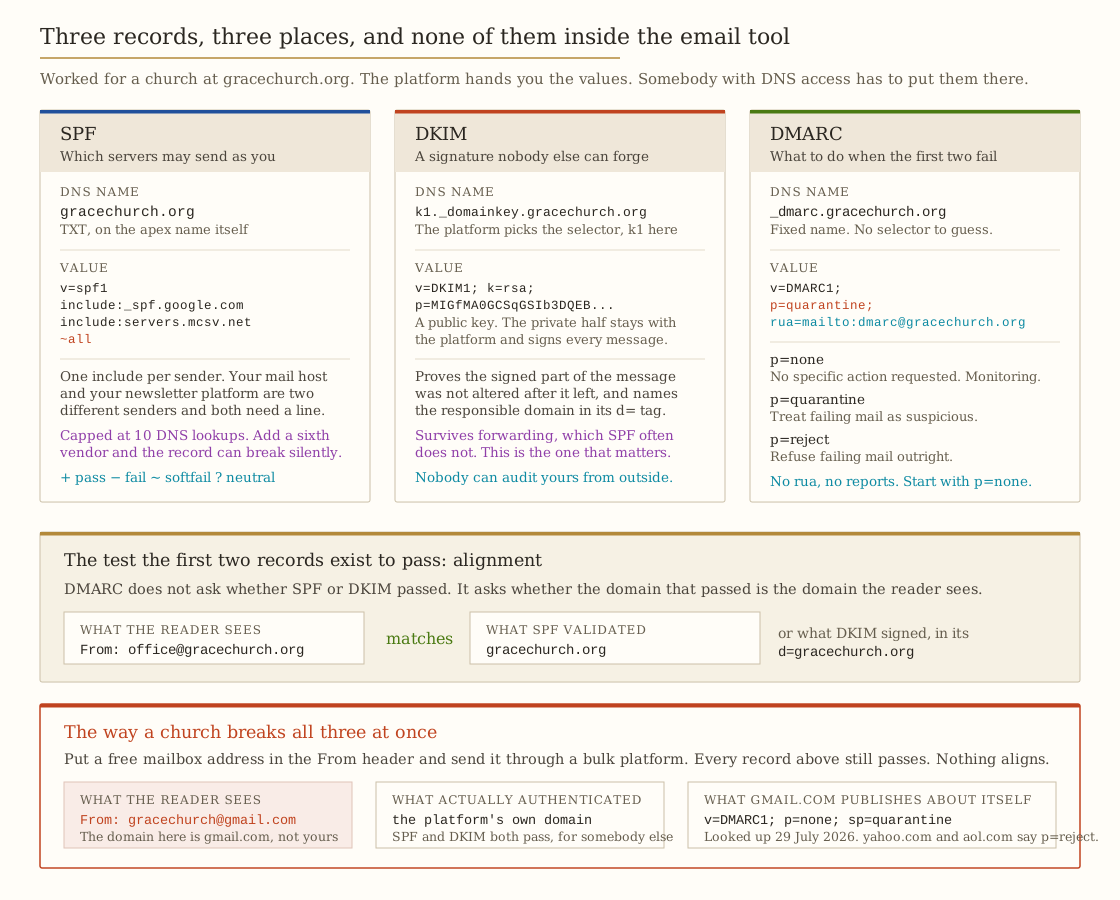
A modern receiver runs three checks. SPF asks whether the server that delivered this message was authorized to send for the domain in the envelope. DKIM asks whether the message carries a valid cryptographic signature from a domain that claimed responsibility for it. DMARC asks the harder question: does the domain that passed either of those match the domain the reader sees in the From line? RFC 7489 calls that Identifier Alignment and defines it plainly: “When the domain in the RFC5322.From address matches a domain validated by SPF or DKIM (or both), it has Identifier Alignment.” Google states the same requirement: “For direct email, the domain in the sender’s From: header must be aligned with either the SPF domain or the DKIM domain.”
Now put gracechurch@gmail.com in the From line of a send that leaves through a bulk platform. SPF passes, for the platform. DKIM passes, signing the platform’s own domain. Alignment fails, because the domain in the From line is gmail.com and nothing in the message authenticated gmail.com. Google’s guidelines say what it thinks of that: “Don’t impersonate Gmail From: headers. Gmail will begin using a DMARC quarantine enforcement policy, and impersonating Gmail From: headers might impact your email delivery.”
What each provider publishes about its own consumer domain is a lookup anybody can do, so we did it on 29 July 2026 against a public resolver. gmail.com publishes v=DMARC1; p=none; sp=quarantine. outlook.com publishes v=DMARC1; p=none; sp=quarantine; pct=100. yahoo.com and aol.com both publish v=DMARC1; p=reject; pct=100. A church sending from a Yahoo or AOL address through a platform is asking receivers to honor a published instruction to refuse the mail.
SPF, DKIM and DMARC, in plain words
SPF is a list of who may send as you. One TXT record on the domain, starting v=spf1, naming your mail host and your newsletter platform. It ends in a qualifier covering everything not on the list: -all for fail, ~all for softfail, ?all for neutral, which says nothing at all. RFC 7208 requires that implementations “limit the total number of those terms to 10 during SPF evaluation”, so a church adding a sixth vendor can break the record for all of them. SPF also authenticates the envelope rather than the visible From line, which is why it is not enough alone.
DKIM is a signature nobody else can produce. The platform holds a private key and signs each message; you publish the matching public key in DNS. RFC 6376 gives the name format exactly: a signature with a d= tag of example.com and an s= tag of foo.bar sends the receiver to foo.bar._domainkey.example.com. The signature proves the signed content “has not changed since it was signed,” and it survives forwarding, which SPF frequently does not. DKIM is the half worth getting right.
DMARC says what to do when those fail. One TXT record at _dmarc.yourdomain. RFC 7489 defines the three p= values: none requests “no specific action be taken,” quarantine asks receivers to treat failing mail “as suspicious,” reject asks them to refuse it. The rua= tag is where the aggregate reports go. Start at p=none with a real rua address, read two weeks of reports, and only then move to p=quarantine. Publishing p=reject before you know which of your own senders are failing is how a church blocks its own giving receipts.
Know the thresholds so nobody panics. Google requires SPF or DKIM of every sender at any volume, and SPF and DKIM plus DMARC above 5,000 messages a day to Gmail accounts, where “Your DMARC enforcement policy can be set to none.” Microsoft’s requirement for Outlook.com, announced 2 April 2025, covers “domains sending more than 5,000 emails per day” and asks for SPF pass, DKIM pass, and DMARC “At least p=none and align with either SPF or DKIM (preferably both).” A church of 2,000 on a weekly send is nowhere near 5,000 a day. The alignment requirement applies anyway.
What 209 real church domains actually publish
Nobody in this category publishes a measurement, so here is one. We took every church in this site’s own register that carries a website, 209 distinct apex domains, and looked up three records for each one over DNS-over-HTTPS against Cloudflare’s public resolver on 30 July 2026 UTC: the MX record, the TXT record on the apex name read for v=spf1, and the TXT record at _dmarc read for v=DMARC1. No church web server was contacted, no mail was sent, and no individual church is named.
- 184 of 209, or 88.0 percent, have an MX record, so mail can arrive. The other 25 cannot receive email at all, so whoever handles that church’s mail does it from an address on somebody else’s domain.
- 149 of 209, or 71.3 percent, have an SPF record. 60 have none, and 39 of those accept mail without telling anyone who may send as them.
- 115 of 209, or 55.0 percent, have a DMARC record. 94 have none.
- Of those 115, 92 are at
p=none, 17 atp=quarantine, 6 atp=reject. So 23 domains out of 209, or 11.0 percent, ask a receiver to do anything at all. - 59 of the 92
p=nonerecords carry noruaaddress. Ap=nonerecord with nowhere to send reports asks for no action and reports to nobody. It is the most common church DMARC record here and it is inert.
The SPF qualifier split is 105 at ~all, 34 at -all, 10 at ?all. Those records also name who does the sending, which is the closest thing to a market-share figure this category has: among the 149, _spf.google.com appears 42 times and spf.protection.outlook.com 39, then servers.mcsv.net, which is Mailchimp, 18 times, websitewelcome.com 15, sendgrid.net 10, secureserver.net 9, relay.mailchannels.net 6, spf.constantcontact.com 4, and mailgun.org 3. On the mailbox side, 94 route mail to Google and 37 to Microsoft 365.
Every count above comes out of research/church-dns/summary.json in this site’s repository, which holds the per-domain answer for all 209 lookups alongside the totals, so the arithmetic can be checked rather than taken on trust. Two things about that file are worth saying plainly. DNS answers change, so a count taken next week through a different resolver will differ by a domain or two, which is why the date is part of the finding rather than decoration. And the per-domain rows stay in the repository rather than on this page, for the reason given below.
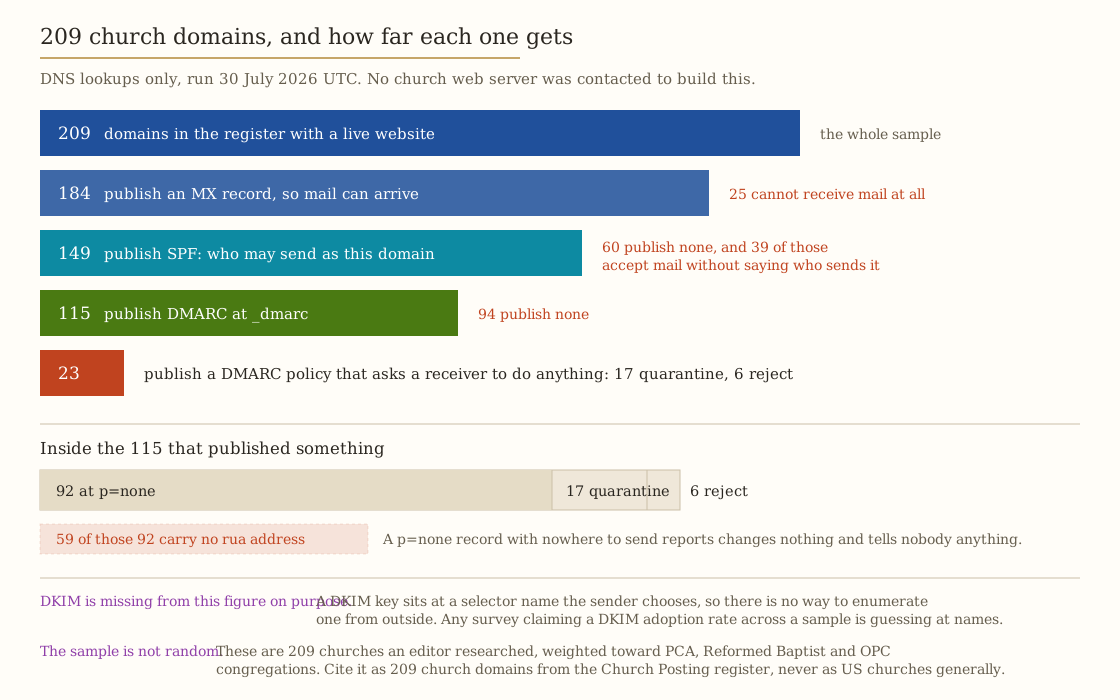
Two limits on that survey matter more than the percentages. DKIM is not in it, and cannot be: a DKIM key lives at a selector name the sending platform chooses, so there is no way to enumerate one from outside a domain, and any survey claiming a DKIM adoption rate is guessing at names. The sample is not random: these are 209 churches an editor researched, weighted toward Presbyterian Church in America, Reformed Baptist and Orthodox Presbyterian congregations, which selects for churches whose websites were good enough to find at all. Cite it as 209 church domains from the Church Posting register, checked on that date, never as a figure about American churches generally.
We are also not publishing the per-domain results. A list naming which congregations have no DMARC record is a list of churches whose donation appeals are easier to forge, and it is not ours to hand out.
Does CAN-SPAM apply to a church newsletter?
Partly, and the part that applies changes with what you put in the message. The four requirements are set out in the newsletter guide. What that guide does not answer is whether a church is inside the statute at all.
CAN-SPAM regulates a “commercial electronic mail message,” which 15 U.S.C. 7702 defines as “any electronic mail message the primary purpose of which is the commercial advertisement or promotion of a commercial product or service.” There is no nonprofit exemption in that definition, and nothing in it reaches a newsletter of prayer requests, service times and a catechism reading either, because none of that promotes a commercial product or service.
Primary purpose is a defined term rather than a matter of impression. 16 CFR 316.3 sets the test. A message consisting exclusively of commercial promotion is commercial. A mixed message turns on whether a reasonable recipient reading the subject line or the body would conclude the primary purpose is commercial, weighing “the placement of content…at the beginning of the body of the message; the proportion of the message dedicated to such content; and how color, graphics, type size, and style are used to highlight commercial content.”
So the Christian school’s tuition drive, the bookstore sale, the conference with early-bird pricing and the banquet with a ticket price are all closer to the line than the prayer list, and a subject line reading “Early bird pricing ends Friday” over a message whose top third is a ticket link is exactly what that test looks at. When it applies, one requirement in 15 U.S.C. 7704 is the one churches never satisfy: subsection (a)(5) requires “clear and conspicuous identification that the message is an advertisement or solicitation” alongside “a valid physical postal address of the sender.” No church labels its newsletter an advertisement, and no church should have to. A church sending a dedicated email promoting a ticketed event probably should. Two mechanics go with it: (a)(3) requires the opt-out mechanism to keep working for “no less than 30 days” after the message went out, and (a)(4) allows at most “10 business days” to stop sending after a request arrives. Nothing here is legal advice, and a lawyer settles anything close to a line.
Consent decides whether the mail arrives rather than whether it is lawful, which makes it the bigger problem. Google asks senders to keep the spam rate below 0.30 percent, and on a list of 300 a single complaint is 0.33 percent. That is the arithmetic making an imported directory a deliverability failure rather than a shortcut. Capture consent when the address is given, record the exact wording the person saw, and store the record where the church keeps the rest of its member data rather than only inside the vendor. The capture belongs in the guest follow-up system, and the same discipline for phone numbers is in the texting rules.
Take the two files
The deliverability checklist is twelve steps on two sides of paper. Six are done once: own the domain, send from it, publish SPF, publish DKIM, send yourself one message and read the authentication results, then publish DMARC at p=none with a real reporting address. Six recur, with a review month against each: consent, opt-outs, the footer, pruning, the complaint rate, and knowing what you could export if you left.
Every price on this page as a CSV carries one row per plan with the billing unit, the monthly figure, the three list sizes, the annual figures marked derived, the nonprofit discount, the source URL, and a column stating what each vendor’s page does not publish.
What to do
If you are already on Planning Center, stop shopping. Email is free, no allowance is published against it, and the only thing to fix is copying the sent archive somewhere that keeps it longer than three months.
If you are not, and the list is under 2,500, price beehiiv Launch and MailerLite Comfort before anything sold to churches. One is free and one is $144 a year derived at 300 addresses, and both undercut every church-branded option on the chart. Take a church product instead when it does a second job you would otherwise buy separately: Flocknote when texting is the real requirement, Tithe.ly when giving and records and a site are all on the list. Both belong in the wider software budget rather than the email line, and the figures go into your own with the software cost tool or against the communication directory.
If you are on Mailchimp, archive your unsubscribed and non-subscribed contacts this week. You are paying for them.
Then do step 5 of the checklist. Send one real draft to a mailbox at a different provider, open the raw message, and find the authentication results line your receiving provider added. Three passes and the church’s own domain on the header.from, or you have a configuration problem rather than a writing problem. It costs two minutes, and 94 of the 209 domains we looked up carry nothing at _dmarc that would tell them how it goes.
Sources
Every price, quotation and rule above was read from these pages on 29 July 2026.
- Mailchimp pricing, Marketing Platform
- Mailchimp, About Your Contacts
- MailerLite pricing
- Brevo pricing
- beehiiv pricing
- Ghost(Pro) plans and pricing
- Flocknote pricing
- Tithe.ly pricing
- Planning Center pricing and Planning Center People
- Constant Contact pricing, attempted, HTTP 403
- Google, Email sender guidelines
- Gmail sending limits in Google Workspace
- Google, Sending limits for Gmail
- Google Workspace pricing
- Google for Nonprofits eligibility
- Microsoft, Outlook’s new requirements for high-volume senders
- RFC 7208, Sender Policy Framework
- RFC 6376, DomainKeys Identified Mail Signatures
- RFC 7489, DMARC
- 15 U.S.C. 7702, CAN-SPAM definitions, via Cornell Legal Information Institute
- 15 U.S.C. 7704, CAN-SPAM prohibitions, via Cornell Legal Information Institute
- 16 CFR 316.3, primary purpose rules, via Cornell Legal Information Institute
What could not be read. Constant Contact’s pricing page returned HTTP 403 to every request, and its robots.txt disallows the JSON endpoint carrying the prices. Mailchimp’s prices above the 0-500 contact step, and its rate after the first twelve months, are drawn by a script. Brevo’s and beehiiv’s prices above their entry steps sit behind sliders likewise absent from the page. The FTC’s own CAN-SPAM compliance guide refused automated requests, so the statute and the rule are cited directly.
Nothing here was tested by running a real church newsletter through these platforms. The prices and rules were read off published pages, and the DNS survey measures what 209 domains publish rather than whether their mail arrives. Deliverability turns on sending reputation as well as authentication, and reputation cannot be read out of a DNS record by anybody.