Church fund accounting in QuickBooks Online
The plan classes start on, the 40-class and 250-account caps, the report that ties funds to the bank, and a 95-account chart of accounts CSV to import.

The treasurer opens the chart of accounts, types Building Fund, and files it under Income. Then Benevolence Fund. Then Missions. Then Memorial Gifts. By March the giving report is a thing of beauty and every fund has its own line on it.
In November a member stands up and asks how much is left in the building fund. Nothing in the file will answer, because an income account has no balance to carry forward. It totals what came in during the year, prints that, and resets to zero on the last day of December.
The fix is one sentence, and it is the whole setup. An account records what a dollar is. A class records which fund it belongs to. Turnkey CFO, a bookkeeping firm that publishes its church configuration, puts the same rule this way on 10 June 2026: “Your accounts describe what a dollar is (tithes, facility expense, payroll). Your classes describe which fund it belongs to.” Get those two ideas separated and QuickBooks will report by fund. Mix them and no amount of cleanup later will produce a fund balance.
What we read, and what we did not run
No QuickBooks Online trial was opened to write this page. Nothing below is a screenshot, a click path we walked, or a verdict on how a screen behaved.
That was not the plan. Intuit’s own help center, at quickbooks.intuit.com, refused every request we made on 29 July 2026, from two different clients, across three URLs: two help articles and the pricing page. One client had the connection reset. The other timed out after 25 seconds with zero bytes received. The developer documentation at developer.intuit.com answered, then turned out to assemble its content in the browser, so a plain client reads 64 characters of text off a 1.2 MB response. A guide about QuickBooks written from Intuit’s own screens was not available to us.
So this page is built from what could be fetched and dated, and it says whose description each claim is:
- Intuit’s own published code. The
AccountTypeEnumandAccountSubTypeEnumfiles in Intuit’s QuickBooks V3 Java SDK on GitHub. These are first-party and exact, and they are where the chart of accounts CSV below gets its account types. - A third-party copy of Intuit’s usage-limits article, reached at npifund.com, which is where the user, class and account ceilings come from. Read that citation with a caution attached: on 29 July 2026 the URL answered with an HTTP 302 to
custommapposter.com, so the text is a republication on a domain unrelated to accounting, and Intuit’s own copy would not load for us to check it against. The ceilings below are what that copy states. Confirm them in your own account settings before you plan around them. - Three publishers’ plan comparisons, read the same day, which disagree about the price.
- Two practitioner write-ups, one from a bookkeeping firm and one from a member of Intuit’s own trainer and writer network.
- Two denominational chart-of-accounts samples and one CPA society’s numbering rule, which is what the account numbering follows.
Every menu path named below is somebody’s published description with a date on it, not a screen we clicked. Our method for pricing and disqualifying software, and the point at which we refuse to publish a number, is written out at how we review.
The plan gate, and the four ceilings
Class tracking does not exist in the two cheapest plans. That single fact decides most church subscriptions, and a church that signs up on its own usually finds it out a month in.
The republished copy of Intuit’s usage-limits article linked above, read on 29 July 2026, sets the ceilings:
| Simple Start | Essentials | Plus | Advanced | |
|---|---|---|---|---|
| Billable users | 1 | 3 | 5 | 25 |
| Reports-only users | not available | not available | unlimited | unlimited |
| Classes and locations, combined | not available | not available | 40 | unlimited |
| Chart of accounts | 250 | 250 | 250 | unlimited |
| Tags | 300 | 300 | 300 | 300 |
Four things follow from that table, and three of them are good news.
Simple Start and Essentials cannot do this at all. The funds are classes. Without classes there is no fund reporting, whatever the chart of accounts looks like. Fit Small Business’s plan comparison, read the same day, agrees, listing class and location tracking as a Plus feature and naming it among the reasons to skip Essentials.
The 250-account ceiling is not the constraint people fear. The chart of accounts published with this page holds 95 accounts, which is 38 percent of it. A church hits 250 by giving every fund, every missionary and every ministry sub-budget its own account, which is the mistake this page exists to prevent.
Forty combined classes and locations is enough, and the cap is a discipline. Seven funds plus three functional categories is ten slots. Turnkey CFO’s read is the same, that most churches need fewer funds than they think and five to eight real classes covers a lot of ground. Resist a class per missionary.
Reports-only users are unlimited and cost nothing. This is the fact that changes the arithmetic. The finance chair and the elder who read the fund report every month do not consume one of the five billable seats. Only the people who enter transactions do, which for most churches is the bookkeeper and the treasurer.
What it costs, and why this page will not give you one number
Three publishers, read on 29 July 2026, print three different prices for the plan a church needs.
Paygration lists Plus at $99 a month and Advanced at $235. Fit Small Business lists Plus at $115 and Advanced at $275. Certum Solutions, an Intuit solution provider, explains part of the gap and adds a number nobody else does: “Essentials moves from $60 to $85 per month, Plus moves from $99 to $140 per month, and Advanced moves from $200 to $340 per month,” effective for renewals on or after 1 August 2026, with new subscribers getting six months at the introductory rate before the updated pricing applies.
If Certum is right, a church signing up this week is looking at a bill that changes on its seventh invoice. We cannot confirm it, because Intuit would not serve us its own pricing page, and a wrong price about a real company is worse than no price. So all three are printed here with the publisher and the date beside them.
- Plus at $99 Paygration's figure
- Plus at $115 Fit Small Business's figure
- Plus at $140 Certum's post-1-August figure
- Advanced at $340 Certum's post-1-August figure
Every annual figure here was derived, not read: we multiplied each publisher's monthly price by twelve, so $99 becomes $1,188, $115 becomes $1,380, $140 becomes $1,680 and $340 becomes $4,080. The three Plus lines stop at five because Intuit's published usage limits allow five billable users on Plus, so the sixth person who needs to enter a transaction moves the church to Advanced. Reports-only access is unlimited and non-billable on both plans, so an elder who only reads the fund report never moves you up a tier. Monthly prices read off three publishers' pages on 29 July 2026; quickbooks.intuit.com refused every request from two clients on that date, so none of these figures came from Intuit.
See the numbers
| Vendor | 1 entering the books | 3 entering the books | 5 entering the books | 8 entering the books |
|---|---|---|---|---|
| Plus at $99 | $1,188 | $1,188 | $1,188 | not offered |
| Plus at $115 | $1,380 | $1,380 | $1,380 | not offered |
| Plus at $140 | $1,680 | $1,680 | $1,680 | not offered |
| Advanced at $340 | $4,080 | $4,080 | $4,080 | $4,080 |
Two practical consequences. Get the number from Intuit’s own checkout before you put it in a budget, and write down the renewal price in the same session, because the introductory rate is not the rate. And check the nonprofit route first: Turnkey CFO recommends looking at TechSoup’s nonprofit QuickBooks program before paying retail. We print no TechSoup figure, because techsoup.org rendered nothing readable to a plain client on 29 July 2026 either. The wider comparison, including the products that do not make you choose a plan tier to get fund reporting, sits in what church software costs.
How a restricted gift actually moves
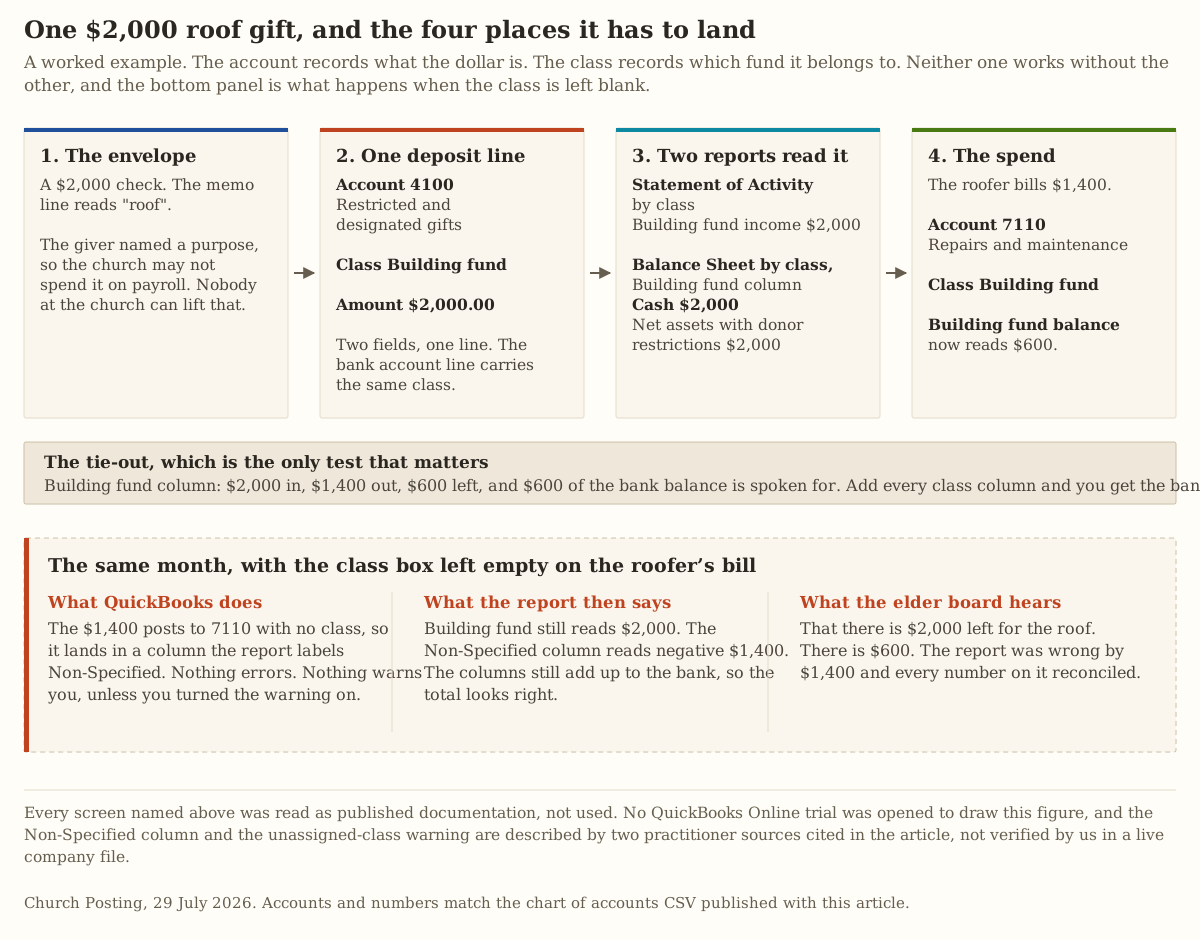
The $2,000 check with “roof” in the memo line arrives with an instruction attached. ECFA’s Standard 7.2 states the obligation plainly: “A giver’s intent relates both to what was communicated in the appeal and to any instructions accompanying the gift, if accepted by the organization.” Accept it for the roof and the roof is what it is for. Nobody at the church can vote that away.
That gift gets recorded once, on one line, carrying two pieces of information: account 4100, restricted and designated gifts, and class Building fund. The bank deposit line carries the same class. When the roofer bills $1,400 and that invoice is coded to account 7110 with the class Building fund, the fund balance reads $600 and the reports produce it without anyone assembling a spreadsheet on Saturday night.
Leave the class blank on the roofer’s invoice and nothing breaks. That is the problem. The $1,400 posts to repairs with no class, the building fund column still reads $2,000, and the columns still add up to the bank balance, so every check on the report passes. The elder board hears that there is $2,000 for the roof when there is $600.
Which is why the second setting matters as much as the first. Turnkey CFO names it: turn on the warning for a transaction with no class assigned, because “that single checkbox prevents the most common error, untagged transactions that quietly break your fund reports.”
The setup, in the order it has to happen
Six steps, and the order is load-bearing, because settings changed after transactions exist mean going back through the transactions.
- Set the company type to the nonprofit option. Settings, then Account and settings, then Advanced. Turnkey CFO describes what this does: the Profit and Loss becomes the Statement of Activity and the Balance Sheet becomes the Statement of Financial Position, which is the language a finance committee and any reviewer expect.
- Turn on class tracking, in the same Advanced section under Categories, and turn on the unassigned-class warning with it.
- Turn on location tracking if you need a functional-expense split. More on why below.
- Turn on account numbers. QuickBooks.ninja describes the step: go to the chart of accounts, click the gear icon above the list, and check the account-number box. Skip it and the Number column in the import file has nowhere to land.
- Import the chart of accounts. File format and steps are below.
- Create the classes by hand. There is no CSV import for classes in QuickBooks Online, so seven funds means seven trips through the same short form.
One class per fund, and the distinction the ranking pages skip
Every page competing for this search treats restricted money as one category. It is two, they behave differently, and the difference surfaces in exactly the meeting where money is short.
Donor-restricted money came with an instruction from the giver or in response to an appeal that named a purpose. Nobody at the church can release it. The building gift above is this.
Board-designated money is unrestricted money a board voted to set aside. A board that designated $20,000 toward a future roof can undesignate it at the next meeting and put it toward payroll. Turnkey CFO’s warning is the practical one: label both kinds “restricted” in QuickBooks and “your financials overstate your restrictions and your auditor will catch it.”
So the class list separates them, and the reason each one is what it is gets written down. Seven classes cover most churches: a general fund, building, benevolence, missions and memorial as donor-restricted, then two board-designated ones for reserve and capital replacement. Sub-classes handle detail under a parent fund where a church genuinely needs it, one per missionary under Missions, for instance, though the 40-slot ceiling is a reason to be sparing.
Then the equity section. The current standard reports two net asset classes rather than three: net assets without donor restrictions and net assets with donor restrictions, with the old temporarily and permanently restricted split gone. Turnkey CFO attributes that to FASB’s ASU 2016-14 and we could not open FASB’s own PDF of it, which refused our client twice on 29 July 2026, so treat the citation as a practitioner’s rather than the standard-setter’s until you have your accountant confirm it. The Greater Washington Society of CPAs describes the same two categories and adds the mechanical detail that matters in QuickBooks: “Opening balance equity is a startup holding account that should equal zero after the company setup has been accomplished. It should never have a balance after that.”
One line carries one class, so the second dimension goes somewhere else
A church has to report by fund and, if it produces a statement of functional expenses, by function as well: program services, management and general, fundraising. A single line in QuickBooks holds one class, so it cannot hold both “building fund” and “program” at once.
Turnkey CFO’s answer is the one every practitioner arrives at: classes carry the funds, locations carry the functional categories, and you run expenses by location to build the functional report. Three locations plus seven classes is ten of the forty slots.
Projects are the third tool and they are for anything that ends. A capital campaign, a mission trip, a week of vacation Bible school, one grant. Turnkey CFO draws the line at permanence: “I lean on projects for anything that will end, and reserve classes for the funds that live forever.” That keeps the class list from filling up with things that finished two years ago.
The report that keeps it honest, and the column that ruins it
The test of the whole setup is one screen: a balance sheet with a column per fund, where the columns add up to the bank.
QuickBooks Online can produce it. Liz Scott, writing in Insightful Accountant as a member of Intuit’s trainer and writer network, describes the path as opening the balance sheet report and specifying display columns by class, and names the exact hazard in the same paragraph: “What might get messy are the number of Balance Sheet accounts which require no Class at all, including loan payments, bank accounts or shareholder distributions. All non-classed transactions will appear on the Balance Sheet by Classes in a column labeled Non-Specified.”
That article is dated 30 April 2018, so read it as a description of how the report worked then rather than a promise about the menu today. We did not open a company file to check the wording of the menu in 2026.
Turnkey CFO, eight years later, is blunter about living with it: the report “is famously finicky in QBO. It frequently shows an unclassed column or fails to balance,” and the usual causes are predictable, which is Opening Balance Equity left over from setup, bank fees and interest that posted without a class, and one-sided transfers. Their fix when it will not balance is to filter for transactions with no class assigned.
This is the honest boundary of the workaround, and it is worth stating in one sentence a treasurer can repeat to a board. Real fund accounting software keeps a self-balancing set of books per fund and the system enforces that balance. QuickBooks has one general ledger and enforces nothing, so a restricted fund can go negative, print, and reconcile. Whoever reviews the report every month is the control, which is the same reason two unrelated people count the offering together.
The chart of accounts, and what the PDFs holding this search get wrong
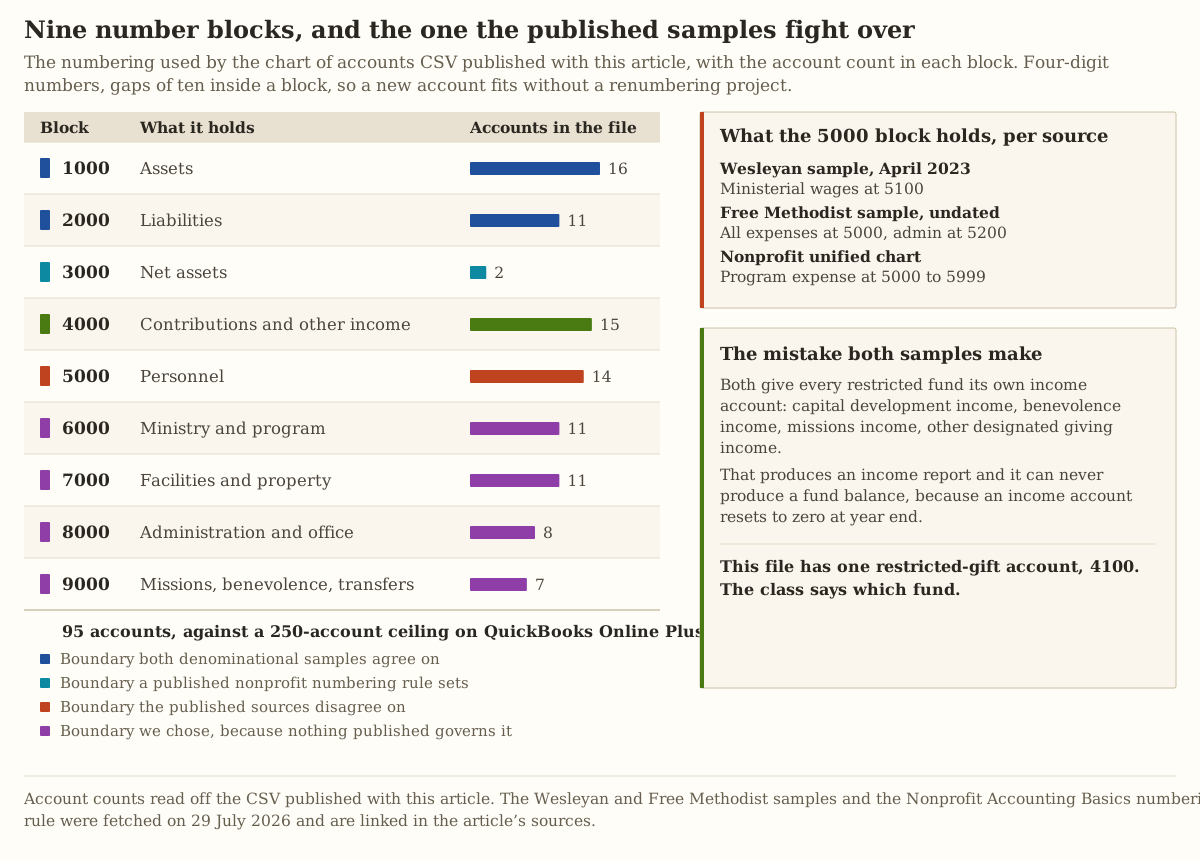
Search for a church chart of accounts and the results are denominational PDFs. Two of them are worth reading and both will mislead a US church that copies them without checking.
The Free Methodist Church in Canada sample carries an account numbered 1110, HST Receivable, which is a Canadian sales tax no US congregation will ever record. It also numbers a heading “5400 Captial Depreciation Expense,” and a typo that has survived long enough to rank tells you how recently anyone maintained the file. Its structure is the deeper problem: it gives every fund its own income account, 4010 Capital Development, 4020 Global Missions, 4070 Benevolent Fund, 4080 Other Designated Giving. That produces an income report and it can never produce a fund balance.
The Wesleyan Church sample, dated April 2023, is the better document and the same trap. Three columns of increasing detail, numbers only in the third, 1000 for assets and 4000 for income, and separate income lines for Restricted Gifts (Building) and Restricted Gifts (Missions).
The numbering conventions in the field disagree with each other, which is why our file documents its own. The Greater Washington Society of CPAs states that “net assets account numbering usually begins with 3” and that “for small and midsize nonprofits without overly complex systems, 4-digit account numbers are usually adequate.” The nonprofit unified chart of accounts, as Wiss describes it, puts contributions and grants at 4000 to 4999 and program expenses at 5000 to 5999, while both church samples put personnel and general expenses at 5000. We followed the church samples, because a church’s largest expense line is people and the block should be findable.
One warning about that Wiss article and every page like it. Its instructions read “Edit > Preferences > Accounting > Company Preferences,” which is QuickBooks Desktop. QuickBooks Online has no Preferences menu. Half the published guidance on fund accounting in QuickBooks describes the desktop product, and Certum Solutions notes that Desktop 2024 was the final version ever released, with 2023 support ending in May 2026. Check which product an article is about before you follow it.
The download, and how to import it
Two files, both free, no email required.
quickbooks-for-church-chart-of-accounts.csv holds 95 accounts in five columns: Number, Account Name, Account Type, Detail Type, Description. Both QuickBooks.ninja and Dancing Numbers describe that column set as what the import screen asks for, with description optional. Every Account Type value in the file is one of the sixteen strings in Intuit’s own published enumeration, so those are exact: Bank, Other Current Asset, Fixed Asset, Accounts Payable, Credit Card, Other Current Liability, Long Term Liability, Equity, Income, Other Income, Expense, Other Expense and four more the file does not need.
quickbooks-for-church-import-notes.md holds the import steps, the class list, the numbering key, and a list of rows to delete before you import rather than after. Nine of the 95 accounts are ones most churches should cut, and the notes name them.
The import path, per both sources: gear icon, then Chart of accounts, then Import, then browse to the file, then map the columns, then review a grid where you can edit any cell before committing. That last screen is the one that saves you, because it flags a row QuickBooks cannot read and lets you fix it in place.
Expect to fix a handful of Detail Type cells. Here is why, stated plainly. The Account Type values are exact because Intuit publishes them as literal strings. The Detail Type values are our rendering of Intuit’s published AccountSubTypeEnum codes into spaced words, and the enumeration stores them as single-word codes like NonProfitIncome and PayrollWageExpenses, so the punctuation the US import screen expects in its own Detail Type menu, the ampersands and slashes, is not something we could verify without a company file. Two accounts are deliberately absent for the same reason: QuickBooks creates and owns Retained Earnings and Opening Balance Equity, and importing your own copies would either fail or leave duplicates.
Where QuickBooks is the wrong answer
Four cases, and in three of them the honest recommendation is a different product.
The ledger has to enforce the fund balance. If your church has a lender, an insurer, or a denominational body that reads your statements, or a grant with a reporting condition, you want a system that will not let a restricted fund go negative. QuickBooks will let it, print it, and reconcile it. The products built for fund accounting are priced and compared in church accounting software, and the reason they cost more is exactly this.
Nobody will class every line. The workaround is discipline. If the person doing the entry is a volunteer three hours a fortnight, the unassigned-class warning will get clicked through and the fund columns will drift. A product where the fund is a required field beats a product where it is a habit.
You want the giving statements out of the same system. Turnkey CFO is direct: QuickBooks sales receipts “lack the required acknowledgment language for gifts of $250 or more.” The IRS sets out what a written acknowledgment must carry, including a statement that no goods or services were provided if that is the case, or that they “consisted entirely of intangible religious benefits, if that was the case.” Keep donor records in the church management system, keep the general ledger in QuickBooks, and bring across a summarized deposit by fund. The processing fees on that giving, which are the larger number, are worked out in what giving platforms actually cost, and the obligations that come with holding the donor roll are in protecting member data.
Six people need to enter transactions. At that point Plus is exhausted and Advanced, at Certum’s post-1-August figure, is $4,080 a year. Several fund-native products cost less than that. Before you upgrade, check whether three of those six people actually need to enter anything, because reports-only access is free and unlimited.
That last point is also the answer to the question churches ask about running ChurchTrac or Breeze alongside QuickBooks. Two systems is a workable arrangement and a bad one if both hold donor gifts, because you then maintain two sets of numbers that have to agree every month and they will not. One system owns the donor record. One owns the general ledger. The bridge between them is a summarized deposit carrying the fund, posted once. We print no new ChurchTrac figure here, because churchtrac.com returned a 403 to our client on 29 July 2026; the dated row lives in the money directory.
What we could not check
The most useful section on this page, because every competing page implies testing that nobody did.
We did not open a QuickBooks Online trial, import the CSV, create a class, or run a balance sheet by class. Nothing here is a verdict on how any screen behaved.
We could not read Intuit’s own pricing page, help articles, or rendered developer documentation, so no price on this page came from Intuit and no menu path did either.
We could not confirm the 1 August 2026 price increase. One Intuit solution provider states it in specific figures; two other publishers print pre-increase and mid-range numbers; Intuit would not tell us.
We could not confirm which equity Detail Type values the US import screen offers, which is why the two net-asset rows in the CSV carry a generic equity value and the notes tell you to expect to change it.
We could not open FASB’s own document on the two net asset classes, so that rule is cited to a practitioner who names the standard rather than to the standard.
We printed no TechSoup nonprofit discount and no current ChurchTrac price, because neither site would serve our client on 29 July 2026.
Nothing on this page is accounting or tax advice for your church. Fund restriction has legal consequences and clergy compensation has its own. Take both to a CPA who has done church books before.
The decision
Pull your last bank statement, write the balance at the top of a page, and list every purpose that money is promised to with an amount beside it, taken from pledge cards, board minutes and the envelopes. Count the purposes. That number is your class list, and it is almost certainly between four and eight.
Then decide one thing at the next finance meeting, and write which one in the minutes.
If the count is eight or fewer, nobody outside the church reads your statements, and one named person will class every line, buy Plus, import the CSV, create the classes, and run the balance sheet by class on the last day of every month. Budget somewhere between $1,188 and $1,680 a year, get the real figure from Intuit’s checkout, and write the renewal price beside it.
If any of those three conditions fails, do not buy Plus. Price the fund-native products instead, and take the cost difference out of the volunteer hours you would have spent reconciling a report that reconciles when it is wrong.
Sources
Every page below was fetched on 29 July 2026, and every figure, quotation and menu path in this guide came off the page linked here on that date. Where a source is a practitioner or a publisher rather than Intuit, the sentence in the body says so.
Intuit’s own published material
- Account type strings used by the CSV: AccountTypeEnum.java, QuickBooks V3 Java SDK. Checked 29 July 2026.
- Detail type codes the CSV’s Detail Type column renders: AccountSubTypeEnum.java, QuickBooks V3 Java SDK. Checked 29 July 2026.
- User, class, location and account ceilings: a third-party copy of Intuit’s “Learn about usage limits in QuickBooks Online,” reached at npifund.com. Checked 29 July 2026, when that URL answered with an HTTP 302 redirect to
custommapposter.comand the article was served from there. Intuit’s own copy at quickbooks.intuit.com reset the connection on that date, so this ceiling table has no first-party confirmation behind it and is the weakest citation on this page. - quickbooks.intuit.com and its help center: no response from two clients across three URLs on 29 July 2026, so this guide prints no Intuit price and no Intuit screenshot.
Practitioner and publisher descriptions of the setup
- Company type, class tracking, the unassigned-class warning, one class per fund, locations for functional expenses, projects for time-boxed efforts, the Balance Sheet by Class failure modes, and the giving-statement limitation: QuickBooks Online for Churches: Setup, Classes, and Fund Tracking, Turnkey CFO, dated 10 June 2026. Checked 29 July 2026.
- Balance sheet columns by class and the Non-Specified column: QBO Balance Sheet with Classes, Liz Scott in Insightful Accountant, dated 30 April 2018. Checked 29 July 2026.
- Class tracking as a Plus feature, plan prices, and user counts: QuickBooks Online plans comparison, Fit Small Business. Checked 29 July 2026.
- The 1 August 2026 price changes, plan prices, and the end of QuickBooks Desktop releases: QuickBooks Online Plans Compared (2026), Certum Solutions. Checked 29 July 2026.
- Plus and Advanced prices and the class and location cap: QuickBooks Online Plus vs Advanced, Paygration. Checked 29 July 2026.
- Chart of accounts import columns and the account-number setting: Import a Chart of Accounts into QuickBooks Online from Excel or CSV, QuickBooks.ninja, and Import Chart of Accounts into QuickBooks Online, Dancing Numbers. Both checked 29 July 2026.
- Unified chart of accounts number ranges, and an example of published guidance that describes the desktop product: QuickBooks for Nonprofits, Wiss. Checked 29 July 2026.
Chart of accounts samples and numbering
- Net asset numbering beginning with 3, four-digit adequacy, and the Opening Balance Equity rule: Chart of Accounts, Net Assets, Greater Washington Society of CPAs Educational Foundation. Checked 29 July 2026.
- The three-level sample and its per-fund income accounts: Sample Wesleyan Church Chart of Accounts, The Wesleyan Church, dated April 2023. Checked 29 July 2026.
- HST Receivable, the 5400 heading, and the per-fund income accounts: Sample Church Chart of Accounts, The Free Methodist Church in Canada, undated. Checked 29 July 2026.
The rules the setup exists to satisfy
- Giver intent and instructions accompanying a gift: ECFA Standards of Responsible Stewardship, Standard 7.2. Checked 29 July 2026.
- What a written acknowledgment must carry at $250 or more, including the intangible religious benefits language: Charitable contributions: written acknowledgments, Internal Revenue Service. Checked 29 July 2026.
- FASB’s ASU 2016-14 on the two net asset classes: fasb.org refused our client twice on 29 July 2026, so the standard is cited in the body to Turnkey CFO, which names it, rather than to FASB.