Church file storage, priced: ten years of sermon video and the egress bill
Backblaze, Cloudflare, Wasabi, Amazon, Google and Resi storage and egress rates, read 29 July 2026 and worked into the real cost of a ten-year sermon archive.
A church that has recorded one service a week in 4K for ten years is holding 11.81 terabytes. Round that to the 12 terabytes this page models throughout, and on Amazon S3 Standard at $0.023 a gigabyte-month the archive costs $3,312 a year to keep. That is our arithmetic on the published rate, 12,000 GB times $0.023 times twelve months, and not a figure Amazon prints. On Google Workspace for Nonprofits it costs nothing, because an eligible nonprofit is given 100 terabytes pooled across all its users at $0 a seat.
That gap is not a discount. It is two different products with the same name on the invoice line.
And underneath both of them sits the number no comparison prints. Egress, the charge for data leaving the provider, is where a church archive actually gets expensive, because the cheaper the storage tier the worse the ratio gets. On S3 Glacier Flexible Retrieval the same 12 terabytes rents for $518.40 a year and costs $1,181.50 to pull out once. Taking it back costs two and a quarter years of keeping it. Both of those are derived too, and the full arithmetic is written out further down.
Every rate below was read off the provider’s own published page on 29 July 2026 and linked at the claim. Every annual figure is arithmetic on those rates, and the arithmetic is shown, because a number that looks read and was actually computed is the failure mode this page exists to avoid. Our method is on how we review.
How much storage does ten years of sermon recordings need?
Between 1.6 and 12 terabytes, and the only thing that decides which is the resolution you shoot. One 75-minute service a week for ten years is 1.57 TB at 720p, 2.45 TB at 1080p and 11.81 TB at 4K. The 4K archive is seven and a half times the 720p archive for a difference nobody in the congregation sees on a phone.
Here is where those figures come from, so you can disagree with the inputs rather than the conclusion.
YouTube publishes recommended upload bitrates of 5 Mbps for 720p, 8 Mbps for 1080p and 35 to 45 Mbps for 4K at standard frame rate, plus 384 kbps for stereo audio. Those are the numbers a church encoder is usually set to, so they are the numbers used here. For 4K this page takes 40 Mbps, the midpoint of the published band, and says so rather than picking the flattering end.
A file size is bitrate times duration divided by eight. A 75-minute service is 4,500 seconds. At 1080p that is 8.384 megabits per second times 4,500, divided by 8, which is 4,716 megabytes, or 4.72 GB. Fifty-two of those is 245.2 GB a year and 2,452 GB after ten years. The same arithmetic gives 3.03 GB a service at 720p and 22.72 GB at 4K.
Every conversion here uses 1 TB as 1,000 GB. Providers disagree about whether a gigabyte is a billion bytes or 1,073,741,824 of them, and Microsoft’s SharePoint documentation states outright that it counts binary gigabytes. The difference is about 7 percent at these sizes and it changes no decision on this page.
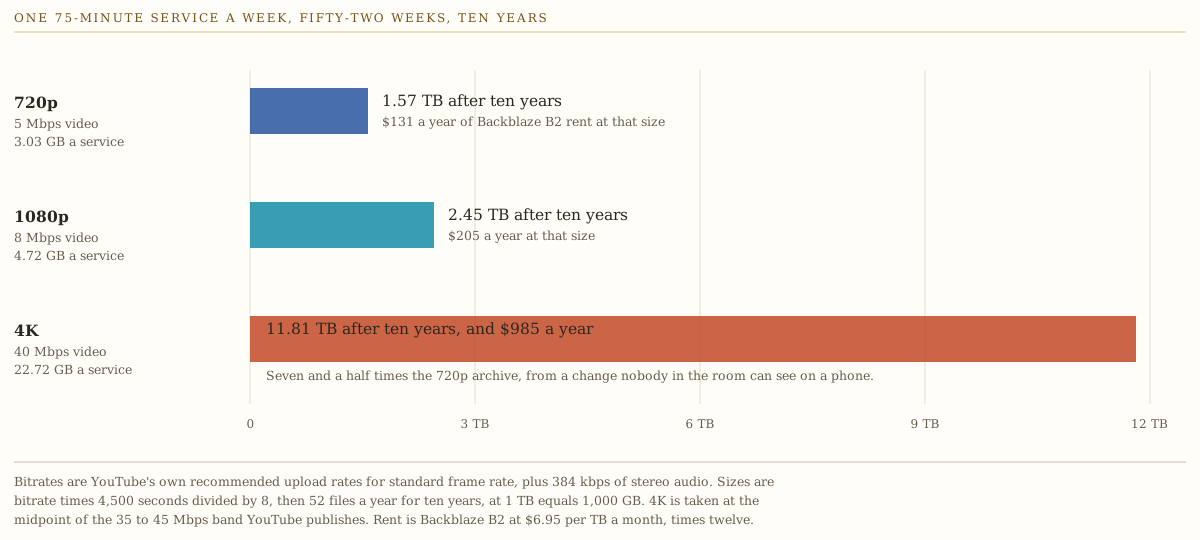
Two things follow immediately. Shooting 4K to serve a 1080p stream buys a bill and nothing else, and the master file is the expensive part of the archive rather than the published copy. Both come back in the retention section.
If you have not bought the camera yet, the gear side of this is in best camera for church live streaming, and the encoder and audio chain is in the church live streaming setup guide. This page owns the file after the service ends.
What each service charges to keep it
One paragraph each, quoting what the page actually said.
Google Workspace for Nonprofits. $0 a user a month with “100 TB shared across all users”, capped at 2,000 users. The discounted paid tiers are $3.50 a user a month on Business Standard with 2 TB a user, and $6.16 a user a month on Business Plus with 5 TB a user, both on a one-year commitment (Google Workspace for Nonprofits). Google’s admin documentation confirms the pooled model and states the nonprofit figure as “100 TB for all End Users”, against “2 TB times the number of End Users” on Business Standard (storage and upload limits). No egress charge appears anywhere on either page. For a church holding less than 100 TB, nothing else on this page beats free.
Microsoft 365. The nonprofit staff rates published are $9.75 a user a month for E3 and $24.00 a user a month for E5, both paid yearly (Microsoft 365 nonprofit plans and pricing). Business Premium carries a “75% discount for eligible nonprofits” with “1 TB of OneDrive cloud storage per user” and the page prints no dollar figure (Microsoft 365 for nonprofits). The storage model is the problem and it gets its own section below.
Dropbox. Plus is “$9.99 / month” for 2 TB for one person. Standard is “$15 / user / month” and “Starts at 3 TB for the team”. Advanced is “$24 / user / month” for three people or more and “Starts at 15 TB for the team” (Dropbox plans). Three people on Advanced is $864 a year and covers a 12 TB archive inside the starting allowance. What a terabyte above that allowance costs is not published, and no nonprofit rate was published on any Dropbox page reachable on 29 July 2026.
Backblaze B2. “$6.95” per terabyte per month, with “Free egress up to 3x storage” as a monthly average and $0.01 a gigabyte beyond it. The page states “No minimum file size fees” and “No minimum storage duration fees”, and that “Class A, B, and C API calls are free” (B2 Cloud Storage pricing). That combination is the reason B2 ends up as the recommendation for a church that has outgrown a pooled allowance.
Cloudflare R2. “$0.015 / GB-month” on Standard and “$0.01 / GB-month” on Infrequent Access, with egress listed as “Free” on both, 10 GB-month free, and Class A operations at $4.50 a million requests. Infrequent Access adds a “$0.01 / GB” data retrieval fee and a 30-day minimum storage duration (Cloudflare R2 pricing). R2 Standard is $180 a terabyte a year, which is 2.16 times B2, and the flat zero on egress is what you are paying the difference for.
Wasabi. “Starting at $7.99 TB/month” with “No fees for egress or API requests” (Wasabi pricing). The pricing FAQ is where the conditions live: 1 TB of active storage is the minimum billed, deleting an object before 90 days incurs “a Timed Deleted Storage charge equal to the storage charge for the remaining days”, and the free egress policy is bounded. Wasabi’s own wording: “If your monthly egress data transfer is greater than your active storage volume, then your storage use case is not a good fit for Wasabi’s free egress policy”, and the company reserves the right to “limit or suspend your service” (Wasabi pricing FAQ). Free egress with a ceiling equal to what you store is still free egress for an archive that gets pulled once. It is not free egress for an archive people watch.
Amazon S3. In US East, Standard is $0.023 a gigabyte-month for the first 50 TB, Standard-Infrequent Access is $0.0125, Glacier Instant Retrieval is $0.004 and Glacier Flexible Retrieval is $0.0036. Retrieval fees are $0.01 a gigabyte from Standard-IA, $0.03 from Glacier Instant Retrieval and $0.01 for a standard restore from Glacier Flexible Retrieval, with bulk restore priced at zero. All of those came out of the S3 metered unit price feed, because the S3 pricing page renders its rate tables in a way an automated fetch cannot read. That page does state the free allowance and the lock-in periods in plain text: transfer out to the internet is free for “the first 100GB per month, aggregated across all AWS Services and Regions”, Glacier Instant and Flexible Retrieval are “charged for a minimum storage duration of 90 days”, and Deep Archive “has a minimum storage duration of 180 days”. Data transfer out to the internet is $0.09 a gigabyte for the next 10 TB and $0.085 for the next 40 TB (AWS data transfer price feed).
Cloudflare Stream. “$5 per 1,000 minutes stored” and “$1 per 1,000 minutes delivered”, and the documentation states “On-demand and live video are billed the same way” (Cloudflare Stream pricing). Stream bills minutes rather than bytes, which means resolution does not change the bill at all. Ten years of 75-minute services is 39,000 minutes, so 39 units at $5 is $195 a month and $2,340 a year, at 720p or at 4K. That is derived, not quoted.
Resi, the church-specific product in this set, and one that publishes a rate. Resi On Demand is $49 a month or $588 billed annually for “1 TB of secure cloud storage”, $99 or $1,188 for “7 TB”, and $199 or $2,388 for “15 TB”. The separate live streaming plans are where the trap is: Starter Lite at $159 a month gives “200 GB monthly bandwidth” and “7-day temporary video storage”, and Pro at $299 gives “1 TB monthly bandwidth” and “30-day temporary video storage” (Resi pricing). A church can stream every Sunday for years on a live plan and hold no archive at all, because temporary storage is exactly what it says.
Annual cost by archive size
- Google nonprofit 100 TB pooled at $0 a seat
- S3 Glacier Flex $0.0036 a GB-month, egress billed
- Backblaze B2 $6.95 a TB-month, egress free to 3x
- Cloudflare R2 $0.015 a GB-month, egress free
- Amazon S3 $0.023 a GB-month, egress $0.09 a GB
Storage only. No egress, no request charges, no retrieval fees. Every line is the published per-unit rate times the archive size times twelve months, rounded to the dollar: Backblaze at $6.95 a TB-month is $83.40 a TB a year, Cloudflare R2 Standard at $0.015 a GB-month is $180, Amazon S3 Standard at $0.023 is $276, and S3 Glacier Flexible Retrieval at $0.0036 is $43.20. Rates read on 29 July 2026 from the pages linked in the legend. Google Workspace for Nonprofits draws along the axis at zero because a 12 TB archive sits inside the 100 TB pooled allowance; that line stops being flat above 100 TB. Wasabi is left off the chart because at $7.99 a TB-month it tracks Backblaze too closely to draw as a second line, running $12.48 a year higher at 1 TB and $149.76 higher at 12 TB. Dropbox, Microsoft 365 and Resi are not plotted because none of them sells storage by the terabyte, and pretending otherwise would put a straight line through a step function.
See the numbers
| Vendor | 1 TB | 2.5 TB | 5 TB | 12 TB |
|---|---|---|---|---|
| Google nonprofit | $0 | $0 | $0 | $0 |
| S3 Glacier Flex | $43 | $108 | $216 | $518 |
| Backblaze B2 | $83 | $209 | $417 | $1,001 |
| Cloudflare R2 | $180 | $450 | $900 | $2,160 |
| Amazon S3 | $276 | $690 | $1,380 | $3,312 |
The shape is worth naming. Between the cheapest and the dearest metered option there is a factor of six on identical bytes, and what that factor buys is retrieval speed and freedom from a lock-in period rather than a better chance of the file surviving. All four metered providers keep the file.
The model behind that chart, with every rate, every derivation and the assumptions written into the header rows, is a spreadsheet: the storage cost model, as CSV. Change the archive size and the resolution and it will tell you a different answer than this page does, which is the point of shipping it.
The column nobody puts in the comparison
Take one action: the church leaves. New provider, new vendor, a hard drive in a safe, the reason does not matter. The whole 12 TB archive has to come out. Here is what that single act costs, once.
On Cloudflare R2, nothing. Egress is priced at “Free”. On Backblaze B2, nothing, because a 12 TB archive earns 36 TB a month of free egress at the 3x allowance and one full pull is a third of that. On Wasabi, nothing, because 12 TB of egress against 12 TB of active storage is exactly at the published boundary of “less than or equal to”. Pull it twice in one calendar month and you are outside the policy and reading a sentence about suspension.
On Amazon S3 it costs $1,061.50. Derived, and here is the arithmetic: 12 TB is 12,000 GB, the first 100 GB in a month is free, the next 10,000 GB bills at $0.09 for $900, and the remaining 1,900 GB bills at $0.085 for $161.50.
Then the storage class adds its own toll on top of the egress, and this is the part that inverts the whole comparison.
- S3 Standard. $1,061.50. There is no retrieval fee. Against $3,312 of annual rent, the exit is 32 percent of a year.
- S3 Standard-IA. $1,061.50 of egress plus $0.01 a gigabyte of retrieval on 12,000 GB, which is $120. Total $1,181.50, against $1,800 of annual rent.
- S3 Glacier Instant Retrieval. $1,061.50 plus $0.03 a gigabyte, which is $360. Total $1,421.50, against $576 of annual rent. The exit now costs nearly two and a half years of the rent.
- S3 Glacier Flexible Retrieval. $1,061.50 plus $120 of standard retrieval. Total $1,181.50, against $518.40 of annual rent. Two and a quarter years. Bulk retrieval is priced at zero in the same feed, which drops it to $1,061.50 and two years, in exchange for waiting hours.
- Cloudflare R2 Infrequent Access. Egress is free and the retrieval fee is not. $0.01 a gigabyte on 12,000 GB is $120, against $1,440 of annual rent.
So the cheapest way to store a church archive is the most expensive way to get it back, and the ratio gets worse the cheaper you go. A church shopping on the storage rate alone will walk straight into the worst version of that trade, because the storage rate is the only number on the comparison page.
Egress is not only about leaving
Moving the archive is the dramatic case. The common case is people watching it.
A church that serves its archive from its own bucket, through its own player or its own app, pays egress on every view. Five hundred views of one 1080p service in a month is 2,360 GB. On S3 that is $203.40 after the free 100 GB. A thousand views is $415.80. The same month costs nothing on R2, and nothing on B2 as long as the traffic stays inside three times what you store.
Most churches never see that bill, because they publish to YouTube or Facebook and those platforms carry the delivery. That is a real answer and it should be said plainly rather than treated as the amateur option. The churches that get the bill are the ones that built their own player, bought an app, or moved off a platform for content reasons and now own the pipe.
The decision that follows is small and it is not about price. If the archive will ever be served rather than only stored, buy storage with zero egress and stop optimizing the per-gigabyte rate. The difference between $83 and $180 a terabyte a year disappears the first month someone links a sermon on Facebook.
What Microsoft’s storage model does to a church archive
This one deserves its own section because the arithmetic is not obvious from any pricing page.
Microsoft’s own service description states the SharePoint total for a tenant as “1 TB + 10GB per license purchased” (SharePoint limits). A five-person church office therefore has 1.05 TB of shared storage, plus whatever OneDrive gives each person individually. That is a document store. It is not an archive.
Reaching a 12 TB shared pool through licenses would take 1,100 of them, because 1 TB plus 1,100 times 10 GB is 12 TB. At the nonprofit E3 rate of $9.75 a user a month that is $128,700 a year. That figure is derived and it is deliberately absurd. It is here to show that the license route does not scale to a video archive, not as a plan anybody should price.
The real route is the add-on, and Microsoft does not publish what it costs. “Office 365 Extra File Storage” is sold “in 1-GB increments” and the documentation says to “review the pricing information” in the admin center before buying (Buy more OneDrive and SharePoint storage capacity). The same page notes that Microsoft 365 SharePoint Storage and Microsoft 365 OneDrive Storage entered public preview in June and July 2026 as pay-as-you-go services requiring an Azure subscription, and it prints no rate for those either. A church cannot budget a Microsoft archive from published information at all.
Google’s equivalent question has a published answer and it is 100 terabytes for nothing. If your church is on Microsoft 365 for email and Office, keep it there for email and Office, and put the archive somewhere that publishes a rate.
What to keep, and for how long
Nobody needs every file forever, and the file that should die first is the one nobody has ever watched: the camera master. A retention rule is what converts an archive from a growing bill into a fixed one.
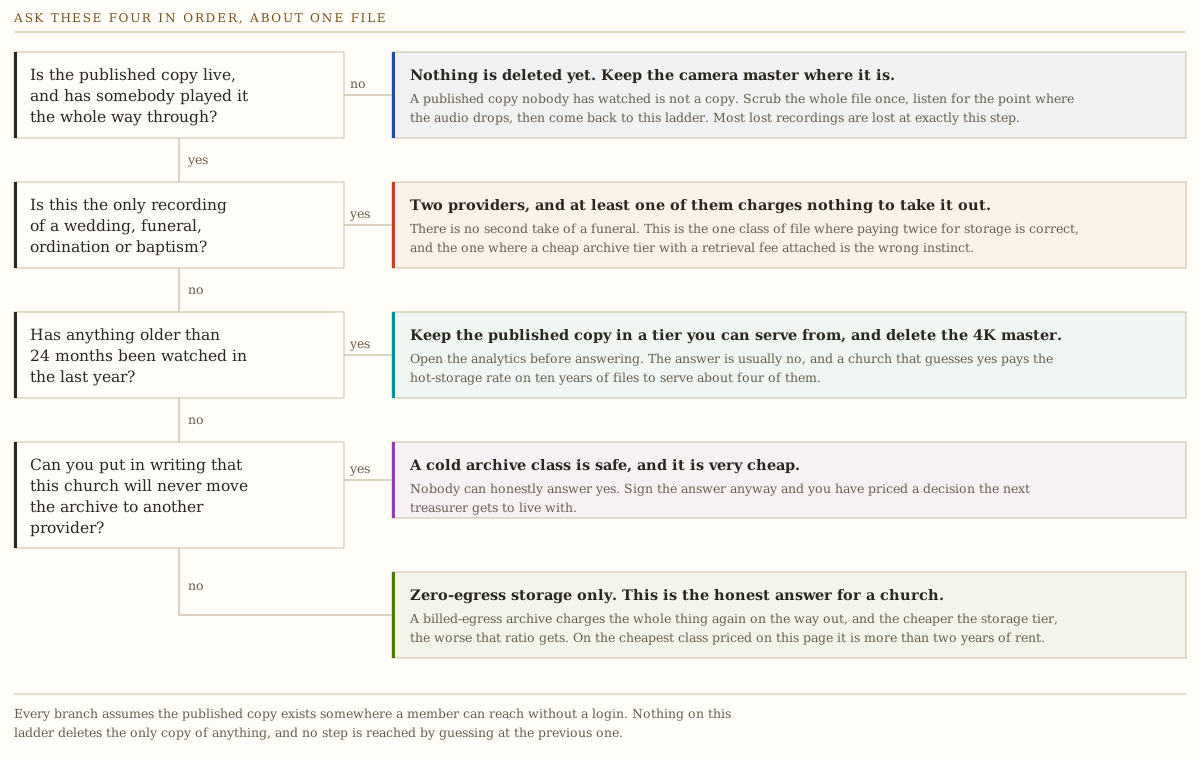
Three rules carry most of the saving.
The published copy and the master are different files with different lifespans. The master exists so the published copy can be remade if the encode failed. Once somebody has watched the published copy end to end, the master has done its job. Ninety days is a generous window for that.
Deleting the 4K master is where the money is. On Backblaze B2, a ten-year 4K archive at 11.81 TB rents for $985.15 a year and the 1080p equivalent at 2.45 TB rents for $204.52. The difference is $780.63 a year, derived at $83.40 a terabyte a year. On S3 Standard the same difference is $2,583 a year, at $276 a terabyte.
Audio is a rounding error. An audio-only copy of a 75-minute service at 128 kbps is about 72 megabytes, one sixty-fifth of the 1080p file. Keeping the audio forever costs almost nothing, which makes it the safe thing to keep on the day the video ages out.
One caution on the cold tiers. Glacier Instant Retrieval and Glacier Flexible Retrieval both carry a 90-day minimum storage duration and Deep Archive carries 180 days, per the S3 pricing page, and Wasabi charges for the unused portion of 90 days on anything deleted early. A retention rule that deletes masters at 90 days and a storage class that bills you for 90 days regardless are a bad pairing. Put the short-lived files somewhere with no minimum, which is what Backblaze B2’s “No minimum storage duration fees” means in practice.
While you are writing the rule down, write down who can reach the archive and who can delete from it. A media volunteer with delete rights on the only copy of a funeral is a governance problem rather than a storage problem, and the control list for that is in protecting the data a church holds about its members.
What was not tested, stated plainly
No account was opened for this page. Nothing was uploaded, no restore was timed, and no provider was billed. Every figure above is either a rate read off a published page on 29 July 2026 or arithmetic on those rates with the arithmetic shown. Specifically not tested, and specifically not claimed:
- Whether a $0 Google nonprofit tenant is actually provisioned 100 TB on day one. Google’s own pooled-storage documentation says storage “increases to your total storage limit after you make a $30 USD payment for your subscription”, and the nonprofit offer costs nothing. Those two sentences do not resolve against each other from published pages, and the answer decides whether the strongest recommendation on this page works. Ask Google before you plan around it.
- Upload time. Pushing 22.72 GB a week over a church internet connection is a real constraint and nobody here measured it on a church connection.
- Restore time. Whether Glacier Flexible Retrieval returns a 12 TB archive in hours or in a working day was not observed, and no retrieval-time figure was read this run.
- Whether Wasabi’s egress policy gets enforced against a church. It is a policy with discretionary language in it, not a rate. The wording is quoted above so you can read it yourself.
- Resi’s egress and bandwidth terms for On Demand storage. The bandwidth figures on the Resi pricing page belong to the live streaming plans. Nothing on the page states what On Demand delivery costs or limits.
- Microsoft’s add-on rate. Not published, so not published here either.
- Any per-request cost at real request volumes. Class A and B operation charges are named above and were not modelled, because at 520 files a decade they round to nothing. At a per-viewer request pattern they would not.
Every one of those gaps closes by opening accounts and running a real archive through them, which is a different piece of work and has not been done. Until it is, treat every figure here as arithmetic on a published rate, because that is exactly what it is.
The decision
If your church is eligible for Google Workspace for Nonprofits and your archive is under 100 TB, put it in a shared drive and stop shopping. It is $0 a seat, the pooled allowance is published, no page mentions an egress charge, and every alternative on this list costs money. Verify the day-one provisioning question above first. Check eligibility, then move on to a problem that actually costs something.
If you have outgrown the pool or you want the archive somewhere separate from the office suite, use Backblaze B2 at $6.95 a terabyte a month. It is the only option priced here that is both near the floor on storage and free to walk away from, and the absence of a minimum storage duration is what makes a 90-day retention rule work. Cloudflare R2 at $0.015 a gigabyte-month is the better answer if the archive will be served to viewers as well as stored, because egress there is zero rather than allowance-bounded.
Do not put a church archive in an S3 Glacier class. The storage rate looks unbeatable and the exit costs more than two years of it. Cold archive pricing is built for organizations that will never move, and no church can honestly sign that.
If you want the church-specific workflow and the player with it, Resi On Demand Enterprise is $2,388 a year for 15 TB. That is roughly twice what 15 TB costs on B2 at $1,251 a year, and the difference buys the player, the encoder integration and somebody to call. Pay it knowingly. If you are on a Resi live plan today and have never bought On Demand, go and check what “7-day temporary video storage” has been doing to your archive.
And shoot 1080p. 4K costs $780 a year more to keep on Backblaze B2, and unless there is a named reason on paper for the extra resolution, that money buys nothing a member will ever see.
Then write the retention rule down, put it in the same folder as the media policy, and give it to whoever runs the desk. A rule nobody has read is a rule that expires with the volunteer who invented it. The wider question of what all this software costs a church in total is in what church software costs, and if you are also weighing what a platform will let you take with you when you leave, the export test in choosing church management software is the same instinct applied to the office system.