Church directory software: who can see your address, and who should not
Verified pricing for the tools that ship a member directory, a permissions matrix you can adopt, what a directory app leaks, and how to leave an at-risk household out safely.

A member directory is the smallest thing a church buys software for and the only one that hands a stranger a street address. Every other module fails quietly. A giving report with the wrong permissions embarrasses a treasurer. A directory with the wrong permissions tells one specific person which house a woman moved into after she left him.
That is the whole problem with this category, and almost nothing written about it says so. The buying guides compare feature lists. The vendors advertise photo quality and app polish. Nobody publishes what each product costs, who can see whose address by default, or what happens the day a member asks to be left out. Those are the three questions, and the third one decides whether a directory is safe to run at all.
Directory software comes in three shapes and they are not close in price
A module inside a church management system. You already own it if you own a ChMS. Planning Center, Breeze, ChurchTrac, Servant Keeper, One Church, Tithe.ly and the rest all carry a people database, and most of them expose some of it to members through an app. You pay for the whole system and the directory rides along.
A dedicated directory product. One job: collect households, collect photographs, publish a browsable list to members and print a booklet. Instant Church Directory and Church Social are the two clearest examples. They cost a fraction of a ChMS because they do a fraction of the work.
A spreadsheet and a printer. Still the most common answer in a church under 100 people, and the one with no permission model at all. Every copy is permanent, every export is untracked, and the file lives in whichever volunteer’s downloads folder it landed in.
The distance between those three is the first decision, and it turns on cost more than most buyers expect.
What a directory actually costs
- Planning Center People, free at every size
- Instant Directory Instant Church Directory, Standard plan
- Church Social flat above 400 members
- Breeze one flat rate at any size
- One Church Core plan, priced by profile count
Annual cost, rounded to the dollar, read off each vendor's own pricing page on 29 July 2026. Tiered vendors are plotted at the tier a congregation of that size falls into. Vendor pricing changes; check the page before you budget.
See the numbers
| Vendor | 120 people | 300 people | 900 people | 3,000 people |
|---|---|---|---|---|
| Planning Center | $0 | $0 | $0 | $0 |
| Instant Directory | $120 | $120 | $120 | $120 |
| Church Social | $720 | $1,080 | $1,440 | $1,440 |
| Breeze | $864 | $864 | $864 | $864 |
| One Church | $557 | $778 | $1,123 | $2,688 |
The numbers behind that chart, with the plan names and the conditions attached.
Planning Center People is free. Not free below a member count, not free with a giving requirement. The page reads “People is completely free” and “Free for every church, regardless of church size and whether or not you use any of our other products.” The directory itself sits in the Church Center app, where, in the vendor’s own words, “People can access each other’s approved contact information and family photos if they choose to share.” Members “edit their own profiles and household details, and adjust their privacy settings” (Church Center).
Instant Church Directory is $9.99 a month on its Standard plan and $14.99 a month on Premium, month to month, with “no annual contracts” and “up to three editors” included. Thirty days free to start. No member or household limit appears on the page, which is why it plots flat across every congregation size above.
Church Social charges $60 a month for 0 to 200 members, $90 a month for 200 to 400, and $120 a month above 400, “invoiced annually.” Three bands, then flat.
Breeze is $72 a month, and the page states the pricing philosophy outright: “Choose one flat rate. No pricing tiers or limits based on your church’s growth.” Unlimited admin users, unlimited people, 250 texts a month included and $10 per 500 after that, 30-day trial.
Tithe.ly prices the same ground three ways: Church Management at $72 a month, a Custom Church App at $89 a month, and All-Access at $119 a month against a stated regular price of $228. The people database sits in Church Management, and the member-facing app is the separate line.
Servant Keeper is $79.99 a month for Core, or $879.89 paid annually, with unlimited families and members and four estimated users. Complete doubles to $159.99 a month, $1,759.89 annually, at eight users. Servant Keeper and Breeze land within twenty dollars of each other over a year, from completely different pricing logic.
One Church Software is the only vendor here that publishes a full per-size table: Core runs $556.80 a year at 250 profiles, $777.60 at 500, $1,123.20 at 1,000, $1,670.40 at 2,000 and $2,688 at 4,000. Core+ runs roughly forty percent above that. Ask what counts as a profile before you sign, because a database that has been collecting guest cards for six years holds far more profiles than the church has members.
Two vendors would not give a number. ChurchTrac’s pricing page ships a calculator with tiers at 75, 125, 250, 500, 1,000 and unlimited names, and the price field renders as “Your Price $/mo paid yearly” with no figure in it when the page is fetched rather than clicked. What it does state in plain text: accounting features add $15 a month, messaging features add $7 a month, and paying yearly takes 10 percent off. Subsplash lists Subsplash Giving at $0 a month and then prices Subsplash One as “Pricing based on church size and usage,” which is a sentence rather than a price. Checked 29 July 2026.
The shape of that chart is the buying advice
A dedicated directory costs about $120 a year. A church management system that includes a directory costs $864 a year and up. That is a seven-fold difference, and the honest version of the comparison is that the ChMS is not seven times better at directories. It is a system for check-in, giving, groups, scheduling and reporting that also holds a list of names.
So the question is not which directory product is best. It is whether your church is buying a directory or buying an office. If a directory is genuinely all you need this year, the $120 answer is correct and the $864 answer is an expensive way to get a photo album. If you are already running a ChMS, do not buy a second product to do a job the first one already does. The comparison work that sits behind that call is in choosing church management software, and if budget is the binding constraint, free church management software states where each free tier actually stops.
Who may see which field
Every product above ships permission defaults that somebody at the vendor chose. Almost no church changes them. Here is what to change them to.
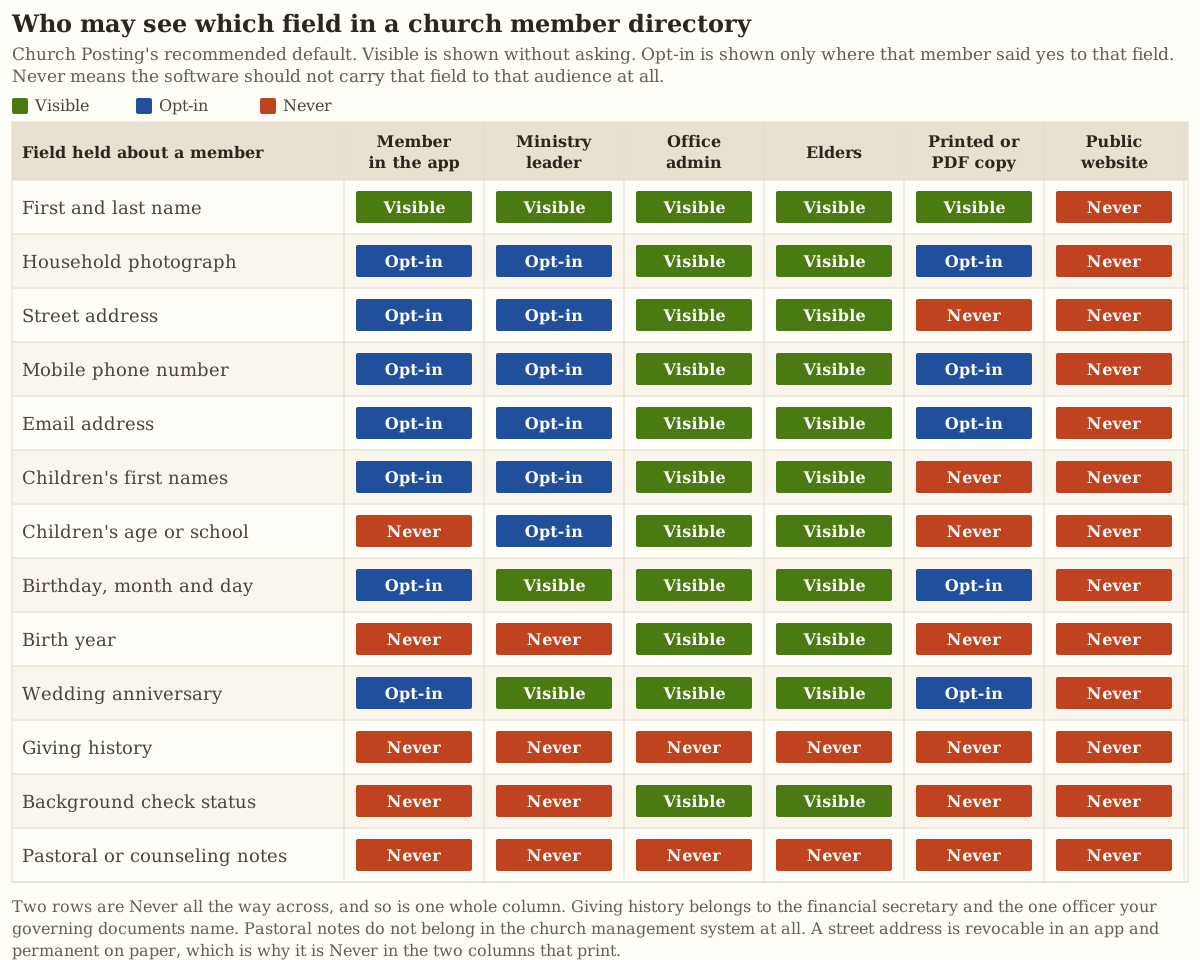
Take it as a file: church-directory-permissions-matrix.csv holds all thirteen rows, all six columns, and a one-line reason for every setting, so an elder board can change a cell on purpose instead of inheriting whatever the software shipped with.
Four of those settings deserve the argument behind them.
A street address is Opt-in in an app and Never in print. This is the cell most churches get wrong, and it is the cell that matters most. An address in an app is one permission change away from being gone. An address in a printed booklet is in two hundred homes forever. The same field, the same data, two completely different levels of risk depending only on the medium.
Birth year is Never outside the office. Month and day are pastorally useful and close to harmless. A full date of birth sitting beside a name and a street address is the opening set of an identity theft attempt. Split the field; most systems will let you.
Giving history is Never for every audience in the table. The financial secretary and whichever officer your governing documents name, and nobody else, by default. Several congregations deliberately keep the preaching elder out of that record on purpose so no sermon can be suspected of following the money. The four-tier model this sits inside is worked out in your church database holds more than a retailer’s.
Pastoral notes are Never everywhere, including the office admin column. They do not belong in a church management system at all. Not in a custom field, not in the notes tab, not marked private. Note privacy in this software is a checkbox, and a checkbox is one administrator’s mistake away from appearing in a report or an export.
Six copies of one record, and only three of them obey you
Here is the part that no feature list contains. When a church publishes a directory, it does not create one directory. It creates copies, and they have different physics.
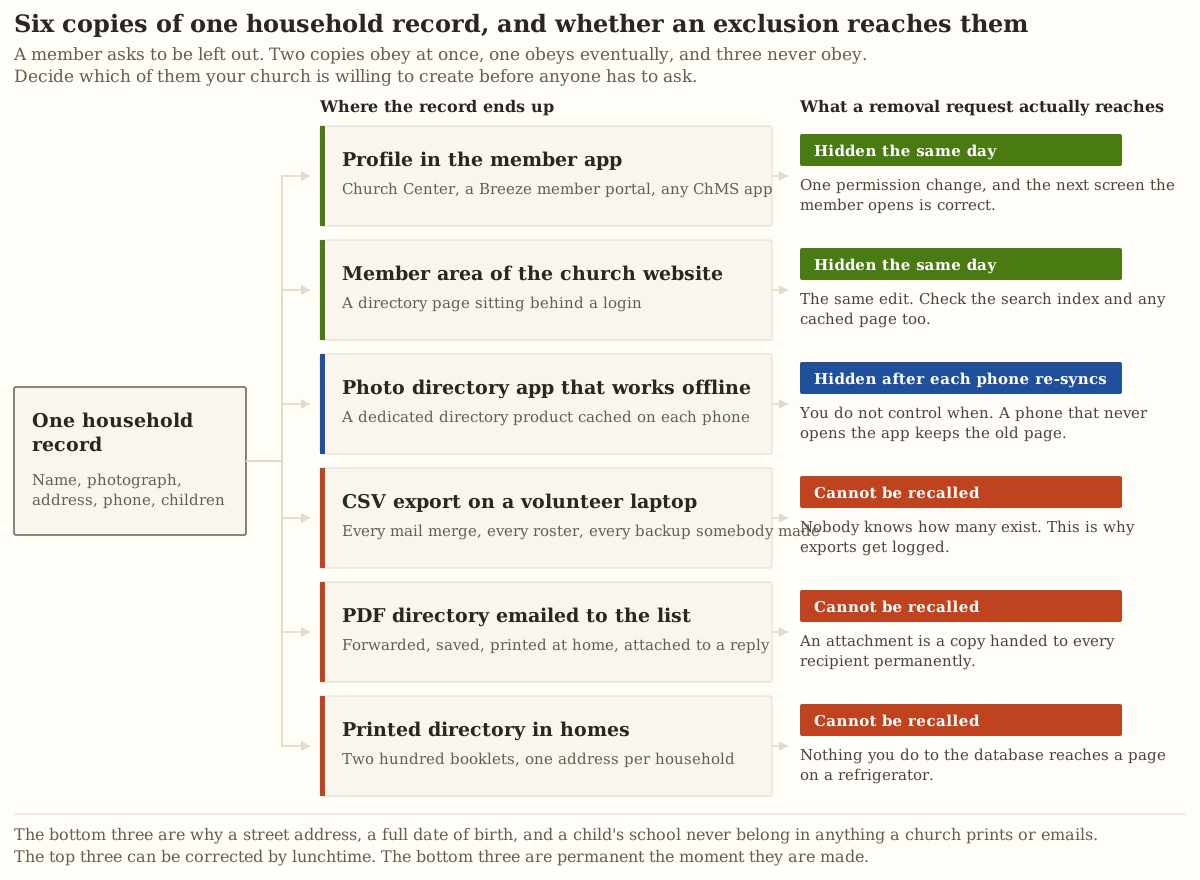
Read the bottom half of that map as a policy question rather than a technical one. Every printed directory, every PDF attachment, and every CSV export is a decision to create a permanent copy of a household’s address that your church can never withdraw. Sometimes that is worth it. A booklet in an elderly member’s kitchen drawer is genuinely how she remembers who to call. But it is a decision, and it should be made out loud by the people who would have to answer for it, not defaulted into because the software has a Print button.
Two practical controls follow directly:
Log every export. Whichever product you use, find out whether it records who exported the member list and when. If it does not, keep the log yourself: one line in a shared document, name and date, every time a CSV leaves the system. This is also the test that tells you whether you can leave a vendor at all, which is the export question at the heart of choosing church management software.
Print less, and print less often. Set a reissue interval in writing and start every reissue from current consent rather than from the last printed copy. A booklet reprinted from the previous booklet carries forward a household that asked to be removed two years ago.
What a directory app leaks
The member-facing app is the part of this that gets sold on convenience and bought without a single question about data. Four things worth knowing before you turn one on for a congregation.
Contacts import is a two-way door. The app store rules on this are unusually blunt. Apple’s guidelines forbid using “information from Contacts, Photos, or other APIs that access user data to build a contact database for your own use or for sale/distribution to third parties,” and forbid contacting people from a user’s contacts “except at the explicit initiative of that user on an individualized basis,” adding “do not include a Select All option or default the selection of all contacts” (App Store Review Guidelines 5.1.2). If your directory app offers a one-tap invite-everyone button, somebody built the thing Apple wrote that clause about.
Consent has to be withdrawable inside the app. Apple requires that apps “provide the customer with an easily accessible and understandable way to withdraw consent” (guideline 5.1.1). Google Play requires that a disclosure “must be within the app itself, not only in the app description or on a website,” that it be visible “in the normal usage of the app,” and that consent “require affirmative user action,” with navigation away from the prompt not counting as agreement (Google Play User Data policy). Open your candidate app and try to withdraw. If the only route runs through emailing the church office, the app is failing a standard its own store publishes.
Offline caching means removal is not instant. A directory app that works without a signal has already written the current page onto every phone that opened it. Hiding a household stops new downloads. It does not reach a handset that has not re-synced, and you have no way to make it re-sync.
Face tagging is a category error in a church. Any feature that recognizes or suggests faces across photographs turns a household album into a searchable biometric index of a congregation, including its children. Several states regulate biometric identifiers directly and the compliance question is genuinely complicated, which is a good reason to decide the simple way instead: turn the feature off, and if your software cannot turn it off, do not use that part of your software.
The broader question of whether your church needs an app of its own is a separate one, worked out in does your church need an app.
The photo consent question, answered with a real standard
Ask three churches how they handle photo permission and you will get three shrugs and one blanket line in a membership packet. There is a better model available, and it comes from the closest analogous system in American law.
Public schools publish directory information under FERPA, and they may only do so after giving “public notice to parents of students in attendance and eligible students” of three specific things: what categories will be published, “a parent’s or eligible student’s right to refuse,” and “the period of time within which a parent or eligible student has to notify the agency or institution in writing” (34 C.F.R. 99.37). The regulation also handles the case churches forget: an institution may publish directory information about former students without redoing the notice, but it “must continue to honor any valid request to opt out” made while they were there.
A church is bound by none of that. It is also holding the same class of information about the same children, with less oversight and a mailing list. So borrow the structure:
- Tell every household exactly which fields will appear and where. Field by field, medium by medium, not “your information may appear in church publications.”
- Say plainly that they may refuse any field.
- Give a date by which they have to say so, and state what happens if they say nothing. Silence is not consent to be printed.
- Keep honoring an old refusal. A household that left the church two years ago does not get put back into the reprint because nobody asked them again.
For children, add one rule the schools do not have to write down: a parent or legal guardian consents, and a person subject to a protective order involving that household does not. Federal law already draws this line for organizations serving victims of violence, where consent must be “informed, written, reasonably time-limited” and an abuser cannot consent on behalf of a minor or an incapacitated person (34 U.S.C. 12291).
That phrase, “reasonably time-limited,” is the one most church consent forms are missing. A signature from 2019 authorizing photographs of a nine-year-old is not consent to publish photographs of that same person at sixteen.
The full instrument is here as a file: church-directory-consent-form.txt. It runs field by field across three media, handles children separately, names one person who takes a withdrawal request, states a timetable for acting on it, and carries a full-exclusion section that asks for no reason. The operational half of photo permission, the part where somebody with a phone has to actually know which families said no, is in social media for a church with no media team.
When a protective order or a custody case lands on the office desk
This is the section the category skips entirely, and it is the one with the highest stakes.
Start from what the state itself is forbidden to do. Federal law prohibits a state, tribe or territory from making “available publicly on the Internet any information regarding the registration, filing of a petition for, or issuance of a protection order, restraining order, or injunction” where publication “would be likely to publicly reveal the identity or location of the party protected under such order” (18 U.S.C. 2265(d)(3)). Courts are held to that standard. Your church directory is held to nothing, and the mailing label it prints defeats the same protection just as effectively.
Then understand what a member in this situation may already be doing. Most states run an address confidentiality program. California’s, administered by the Secretary of State since 1999, “offers a substitute mailing address to receive first class, certified, and registered mail” and keeps “the residence address confidential and out of the hands of someone who might want to harm the victim,” with government agencies accepting the substitute address “in lieu of a residential or other mailing address where a victim can be tracked down” (Safe at Home). A church that records the real address and prints it in a booklet has quietly undone a program the state built.
The threat model here is not theoretical. The Safety Net Project at the National Network to End Domestic Violence puts it in one sentence: “If an abuser should discover that a victim is seeking services, the abuse could increase in frequency and severity” (NNEDV confidentiality toolkit). The same toolkit is where the informed, time-limited, written consent standard is worked out in practice, and where you will find that programs serving survivors treat a data breach as a safety event rather than a paperwork event.
So the church’s rule, written down before it is needed:
- Hold three facts and no more. That a court order exists. Whether the person subject to it may be on the property. Who at the church is allowed to answer questions about this household. Write down as little of each as you can.
- If a member uses a substitute address, that is the only address you hold. In every system, including the one the office uses for mailing labels, and including the giving records where a year-end statement gets posted.
- Never confirm attendance to a caller. Not the day, not the service, not “she usually comes to the second one.” Staff answer a question about an excluded household exactly as they would for a household that has never been in the record.
- The exclusion itself is confidential. The fact that a family asked to be left out is not announced, explained, or discussed with the person who noticed the gap in the alphabet.
None of this is legal advice. Have an attorney in your state read your policy, and if a member is in an active case, ask what their advocate or attorney wants the church to do rather than deciding for them.
How to leave one household out without telling the congregation why
A safe exclusion fails in four predictable places, and every one of them is a person rather than a setting.
The gap in the alphabet. A printed directory that runs from Harrison to Hutchinson with nothing between them announces that somebody was removed. Print by household in a continuous list with no numbering, no photo grid position that leaves a hole, and no index that carries a name the body does not.
The helpful volunteer on the phone. The most common failure by a wide margin. Somebody calls the office, sounds legitimate, and a volunteer who has never been told otherwise reads out an address. Write the answer down and put it where the phone is: the office does not give out member addresses to anyone, for any reason, and takes a message instead. One rule, no judgment calls, no exceptions for people who sound convincing.
The group roster. The household is hidden from the main directory and still appears on a small group list, a Sunday school roster, a serving team schedule and a weekly email. Every one of those is a directory with a different name. Check all of them, and check the ones that generate automatically. Contact data flows into the texting and email tools too, which is worth a pass through what a church texting service costs if that is where your rosters end up.
The mail merge that runs off an old export. Somebody keeps a spreadsheet because the software was slow once. That file does not know about the exclusion and never will. Find the spreadsheets and delete them.
The capture side matters as much as the publication side. A guest who filled out a card asking for information about a Bible study did not consent to appear in a directory, and the moment they are added to one you have made a promise you did not have permission to make. The workflow for handling that honestly is in a guest follow-up system one volunteer can run.
Does a church directory have to be public?
No, and it should not be. A member directory belongs behind a login or in print, and it should never appear on the open web. A page a search engine can read is a page a scraper can read, and the household that would be harmed by that is exactly the household least likely to speak up first.
Can a member ask to be removed from a church directory?
Yes, at any time, for any reason, and without giving one. Remove them from the app and the member area the same day, from every group list and roster within two days, confirm it back to them in writing, and leave them out of the next printed copy. Copies already in homes cannot be recalled, and the member deserves to be told that plainly rather than reassured.
Is a printed church directory a bad idea?
It is a permanent one. A printed booklet reaches members who will never open an app, which is a real pastoral good in a congregation with older households. It also creates copies nobody can withdraw. Print it if you need it, keep addresses and dates of birth out of it, reissue from current consent rather than from the last edition, and set the interval in writing.
The decision
Three situations, three answers.
You have no church management system and you want a directory. Buy Instant Church Directory at $9.99 a month, or Church Social at $60 a month if you want a fuller member area and can justify six times the price. Do not buy a ChMS to solve this. Spend the difference on the office.
You already run a church management system. Use the directory it already has. Then spend the two hours the money would have cost you on the matrix above: open the permission settings, set every cell deliberately, and turn off face tagging and public visibility. A correctly configured free directory beats a badly configured paid one every time, and Planning Center People is free at every congregation size, which makes it the strongest starting position in this category by a distance.
You are choosing a ChMS now and the directory matters. Ask four questions before you look at the feature grid. Can a member hide one field without hiding the whole record. Does the app cache offline, and how long does a removal take to reach a phone. Does the system log exports. Can face recognition be turned off entirely. A vendor who cannot answer those four has not thought about the problem this page is about.
Then do the three things that cost nothing. Adopt the permissions matrix. Run the consent form through your households this year with a review date on it. Write the phone rule and tape it where the phone is.
A church asks its members to be known by name, by household, and by address. That request only holds if the church is trustworthy with what it learns, and a directory is where that trust is either kept or handed to whoever asks nicely.
Sources
Prices below were read from each vendor’s own pricing page on 29 July 2026. Vendor pricing changes; check the page before you budget.
- Planning Center People, pricing and the free-for-every-church statement. Checked 29 July 2026.
- Planning Center Church Center, the member-facing directory and its privacy settings. Checked 29 July 2026.
- Instant Church Directory, Standard and Premium pricing, editor limit, trial. Checked 29 July 2026.
- Church Social pricing, three member bands, invoiced annually. Checked 29 July 2026.
- Breeze ChMS pricing, flat rate, texting allowance. Checked 29 July 2026.
- Tithe.ly pricing, Church Management, Custom Church App, All-Access. Checked 29 July 2026.
- Servant Keeper pricing, Core and Complete, monthly and annual. Checked 29 July 2026.
- One Church Software pricing, the full per-profile annual table. Checked 29 July 2026.
- ChurchTrac pricing, name tiers and add-on prices. The base price is rendered by a calculator and returned no figure to a fetch. Checked 29 July 2026.
- Subsplash pricing, Subsplash Giving at $0 and no published figure for Subsplash One. Checked 29 July 2026.
- 34 C.F.R. 99.37, conditions on disclosing directory information, via Cornell Legal Information Institute. Checked 29 July 2026.
- 34 U.S.C. 12291, definitions and the nondisclosure rule, via Cornell Legal Information Institute. Checked 29 July 2026.
- 18 U.S.C. 2265, full faith and credit given to protection orders, subsection (d)(3), via Cornell Legal Information Institute. Checked 29 July 2026.
- California Secretary of State, Safe at Home, substitute address program. Checked 29 July 2026.
- Safety Net Project, National Network to End Domestic Violence, confidentiality toolkit. Checked 29 July 2026.
- Apple App Store Review Guidelines, guidelines 5.1.1 and 5.1.2. Checked 29 July 2026.
- Google Play User Data policy, prominent disclosure and in-app consent. Checked 29 July 2026.
Two pages refused an automated fetch in this run and nothing here is sourced to them: ChurchTrac’s own best-church-management-software article returned HTTP 403, and Brotherhood Mutual’s photo permission article returned HTTP 403. The Illinois General Assembly page for the Biometric Information Privacy Act returned HTTP 404, which is why the face-tagging section above names no statute and argues from the practical side instead. None of this is legal advice.