Church calendar software, printed or online
Room and login prices read off vendor pages on 29 July 2026 for Planning Center, Teamup, Skedda, CalendarWiz and Breeze, plus a printable month and year template to hand out.
The noticeboard by the side door holds three sheets. Two are month grids from the spring, still pinned, still showing a work day that happened in April. The third went up this morning because a woman in the office printed it, walked it down the hall, and pushed a pin through the corner. That is the church calendar. It is not the thing on the screen in the office. It is the thing people in the building can see.
Two completely different jobs hide inside the phrase “church calendar.” One is a booking system: the fellowship hall, the nursery, the van, the coffee urns, and a piece of software that refuses the second request for the same Saturday. The other is a printed sheet somebody can carry home, pin up, or fold into a bulletin. Vendors sell the first and pretend the second does not exist. Search results for the second are full of blank grids with no dates on them.
This page prices the first and hands you the second. The deeper treatment of room booking, approvals, and volunteer rotas is in church event planning software, so what follows does not repeat it.
Which do you need: calendar software, or a printable calendar?
Answer one question before you open a single pricing page. Who is the calendar for?
If the answer is the office, you are buying conflict detection and you should pay for rooms. If the answer is the congregation, you are buying a way to publish, and the publishing is nearly always free. If the answer is the volunteers, you are not shopping for a calendar at all, you are shopping for a rota, and it is priced by a different unit.
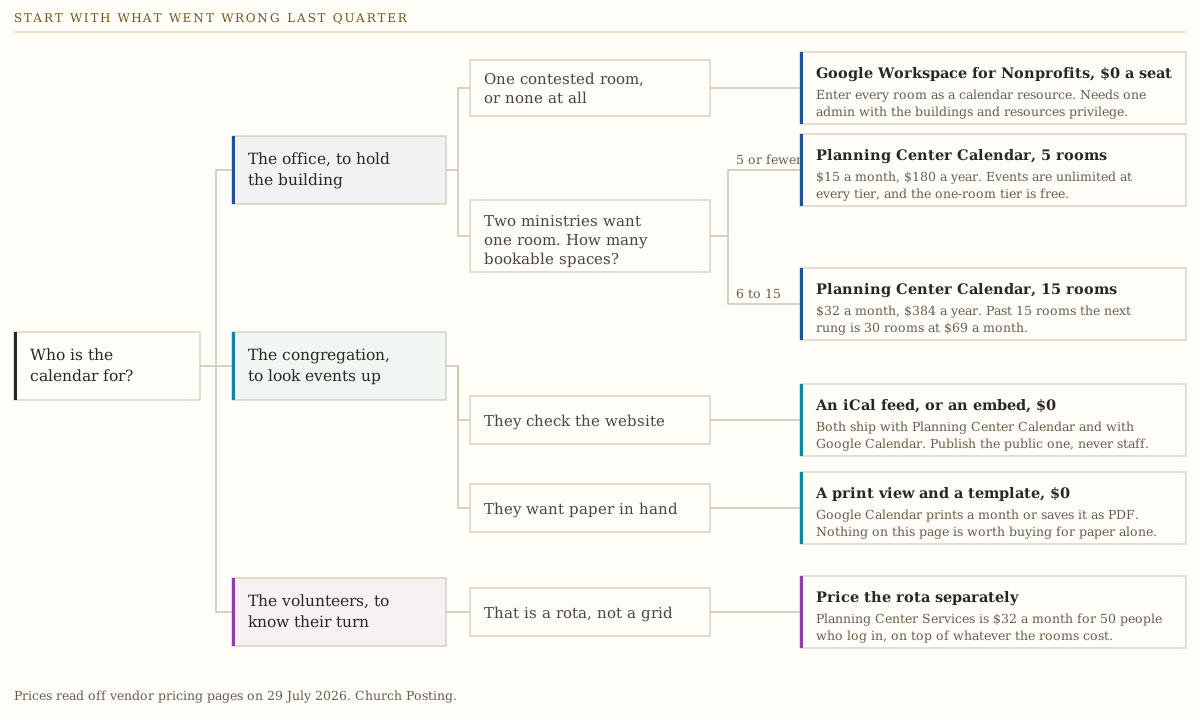
Most churches under 300 people arrive believing they have the first problem and actually have the second and third. The test is arithmetic, not opinion: pull the last three months of entries and count the times two ministries wanted one room on one day. If the answer is zero, no amount of software will improve your Sundays, and you can stop reading vendor pages after the next section.
What church calendar software costs, checked 29 July 2026
Every figure below was read off the vendor’s own pricing page on that date, linked at the claim and again in Sources. Prices in this category move without notice, so confirm before you sign anything. The method is on how we review.
Two products here charge by space. Two charge by person. One charges a flat rate and ignores both. That difference matters more than any feature list, because it decides whether your bill grows when the building fills up or when the volunteer roster does.
- Planning Center Calendar
- Skedda no published tier past 45 spaces
- Teamup
- Breeze
- Google Workspace for Nonprofits
Prices read off vendor pricing pages on 29 July 2026 and multiplied to a year. Skedda publishes no tier below 15 spaces and none above 45, so 1, 5 and 50 are blank rather than guessed. Teamup does not sell rooms, so each room here is modeled as one sub-calendar on the smallest plan that holds them. Breeze and Google Workspace do not charge by space at all.
See the numbers
| Vendor | 1 people | 5 people | 15 people | 30 people | 50 people |
|---|---|---|---|---|---|
| Planning Center Calendar | $0 | $180 | $384 | $828 | $1,380 |
| Skedda | not offered | not offered | $1,188 | $2,988 | not offered |
| Teamup | $0 | $0 | $360 | $840 | $840 |
| Breeze | $864 | $864 | $864 | $864 | $864 |
| Google Workspace for Nonprofits | $0 | $0 | $0 | $0 | $0 |
The shape of that chart is the finding. Below about eight rooms, the church product built for churches is cheaper than everything except free, and free is genuinely an option. Above thirty rooms the workplace booking product costs three times the church product and knows nothing about a Sunday service.
Planning Center Calendar
The pricing on the Calendar page is a ladder of rooms: one room free, five rooms $15 a month, fifteen $32, thirty $69, fifty $115, seventy five $179, and a top tier at $239. Events are unlimited at every rung, including the free one. A church with a sanctuary, a fellowship hall, a nursery, and two classrooms pays $15 a month, which is $180 a year.
The same page names an iCal feed out, iCal file import in from Google or Outlook, embedding events on a website, and approving facilities requests. Those four together are the reason this is the default answer for a church with a real building. You pay for the thing you actually need and the publishing comes with it.
What it does not include is the rota. That is a separate product on a separate ladder, priced in the next section, and forgetting it is how a $15 quote turns into a $47 bill.
Teamup
Teamup is the strongest option nobody in this category writes about, because it is a calendar company rather than a church company. It prices per master calendar: free for five sub-calendars and five users, Plus at $12 a month billed yearly for twelve of each, Pro at $30 for twenty five sub-calendars and twenty five users, Business at $70 for seventy sub-calendars and fifty users, and Enterprise at $125 for one hundred and fifty and one hundred.
Its own features page names twelve calendar views including year and table views, nine levels of access permission, sharing by link with no user account required, iCalendar feeds, and embedding calendars into websites. The nine permission levels are the part worth paying attention to: they are how one calendar serves the office, the website, and a ministry leader who should see the gym and nothing else.
Two honest limits. Nothing on the pages we read this run names room conflict detection or a facilities approval queue, so ask about both directly rather than assuming a booking product. And a sub-calendar is not a room; modeling rooms as sub-calendars works and is what the chart above assumes, but the software will not refuse a second booking on your behalf unless it is built to.
Skedda
Skedda sells bookable spaces to workplaces: Starter at $99 a month for fifteen spaces, Plus at $149 for twenty, Premier at $199 for twenty five, then $249 for thirty five and $349 for forty five, every one of them billed annually. Above forty five spaces the page says Talk to Sales and prints no number, so this guide prints none either. A separate product called AllBooked is listed for organizations of all sizes with pricing also behind a sales call.
Run the arithmetic before the demo. Skedda Starter is $1,188 a year for fifteen spaces. Planning Center Calendar is $384 a year for the same fifteen and it already knows what a Sunday morning is. The one case where Skedda earns the gap is a church renting the gym to an outside league, because paid public booking is something church software does not do.
CalendarWiz
CalendarWiz prices by users, not rooms: Basic at $11 a month or $123 a year for up to ten users and up to three categories, Standard at $17 or $189 for twenty users and eight categories, Professional at $27 or $274 for forty users and twenty categories, and Enterprise at $47 or $474 for one hundred users and forty categories. Every plan carries unlimited visitors to your calendars, which is the number that matters for a public calendar.
The pricing page names embedded calendars and website plugins. It does not document printing, PDF export, or anything church specific in the feature list we could read, and the one church reference on the page is a customer quotation rather than a feature. Categories are the unit to watch: a church with a youth calendar, a women’s calendar, a men’s calendar, a music calendar, a missions calendar, and a facilities calendar has already used six of Basic’s three.
Breeze
Breeze is $72 a month flat with no tier by contact count and no tier by room, and its pricing page lists church calendar and events, volunteer tracking and scheduling, unlimited contacts, and unlimited admin users as included. Text messaging gives 250 messages a month and then charges $10 per 500. Worship Tools is $29 more, and a bundle with apps and sites runs $119 a month.
At $864 a year Breeze is the most expensive line on the rooms chart until you pass thirty rooms, and it is the cheapest total bill for a church that also needs the rota, the membership roll, and check-in, because those are not separate ladders. Two things to establish on the sales call. The pricing page carries the line that Breeze has been rebranded as Tithely Church Management, so ask which roadmap you are buying. And nothing on the pricing page states how rooms and resources behave, so put your real room list in front of it during a trial.
ChurchTrac
ChurchTrac prices by names in the database and prints the number only after you pick a tier on the page. The tiers in the page are 75, 125, 250, 500, 1,000 and unlimited names, at $9, $18, $36, $54, $72 and $90 a month. Accounting adds $15 and messaging adds $7, messaging includes 250 credits, and further credits are billed in blocks of 250 for $7. Paying yearly saves ten percent, and archived names do not count against the limit, which is a fairer definition of a billable person than most of this category manages.
It is the cheapest credible church system on this page. Its room and conflict behavior was not verified in this run, so it sits here as a price and not as a recommendation for facilities work. The event planning guide records what its own feature pages named when they were read.
Google Workspace for Nonprofits
Google Workspace for Nonprofits is $0 per user per month for eligible organizations, with discounted paid editions at $3.50 per user per month for Business Standard and $6.16 for Business Plus on a one-year commitment, and a cap of 2,000 users on the free and the two discounted tiers.
Google Calendar has real room booking inside it, and almost nobody shopping for church calendar software knows this. Google’s admin documentation describes setting up Calendar “so users can book shared resources, such as rooms, projectors, company cars, or bicycles,” which covers a church building well enough. Creating them requires the Buildings and resources administrator privilege, CSV bulk upload is supported in both directions so you can export the empty list and fill your whole building in a spreadsheet, and the ceilings are 10,000 buildings, 10,000 resources, and 100 features per domain.
So the honest answer for a church already on Workspace with an administrator and fewer than about eight contested spaces is: build the resources this week and buy nothing. A church running on personal Gmail accounts has no room booking at all and no way to add it, which is the real reason those churches go shopping.
Covenant OS
Covenant OS is our own church management system. It is in development, there is nothing to buy, and it belongs in this list as disclosure rather than as an option. Choose from the products above, this month.
The second bill: who has to log in
Room pricing is the number a church budgets. Login pricing is the number that surprises it four months later.
Prices read off vendor pricing pages on 29 July 2026 and multiplied to a year. Each line takes the cheapest published plan that holds that many people. Planning Center Services is the volunteer scheduling product, priced separately from Calendar. Breeze includes unlimited admin users at its flat rate.
See the numbers
| Vendor | 5 people | 20 people | 50 people | 100 people |
|---|---|---|---|---|
| Planning Center Services | $0 | $180 | $384 | $828 |
| CalendarWiz | $123 | $189 | $474 | $474 |
| Teamup | $0 | $360 | $840 | $1,500 |
| Breeze | $864 | $864 | $864 | $864 |
| Google Workspace for Nonprofits | $0 | $0 | $0 | $0 |
Planning Center Services is priced by team members: five free, twenty for $15 a month, fifty for $32, one hundred and fifty for $69, four hundred for $115, one thousand for $179, and unlimited for $239. Storage rises with each rung, from 100MB on the free tier to 200GB at the top.
Now count the people at a 200-member church who need an account. A worship team of eight. Two nursery rotations, six each. Ushers, six. A sound and slides rota, four. Greeters, six. Youth leaders, four. Two office staff and three ministry leads who book rooms. That is fifty five people, so $32 a month, and Calendar for fifteen rooms is another $32. The suite is $768 a year at a church that was quoted $180.
Compare that with Breeze at $864 flat and the gap closes to $96 a year, which is not a reason to choose either one. The reason to choose is whether you want one login for the whole office or a set of modules you assemble. The free ceilings on every product in the Planning Center family, and the exact point each one ends, are in free church management software.
Two lines on that chart are worth naming outright. Teamup at fifty users is $840 a year, which beats every church product except the free ones, and it does it while giving nine permission levels and link sharing that needs no accounts at all. CalendarWiz flattens at $474 because Enterprise holds one hundred users, so it is the cheapest paid line at fifty and above. Neither of them will refuse a double booking for you.
How to print a church calendar without buying anything
Here is the part every vendor page skips. Of the products above, exactly one has documentation we could read this run describing how to get a month onto paper, and it is the free one.
Google’s own instructions are specific. Pick the range with the Day, Week, Month, Schedule or 4 days control, open the settings menu and choose Print, then set orientation with Landscape or Portrait, pick a size from the Font size dropdown, deselect Show weekends if the church does nothing on Saturday, choose Full color or leave it black and white, and tick Print descriptions to carry the detail through. Under print destinations, Save as PDF produces the file you email to whoever runs the copier.
Two settings decide whether the sheet is usable. Black and white is the default and it is the right default, because a color month grid costs eight times as much per copy at any print shop and reads no better. And Print descriptions is off by default, which is why so many printed church calendars show an event title and no time, no room, and no contact.
Planning Center’s support site refused an automated fetch on 29 July 2026, so this guide states nothing about how its Calendar prints. Ask that question in the trial, with a real month loaded, and watch what comes out of the printer before you sign.
The wider point is that paper is a rendering problem, not a software problem. A church that types its events twice, once into the software and once into a document for the noticeboard, has two calendars and one of them is always wrong. Print from the source or print from the template below, and never from a retyped copy.
What the printable template holds
Three files, no email address, nothing to sign up for.
The printable month worksheet, as a CSV holds one seven-column block per month from August 2026 through December 2027. Every date is filled in. Under each week of dates sits a row for what happens that week and a blank row for your own notes, so it prints as a working grid rather than an empty one. Anchor dates are already written into the event rows: Advent, Christmas, Epiphany, Ash Wednesday, Holy Week, Easter, Ascension, Pentecost, Trinity, Reformation Day, All Saints, plus the civil dates a church office schedules around, and every fifth Sunday marked in capitals. It opens in Google Sheets, Excel, or Numbers. Print landscape, one month per page.
The year at a glance, as a text file holds seventeen mini month grids three across, sized to seventy two characters so the whole span fits one landscape page in a fixed-pitch font at nine point. Below the grids: a blank month worksheet to photocopy, every church year anchor from 2026 through 2031 with the weekday spelled out, the months holding five Sundays across the same six years, and a set of recurrence rules you can paste into a calendar.
The church year anchors, as an ICS file imports straight into Google Calendar, Outlook, or anything else that reads iCalendar. It carries the movable and fixed anchors for 2026 through 2031 as all-day events, plus a marker on every fifth Sunday with a note about what it does to a rota. Every date in all three files is computed with the same Gregorian computus behind the liturgical calendar tool, so the download and the site can never disagree.
If the printed sheet is going in a bulletin rather than on a wall, the folding, the paper weight, and the column widths are worked out in church bulletin templates.
Recurring events, and the fifth Sunday that breaks the rota
Every rota written as “first and third Sunday” carries a defect, and the defect fires four or five times a year.
Four months in 2026 hold five Sundays: March, May, August, and November. In 2027 it is January, May, August, and October. In 2028 there are five such months: January, April, July, October, and December.
The reason is in the file format. A monthly repeat that names a numbered weekday is an ordinal rule. The iCalendar specification puts it plainly: a number in front of a weekday “indicates the nth occurrence of a specific day within the MONTHLY or YEARLY RRULE,” so +1MO “represents the first Monday within the month, whereas -1MO represents the last Monday of the month.” An ordinal rule counts from the start of a month. A rota is a queue. Those two things agree for eleven weeks out of twelve and then stop.
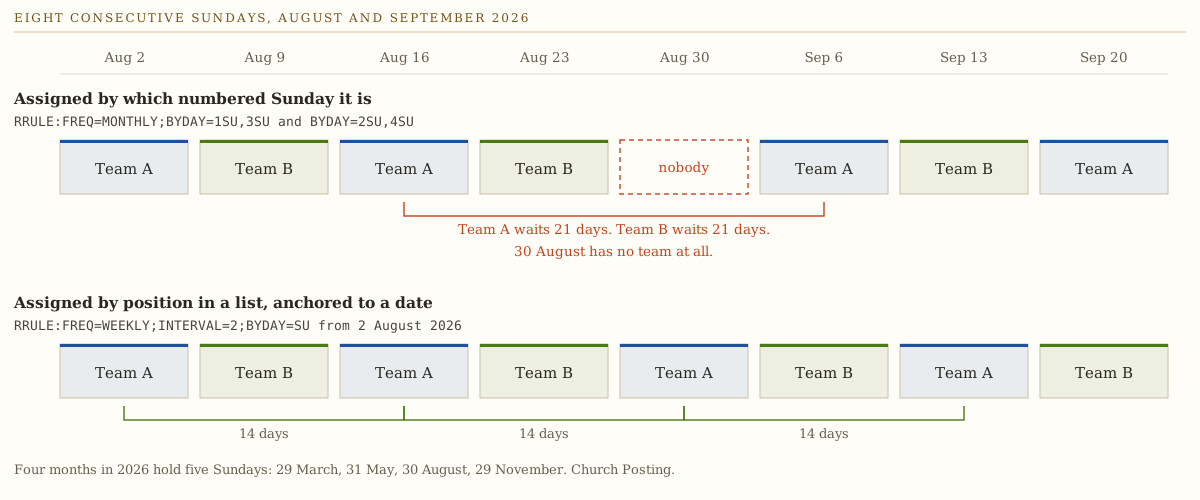
Two fixes, and the first is better.
Rotate by position in a list, anchored to a date. FREQ=WEEKLY;INTERVAL=2;BYDAY=SU from a chosen Sunday alternates forever without caring which numbered Sunday of the month it lands on. Every gap is fourteen days, every Sunday has somebody, and the pattern survives a month with five Sundays and a year with a leap day.
Or name the fifth Sunday as its own event. Plenty of churches already do: a combined service, a fellowship meal, a hymn sing. Naming it removes the ambiguity and hands you four or five Sundays a year that are deliberately outside the pattern.
The specification has one more tool most repeat editors hide. BYSETPOS picks “the nth occurrence within the set of recurrence instances specified by the rule,” so FREQ=MONTHLY;BYDAY=MO,TU,WE,TH,FR;BYSETPOS=-1 gives the last working day of the month whichever weekday that turns out to be. That is the rule for a monthly deadline that must not fall on a Sunday. The full set, including how to skip one occurrence without deleting a series, is in the text download above.
Spend ten minutes on this during any trial. Try to express your real standing meetings: a women’s study on the last Tuesday, elders on the first Monday unless it is a holiday, a work day that skips December. Then change one occurrence and see whether the change sticks to that date or propagates to the whole series, and delete one and see whether it returns next year. Product pages say nothing about this and calendar tools differ here more than anywhere else.
Can you put the church calendar on your website?
Yes, three ways, in descending order of durability. The trap is not technical. It is deciding which calendar goes out.
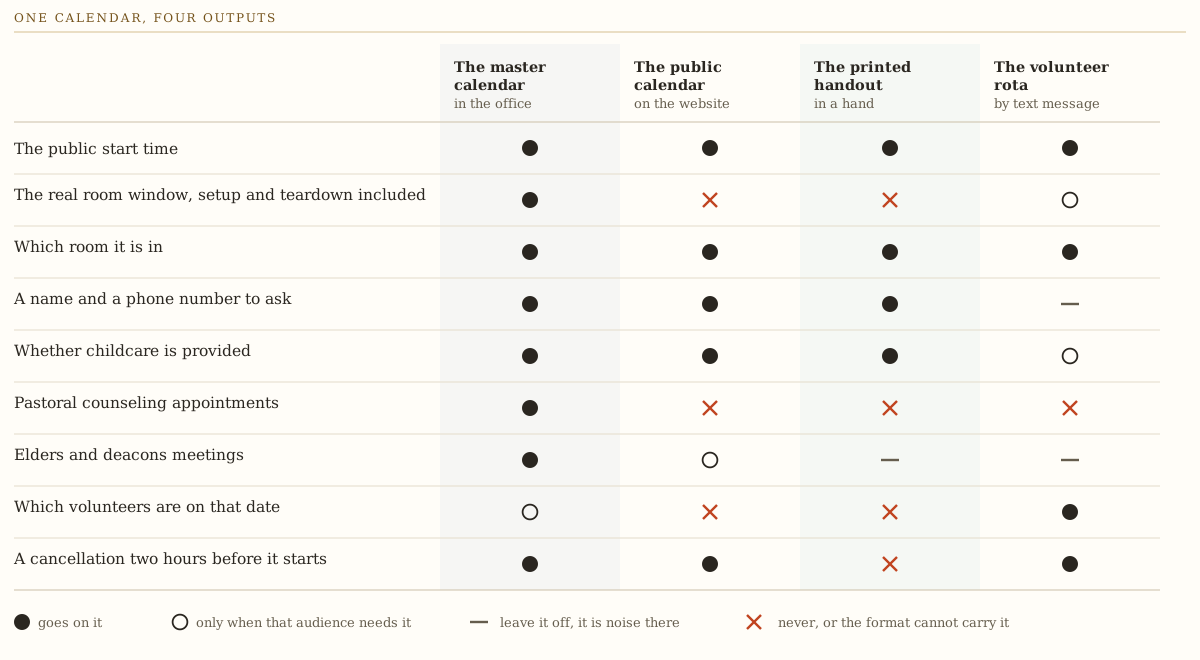
An iCal feed keeps one source of truth. The website, a member’s phone, and a staff member’s Outlook all read the same file, and an edit in one place reaches all three. Planning Center Calendar publishes one and takes one in, Teamup publishes them on every plan including free, and Google Calendar does both.
An embed takes a volunteer ten minutes. Google’s instructions start with the requirement that decides everything: “Your calendar is only visible to people you share it with. To make your calendar visible to everyone, make your calendar public.” Then Settings, the calendar name in the sidebar, Integrate calendar, Customize under Embed code, dimensions of at least 500 pixels each way, and paste the result into the page. The same page carries a warning worth heeding: turn off navigation buttons and “people can only use keyboard shortcuts to navigate your calendar,” which on a phone means they cannot navigate it at all. The upside is that a visitor can click Add to Google Calendar at the bottom left and take your events with them.
Retyping events by hand is what most churches do, and it is why a website still advertises a Vacation Bible School that ended in July. If retyping is the process it needs a named owner and a weekly slot, in writing.
If your site runs on WordPress there is a fourth route. The Events Calendar sells Essentials at $259 a year, Pro at $399, and Elite at $599, with recurring events and series on every tier supporting daily, weekly, monthly, yearly, or a custom interval, and event importing capped at 100 a day on Essentials and 200 on the higher plans. The page does not state how many sites a license covers, so ask. It is the most expensive way to publish a calendar on this page and the only one that gives you real event pages your own site owns, which is worth something for search.
One rule underneath all of it. Never publish the raw staff calendar. A visitor reading “Fellowship Hall HOLD 4:30pm setup” has learned that your church confuses its filing system with an announcement. What a public listing needs is the public start time, the address or the room, whether childcare is provided, and a name to contact. A title and a date is a rumor.
When those events get announced on social and in the newsletter is a separate rhythm, and it is worked out in the church content calendar.
Room conflicts, in one paragraph
A room is a space one event occupies, so a conflict on a room is a hard no. A resource has a quantity, so three events can each take four of your ten round tables and none of them conflict. Nested spaces break naive setups: the fellowship hall that divides into A and B needs the parent and the children entered with a relationship between them, or the software will book the whole hall for a reception and side B for a class at the same hour. Setup and teardown time breaks them too, because a 6pm event occupies the room from 4:30pm and a calendar told otherwise reports no overlap. And one person owns the room list, or you will end up comparing “Fellowship Hall” against “fellowship hall” and calling it conflict detection. The approvals, the request forms, the rota mechanics, and the vendor-by-vendor detail all live in church event planning software.
What we could not verify
Four gaps, stated rather than papered over.
Planning Center’s support site returned HTTP 403 to an automated fetch on 29 July 2026, so nothing here describes how Planning Center Calendar prints or exports to PDF.
Nothing on the Teamup or CalendarWiz pages we read names room conflict detection or a facilities approval queue. Both may have it. Neither claim is made here.
ChurchTrac’s pricing page renders its price with a script rather than as text, so the tier figures above came out of the page source. Its room and resource behavior was not tested in this run.
Skedda publishes no figure above forty five spaces and none for AllBooked, and this guide prints no number where the vendor prints none.
What to do this week
Under 100 people, one contested room. Google Workspace for Nonprofits at $0 a seat, one afternoon spent uploading the room list by CSV, and the printable month worksheet above for the noticeboard. Buy nothing. Your problem is that people do not know what is happening, and that is a publishing problem.
100 to 400 with a real building and a real rota. Planning Center Calendar at $32 a month for fifteen rooms plus Planning Center Services at $32 for fifty people, which is $768 a year. If the office already runs Breeze and it works, keep it: $864 flat covers the calendar, the rota, and the membership roll in one login, and tearing out a working system to save $96 is a bad trade.
A public calendar is the whole problem and rooms are not. Teamup, free below five sub-calendars and $360 a year at Pro. Nine permission levels, iCal feeds, embedding, and link sharing that needs no accounts is a better fit for publishing than any church product, and it costs less than half of what CalendarWiz charges for a hundred users.
You rent the gym to an outside league for money. Skedda, and ask about AllBooked rather than the workplace product. Price it against what the gym actually brings in, because $1,188 a year is a lot of basketball.
A printed calendar is all anybody has ever asked you for. Take the three files above, print the month, pin it up, and close the browser tab. No product on this page is worth buying for paper.
Then do two things regardless of which way you went. Walk the building with a clipboard and write down every space two ministries could want at once, including the kitchen, the parking lot, and the room with the copier, marking which ones nest inside others. Then run one trial rather than four: load your real room list, enter next month with real setup and teardown windows, express your two most awkward recurring meetings, and print a month. A tool that survives that is the tool.
If the calendar decision is going to be bundled into a wider office purchase, start with choosing church management software and compare the systems side by side in the church management directory. If reminders by text are the reason you are shopping, the per-message and per-contact costs are in church texting services. And if the harder question is which events belong on the grid at all, read what fills a church calendar before you spend a dollar, because software makes an overloaded calendar run on time rather than making it smaller.
Sources
Every page below was fetched on 29 July 2026, and every price and quotation in this guide came off the page linked here on that date. Prices in this category move without notice.
Room and space pricing
- Planning Center Calendar room tiers, the free tier, unlimited events, approvals, iCal feed and import, and website embedding: planningcenter.com/calendar. Checked 29 July 2026.
- Planning Center Services team-member tiers and storage: planningcenter.com/services. Checked 29 July 2026.
- Skedda space tiers, annual billing, and the missing figure above 45 spaces: skedda.com/pricing. Checked 29 July 2026.
- Breeze flat rate, inclusions, texting allowance, add-ons, and the Tithely rebrand line: breezechms.com/pricing. Checked 29 July 2026.
- ChurchTrac name bands, add-on prices, annual discount, and archived names: churchtrac.com/pricing. Checked 29 July 2026.
Calendar-first products
- Teamup plan prices, sub-calendar and user counts, and per-user add-on rate: teamup.com/pricing. Feature list including twelve views, nine permission levels, iCalendar feeds, and embedding: teamup.com/features. Both checked 29 July 2026.
- CalendarWiz plan prices, user counts, category limits, and unlimited visitors: calendarwiz.com/pricing. Checked 29 July 2026.
- The Events Calendar tier prices, recurring events and series, and import caps: the Events Calendar pricing. Checked 29 July 2026.
Free routes, printing, and publishing
- Google Workspace for Nonprofits per-seat figures, discounted editions, and the 2,000-user cap: google.com/nonprofits/offerings/workspace. Checked 29 July 2026.
- Calendar resources, the Buildings and resources privilege, CSV bulk upload, and the 10,000 ceilings: Create buildings, features and Calendar resources. Checked 29 July 2026.
- Print steps and every print setting, including Save as PDF: Print your calendar. Checked 29 July 2026.
- Embedding steps, the public-calendar requirement, the 500-pixel minimum, and the navigation-button warning: Embed a calendar on your website. Checked 29 July 2026.
The file format
- BYDAY ordinal prefixes and BYSETPOS, quoted from the recurrence rule section of RFC 5545: iCalendar RFC 5545, section 3.3.10. Checked 29 July 2026.
Refused
- Planning Center’s support site returned HTTP 403 to an automated fetch on 29 July 2026, so no claim about how Planning Center Calendar prints appears above.