Planning Center vs Breeze vs ChurchTrac, priced at five congregation sizes
Every published tier read on 29 July 2026, the export test run against each vendor's own documentation, what each one is bad at, and a named recommendation by size. Tier table as a CSV.
Updated

Three systems turn up on almost every small-to-mid church shortlist in the United States, and they are priced on three units that have nothing to do with each other. Planning Center bills per module, on a different counting unit for each module. Breeze bills one flat number no matter how large you get. ChurchTrac bills on how many names you keep.
That means the sentence “which one is cheaper” has no answer until you know six things about your own church. Once you know them, the answer is not close.
Every figure below was read off the vendor’s own page on 29 July 2026 and is linked at the claim. Methodology, including what would make us drop a product, is on how we review software.
The short version. ChurchTrac is the cheapest complete system at every size tested, by a wide margin, and it is the only one of the three that puts fund balances and a budget in the same login as the roll. Breeze is one flat $72 a month, which stops being an overpayment somewhere between 75 and 150 names. Planning Center is the deepest system for worship planning and volunteer scheduling and the most expensive by a factor of eight at 2,000 names, because five separate modules each step up on their own ladder. Skip to the decision tree if you want the answer without the arithmetic.
The counting unit is the whole story
Read the unit before the number.
Planning Center publishes eight products and a shared price ladder: $0, $15, $32, $69, $115, $179, $239 a month. What changes between products is what is being counted. Services counts “people who can log in”. Check-Ins counts “people who check in on your busiest day of the week”. Giving counts “the total number of donations given per month”, meaning transactions and not dollars. Groups counts “members (including leaders) in an active group”, once per person however many groups they join. Calendar counts rooms. Registrations counts attendees at your largest event (Planning Center pricing). People, the membership database itself, is free with unlimited records.
Breeze counts nothing. One line item, $72 a month, “no pricing tiers or limits based on your church’s growth”, unlimited contacts, no contract (Breeze pricing). Worship Tools is a $29 add-on, and a bundle of the system with Worship Tools, Tithely Church Apps and Tithely Sites is listed at $119 a month.
ChurchTrac counts names, in six bands: 75, 125, 250, 500, 1,000 and unlimited, at $9, $18, $36, $54, $72 and $90 a month. Its own page defines the unit without wriggle room: “Every individual you add, adults, children, members, donors, or anyone you track, counts as one name,” and archived names do not count. Accounting is a $15 add-on, two-way texting is a $7 add-on, and annual billing multiplies the monthly figure by 10.8, which is the ten percent saving the page advertises (ChurchTrac pricing).
So before any demo, write down six numbers: names on the roll, people who need to sign in, children who check in on your busiest Sunday, separate donations in a month, people in an active group, and rooms you want to stop double-booking. Those six set the price at all three vendors. They are the first page of the demo script below.
What the three actually cost, at five sizes
A price only means something inside a basket. The basket here is the work a church office does every week: a membership roll, giving with year-end statements, children’s check-in, groups, volunteer and service scheduling, and room booking. Registrations and Publishing are left out because both can sit on a free tier most of the year, and texting is handled separately further down because all three charge for it differently.
The assumptions are printed rather than hidden. At each size the scenario assumes sign-ins, Sunday check-ins, monthly donation count, group members and rooms in the proportions a church of that size usually runs. Change any of them and the Planning Center column moves; the other two barely notice.
Prices read off each vendor's own pricing page on 29 July 2026. Planning Center is the sum of Services, Check-Ins, Giving, Groups and Calendar at the tier each scenario needs, billed monthly. Breeze is the flat $72 a month plan. ChurchTrac is the base plan at the matching name band, billed annually at 10.8 times the monthly rate. Card and bank processing fees are excluded from all three because they scale with giving, not with size.
See the numbers
| Vendor | 75 names | 150 names | 400 names | 900 names | 2,000 names |
|---|---|---|---|---|---|
| Planning Center | $540 | $924 | $2,160 | $4,248 | $7,836 |
| Breeze | $864 | $864 | $864 | $864 | $864 |
| ChurchTrac | $97 | $389 | $583 | $778 | $972 |
Three things fall out of that shape.
Breeze overtakes Planning Center somewhere between 75 and 150 names. At 75 names the modular approach wins: $540 a year against Breeze’s $864. By 150 names Planning Center’s basket has reached $924 and the flat rate has already won. Above that the gap only opens, and it opens fast.
Planning Center at 2,000 names costs about eight times ChurchTrac. $7,836 against $972 a year. That is not a rounding difference, and it is not an argument that Planning Center is overpriced. It is what happens when five ladders climb at once.
ChurchTrac is cheapest at every size on the board. From $97.20 a year at 75 names to $972 a year with unlimited names. If price were the only question, the article would end here. It is not, and the reason is two paragraphs down.
One useful cross-check on the Planning Center column. Breeze publishes its own comparison grid on the same pricing page, and puts Planning Center at $85, $100, $274 and $374 a month at 100, 250, 500 and 1,000 contacts. Building the number up independently from Planning Center’s published tiers gives $354 a month at 900 names. Two routes, arrived at differently, landing within six percent of each other. Neither vendor states which modules the number covers, which is exactly why the basket above is spelled out.
Where the money leaks: texting and card fees
The subscription is not the bill. Two costs sit outside it and neither shows up in a demo.
Texting. Breeze includes 250 messages a month and then charges $10 per 500. ChurchTrac’s messaging add-on is $7 a month including 250 credits, with further credits billed automatically in blocks of 250 for $7. Planning Center charges $0.02 per text through People, plus $5 a month if you want a toll-free number for text giving. Run the arithmetic on your actual sending habit: a church that texts 400 people twice a month is sending 800 messages, which is $10 on Breeze, $21 on ChurchTrac, and $16 on Planning Center. A church that sends one weekly reminder to 900 people is sending 3,600 and the ranking flips. If texting is the main channel rather than a convenience, the comparison you want is church texting services priced at four congregation sizes, because a dedicated platform beats all three of these on volume.
Card and bank fees. Planning Center processes at 2.15% plus $0.30 for credit and debit and 0% plus $0.30 for ACH bank transfers in the United States, with international cards adding 1.5%. Breeze’s own giving page lists 2.9% plus $0.30 for credit and debit, 1% plus $0.30 for ACH, and 3.5% plus $0.30 for American Express (Breeze giving). ChurchTrac publishes no rate at all: its pricing FAQ says online giving “uses Stripe’s discounted nonprofit processing rate (contact us for details)”.
On $400,000 of annual giving taken entirely by card, the difference between 2.15% and 2.9% is exactly $3,000 a year, which dwarfs every subscription in the chart above. That is the number to argue about, and it is worked out properly in what giving platforms actually cost your church.
Two footnotes worth having. Planning Center’s own comparison page quotes Breeze’s ACH rate as 1% plus $0.25, while Breeze’s page says $0.30. Small, but it is a reminder that a competitor’s grid is marketing and the vendor’s own page is the source. And ChurchTrac declining to print a giving rate means a church cannot compare the largest line in its software budget without a sales conversation. Every other number on that page is admirably plain, which makes the one omission conspicuous.
The export test, run on all three
Ask one question in every demo, before pricing: can I export every field, for every person, including giving history, as one file, myself, without contacting support? Then ask them to show the button.
A vendor who exports cleanly expects to keep you by being good. A vendor who routes exports through a ticket has built a fence. This single question predicts the next five years better than any feature grid, and it is the test that governs every software review on this site.
Here is what each vendor’s own documentation says, read on 29 July 2026.
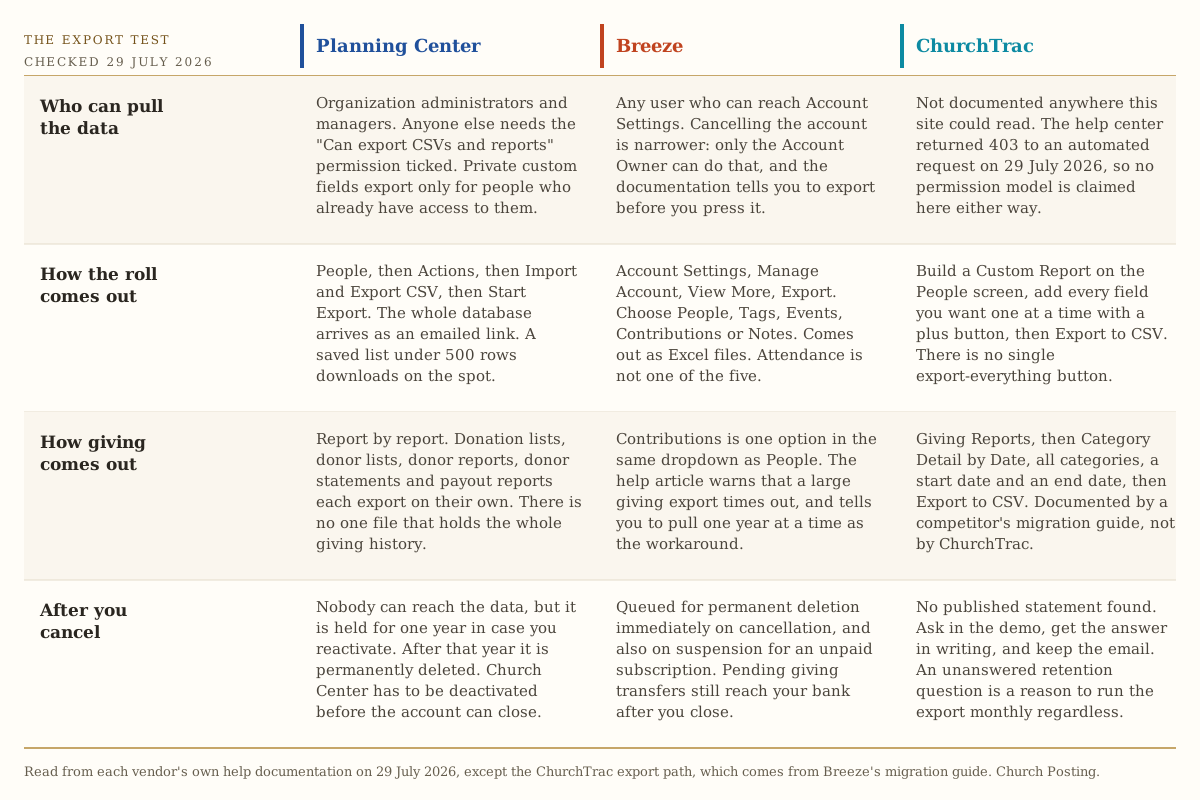
Planning Center exports the whole database in one action. People, then Actions, then Import and Export CSV, then Start Export, then Generate and send CSV, which emails a download link. A saved list under 500 rows downloads immediately; over 500 arrives by email. The permission is named: organization administrators and managers can do it, and so can any viewer or editor with “Can export CSVs and reports” ticked. One real limit is documented plainly: “Information stored in private custom fields can only be exported by people with access to those fields” (Planning Center, Export data). Giving is weaker. It comes out report by report, as donation lists, donor lists, donor reports, donor statements and payout reports, each exported separately (Planning Center, Importing and exporting Giving information). There is no single file that holds the whole giving history.
Breeze exports five things from one dropdown. Account Settings, Manage Account, View More, Export, then pick People, Tags, Events, Contributions or Notes, and it comes out as Excel. Its own article is honest about the failure mode: if the export takes more than a couple of minutes, “it’s probably related to the large amount of giving data in the database,” and the suggested workaround is exporting one year at a time (Breeze, Exporting Your Data). Attendance is not one of the five and comes out of attendance reports instead. Breeze’s pricing page lists “Free Data Export/Import” as a core feature, and the documentation backs it up.
ChurchTrac has no export-everything button that we could find documented. The path runs through Custom Reports: pick a report, choose who to include, then add every field you want one at a time with a plus button, then Export to CSV. Giving comes out through Giving Reports, Category Detail by Date, all categories, with a start and end date. That path is documented not by ChurchTrac but by Breeze, in the migration guide it publishes for churches leaving ChurchTrac (Breeze, ChurchTrac Export Instructions).
Say the awkward part out loud. On 29 July 2026 the ChurchTrac pricing page answered once, and then every further request to that host returned HTTP 403, including /help, /support, /robots.txt and /sitemap.xml. So the ChurchTrac column above is thinner than the other two, and it is thinner because of requests that were refused rather than because a feature is missing. Ask in the demo and get the answer in writing.
What happens to your records after you leave
This is the part nobody asks and everybody should.
Planning Center holds your data for one year. On cancellation, nobody can access anything, “your data is stored for one year in case you decide to reactivate your account. Once one year passes, all data associated with the account is permanently deleted.” Church Center has to be deactivated before the account can be closed (Planning Center, Cancel your account).
Breeze deletes immediately. “Immediately upon cancellation your data will be queued for permanent deletion from all Breeze systems.” Only the Account Owner can cancel, and the article tells you to export first (Breeze, Cancel Account / Restore Account). Its ownership article extends that to non-payment: “After cancellation of service, or suspension due to an unpaid subscription, we will queue data up for permanent deletion from our secure servers” (Breeze, Ownership of Data). The same article states the thing that matters most and that few vendors write down: “The Organization is who holds the keys and owns all of the data that is stored with Breeze.” Pending giving transfers still reach your bank after you close.
ChurchTrac publishes no retention statement we could read, for the reason above.
Two practical consequences. A church whose card expires over Christmas and whose treasurer is traveling can lose a Breeze database to a suspension, so keep the billing card and the Account Owner current and known to two people. And whichever of the three you pick, run the export once a quarter into a folder the church owns rather than a staff member’s personal account. Who should be able to see which fields, and where counseling notes must never live, is the subject of your church database holds more than a retailer’s.
The split that decides it for a lot of churches
Only one of the three does church accounting, and the other two say so.
ChurchTrac’s $15 accounting add-on covers managing finances, creating budgets, tracking deposits and expenses, and tracking fund balances. At 250 names that is $51 a month, or $550.80 billed annually, for records and a fund ledger in one login.
Planning Center’s product list has no accounting product in it. Eight products, none of them a ledger.
Breeze’s own help documentation is explicit. “Breeze is all about donor management.” Its stated best practice is to “Let Breeze track individual donations” and “Use an accounting system like Quickbooks or Aplos for Fund Accounting/General Ledger”, transferring fund totals by hand. It goes further and warns you off its own integration: the QuickBooks extension “is not best practice”, and copying individual donations across “creates a reconciliation nightmare” in their own words (Breeze, Using an Accounting System/General Ledger with Breeze).
So for a church with three restricted funds and a building campaign, the real comparison is not $72 against $36. It is $72 plus an accounting subscription plus a monthly manual re-entry step, against $51 with the fund balances already inside. Aplos and PowerChurch pricing, and the balance sheet a fund ledger actually has to produce, are in church accounting software that keeps designated funds straight.
The exception: a church whose books are already in QuickBooks and whose bookkeeper likes them there gains nothing from moving the ledger, and Breeze’s split is then a feature rather than a gap.
What each one is genuinely bad at
Relentless positivity reads as advertising, so here is the other column.
Planning Center is bad at telling you what it will cost. The pricing page is a calculator with seven free tiers, and every one of those tiers is set low enough that a real church crosses several of them on the first Sunday. Five sign-ins is one worship leader and four volunteers. Ten daily check-ins is a nursery. Ten monthly donations is a church plant with eleven givers. Fifteen group members is two home groups. The free plans are genuine and they are not a plan you stay on, so the honest way to price Planning Center is to assume you will pay on four or five modules and work it out before you sign. Where each of those tiers actually stops, across every vendor with a free plan, is the whole subject of free church management software.
Breeze is bad at everything a growing church adds after the roll. No accounting by its own account. Service planning arrives as a $29 add-on rather than a core capability. The flat rate that is a bargain at 900 names is an overpayment at 75, where ChurchTrac charges $9. And ownership has changed under it: the pricing page now carries a banner reading “Breeze has been rebranded as Tithely Church Management”, the product card reads “Church Management + Free Giving, Powered by Breeze ChMS”, and the page footer reads “2025 Breeze, a Tithe.ly company”. Planning Center’s competitive page states Breeze was purchased by Tithe.ly in 2021 and claims development has plateaued since (Planning Center vs Breeze); that is a competitor’s characterization and should be read as one, but the rebrand banner is on Breeze’s own page and is not in dispute. One more small tell about how carefully that page is maintained: three of its testimonial cards still carry placeholder lorem ipsum text under the name “Name”.
ChurchTrac is bad at getting your data back out, and at telling you anything about the exit. The export runs through a report builder where fields are added one at a time, giving needs a date range, the retention policy is not published where an automated reader can reach it, and the giving processing rate is not published at all. It is also the only one of the three whose help center refused a fetch, which is a small thing that says something about how much of the product is meant to be evaluated before a conversation. Set against that, it is the only one of the three that includes a website, a member app, check-in, groups, volunteer scheduling, service planning and giving in the base plan at $9 a month.
Who should skip each one
- Skip Planning Center if nobody on staff plans a worship service in software, or if the office is one part-time administrator. The depth is real and it is depth in a job you are not doing, and you will pay for four modules to use two.
- Skip Breeze if the treasurer needs fund balances in the same system, or if you have fewer than about 150 names and no plan to double. At 75 names the flat rate is eight times ChurchTrac’s.
- Skip ChurchTrac if worship and volunteer scheduling is the reason you are buying at all, or if a documented one-click full export is a board-level requirement. Also skip it if a published giving rate is a condition of the purchase, because there is not one.
- Skip all three if what you actually need is a room-booking calendar and nothing else. That is a much smaller and cheaper purchase, laid out in church event planning software.
Which one to pick
Four questions, in this order. The first yes ends the process.
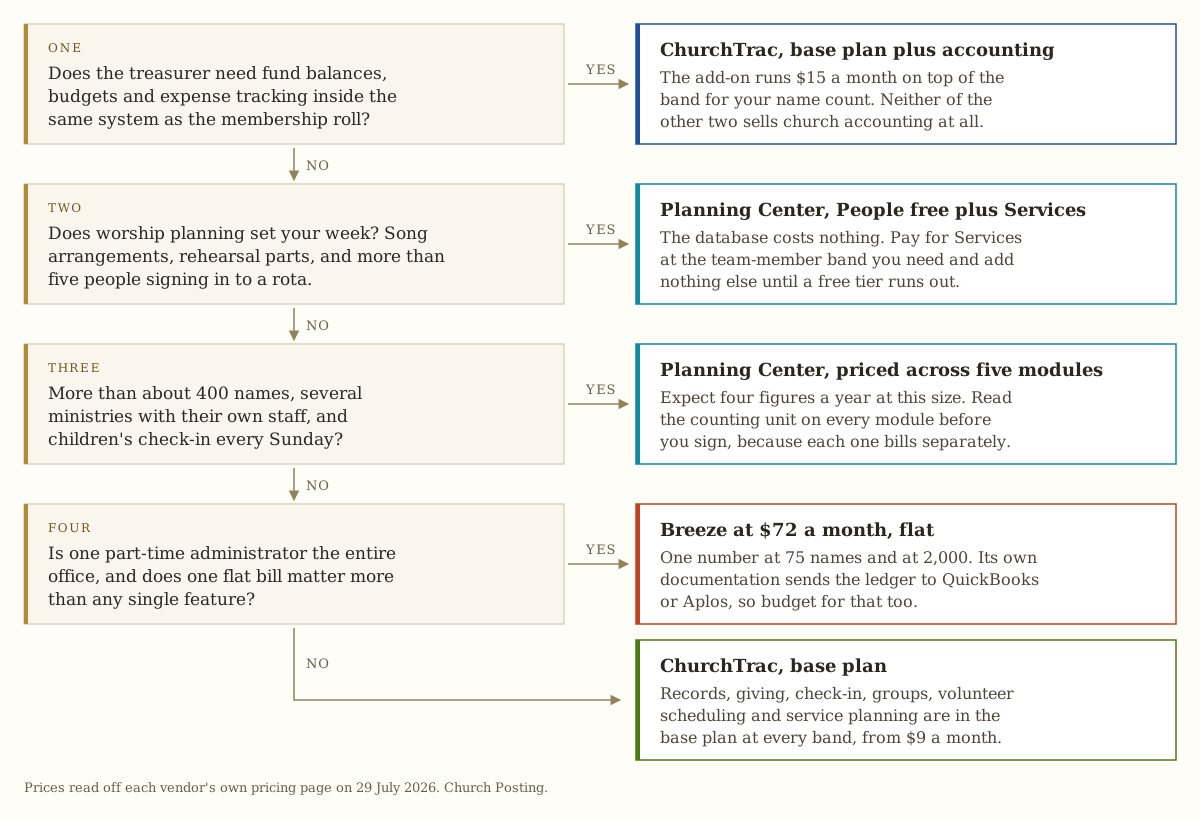
By size, with the reasoning compressed:
Under 100 names. ChurchTrac base plan, $9 a month at the 75-name band, $97.20 for the year paid annually. Add accounting for $15 if there is a treasurer who wants budgets. Nothing else on the board is close, and a church plant that outgrows the band pays $18 next year.
100 to 400 names. ChurchTrac if the treasurer needs the ledger, Breeze if one administrator runs the whole office and wants one bill, Planning Center if the worship team is the reason you are buying. At 150 names the three come to $388.80, $864 and $924 a year on the basket above. By 400 names ChurchTrac is $583.20 and Planning Center has reached $2,160.
400 to 900 names. The price difference has become large enough to be a staffing decision. ChurchTrac at $583 to $778 a year, Breeze flat at $864, Planning Center at $2,160 to $4,248. Choose Planning Center here on capability, knowing the number, or choose one of the other two and put the difference into a part-time administrator.
Above 900 names. Planning Center earns its price if you genuinely run several ministries with their own staff, weekly check-in, and a worship team on rotation, and if you have someone who will keep five module tiers tuned. Otherwise Breeze at $864 flat is the pragmatic answer and ChurchTrac at $972 unlimited is the cheap one. Attendance is the number that should drive this decision, and most churches do not measure it in a way that supports one, which is the argument in average attendance hides whether your church is growing.
Covenant OS, our own church management system, is in development and not available to buy. Nothing here should push a church to wait for it. Pick from the three above, this month, and switch later if we ship something better.
Take the numbers with you
Two files, both plain text, no email required.
Every published tier for all three, as a CSV. Sixty-eight rows: vendor, product, what the price is based on, the tier limit, the monthly figure, the annual figure, the source URL and the date checked. Every Planning Center module ladder, both Breeze add-ons, all six ChurchTrac name bands, and all three processing schedules including the one ChurchTrac does not publish. Drop it in a spreadsheet, put your own six numbers next to it, and you have a quote you built yourself.
The demo script, as a text file. The six numbers to gather first, then six questions to ask out loud in a demo, each with what the documentation said on 29 July 2026 so you can tell when a salesperson contradicts it.
What to do this week
- Count the six numbers. An hour with your current records. Nothing else in this decision can happen until they exist.
- Run the export on what you have now. Before you shortlist anything, prove you can get your own data out. If you cannot, that is the first project and it is separate from choosing what comes next.
- Price all three from the CSV, not from a salesperson. Fill your numbers into the tier table and total it. Bring the total to the demo.
- Ask the six demo questions in the first call, before pricing, and write the answers down with the date.
- Pay monthly through one full giving cycle and one check-in season. The annual discount is worth about one month. Leaving in month four is worth more.
- Set giving permissions before you invite staff. In most churches, giving amounts by name should be visible to the financial secretary and one elder, and to nobody else. Tightening later is a conversation nobody enjoys.
The order of the whole purchase, and the three jobs a system has to do before you watch a single demo, are in choosing church management software without regretting it in a year.
Sources
Every price, tier, permission and retention rule above was read from these pages on the dates given. Prices move without notice; check the vendor page before you budget.
- Planning Center pricing, Planning Center. Read 29 July 2026. Every module ladder, counting unit, processing rate and texting price.
- Breeze pricing, Breeze Church Management. Read 29 July 2026. The $72 flat plan, the $29 and $119 options, the texting allowance, and the competitor grid.
- Breeze giving, Breeze Church Management. Read 29 July 2026. Card, ACH and American Express processing rates.
- ChurchTrac pricing, ChurchTrac. Read 29 July 2026. Six name bands, both add-ons, the annual multiplier, and the name-counting rule.
- Export data, Planning Center Help. Read 29 July 2026. The full-database export path, the export permission, and the 500-row threshold.
- Importing and exporting Giving information, Planning Center Help. Read 29 July 2026. Giving exports report by report.
- Cancel your Planning Center account, Planning Center Help. Read 29 July 2026. One year of retention, then permanent deletion.
- Exporting Your Data, Breeze Support. Read 29 July 2026, article updated 13 September 2024. The five exportable data types and the giving timeout.
- Cancel Account / Restore Account, Breeze Support. Read 29 July 2026, article updated 4 March 2026. Immediate deletion queue and the Account Owner rule.
- Ownership of Data, Breeze Support. Read 29 July 2026. Data ownership, and deletion on suspension for non-payment.
- Using an Accounting System/General Ledger with Breeze, Breeze Support. Read 29 July 2026. Breeze’s own instruction to run fund accounting elsewhere.
- ChurchTrac Export Instructions, Breeze Support. Read 29 July 2026, article updated 27 August 2025. The ChurchTrac export path, documented by a competitor.
- Planning Center vs Breeze, Planning Center. Read 29 July 2026. Used only for claims labeled as a competitor’s, including the 2021 acquisition and the ACH rate discrepancy.
Refused a fetch on 29 July 2026. The ChurchTrac pricing page answered once, and every later request to that host returned HTTP 403, including /help, /support, /robots.txt and /sitemap.xml. Its own documentation of its export path, its permission model and its data retention policy is therefore not cited here, and the gaps in the matrix above are gaps in what could be read rather than findings about the product. The prices are safe: they were read off the page that answered, and the six bands are printed in its own page script.
Claims left out for lack of a source. Reddit threads and review-site scores were not used, because neither is a price and neither is dated. ChurchTrac’s giving processing rate is left blank rather than estimated from Stripe’s published nonprofit rate, because ChurchTrac describes it as discounted and does not say by how much. No annual-billing discount is quoted for Planning Center or Breeze, because neither pricing page publishes one.